mui-toolpad
 mui-toolpad copied to clipboard
 mui
mui
Update demo video and docs screenshots
Duplicates
- [X] I have searched the existing issues
Latest version
- [X] I have tested the latest version
Summary 💡
Reminder task to be done before https://github.com/mui/mui-toolpad/issues/900
- In the header nav bar, show Try demo and self-host CTAs. Also, directly link the Toolpad GitHub repo

While I can do this task, IMO it would be best if someone else took it as per our previous discussions about generating screenshots for each case individually. I think it's important that someone else besides me experiences same, maybe could come up with an alternative solution to screenshot capturing than the one I have proposed. cc @mui/toolpad

I don't think the solution you proposed is bad. It just requires more work before it's fully usable. In any case, I don't think the merging of new UI must necessarily be blocked by screenshots in the docs. I'm fine test driving it a bit before sinking the time to add screenshots (however method)

I don't think the merging of new UI must necessarily be blocked by screenshots in the docs
I also think that it might make more sense to update screenshots AFTER the new UI is merged, so that the docs match how our UI looks @prakhargupta1 what's the reason to update screenshots before UI update?
@gerdadesign please use this video to update the existing one. Let me know if you suggest any changes. I have taken the light them for Toolpad and the app. https://user-images.githubusercontent.com/92228082/197453558-5e9566d4-8c07-4fb8-8f6a-764a99cb1787.mov
@bytasv Can we import existing apps (to cloud) using DOM export? This will help in updating screenshots faster.
@prakhargupta1 we don't really have an import feature 🤔 I'll probably have to recreate those apps then so that anyone could pick it up in the future
@bytasv We have a hidden option TOOLPAD_ENABLE_CREATE_BY_DOM that allows you to create an app by importing an existing dom. Currently we use this for integration testing only (and PR previews). We'll need to add validation before we can make this user-facing.
@prakhargupta1 There are a lot of instances in this video where the mouse is going in one direction and then changes direction to the button that its intending to click. Any way you can do a cleaner recording? That will make the editing a lot smoother.

New video: https://user-images.githubusercontent.com/92228082/198187732-bd3b32fc-8de0-4ff8-9cc4-fc3b13dba116.mov
Here I have also shown Toolpad and app theme at the end.
Here's the new version. A little bit longer than the previous, even sped up. Let me know what you think! Some parts at the end seem a little bit muddy — this is due to the mouse moving while states are loading. It's more difficult to cut out the extra half a second while waiting for something, ex. the data grid, to load. I don't think it's dire, though—would just make it incrementally smoother!
https://user-images.githubusercontent.com/106991024/198747090-79aeff47-ec7a-481d-9a1b-125af111a41b.mp4
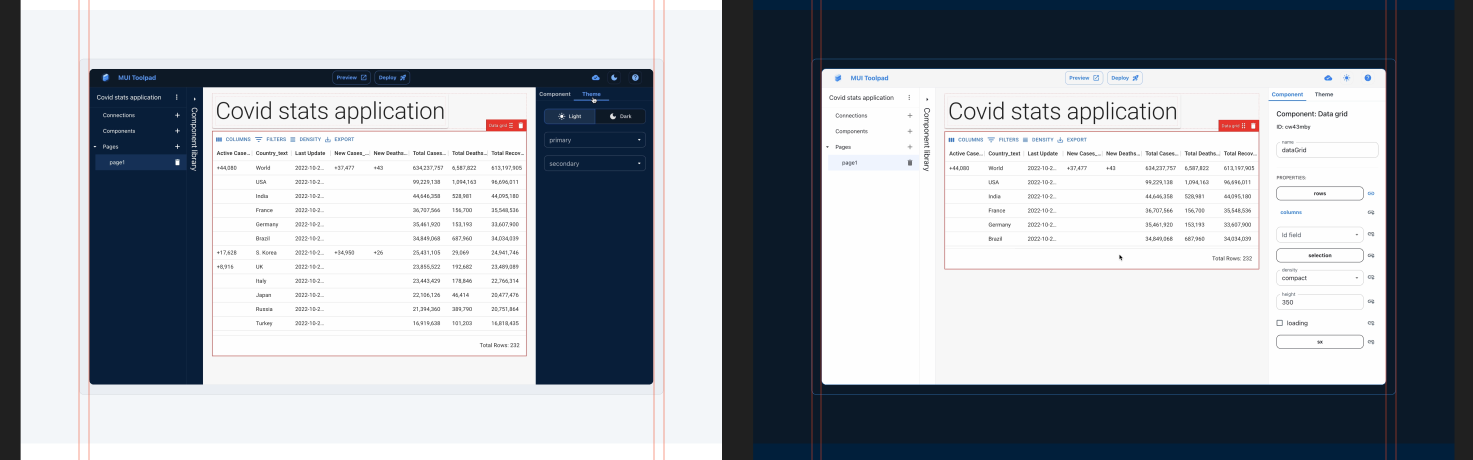
@prakhargupta1 @bharatkashyap What do you think about having two different fallback images — one for light mode, one for dark mode? Since the video has both and contrasts with each respective background.