

 muckSponge
Trying to make tabs opaque, and minimize/close buttons are covered with theme
Hello,
I've installed MaterialFox on firefox dark theme. But I don't want the background of inactive tabs to be transparent, so I installed a matte black theme from add-ons:
https://addons.mozilla.org/en-US/firefox/addon/matte-black-v2/
But now it shows my top right minimize/close buttons as like this:
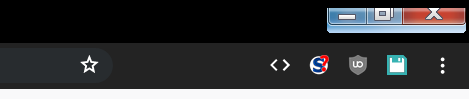
Any way to fix this? Either by changing css or recommending how to change the inactive tabs to opaque in some other way.
Thanks!
Info: Firefox 69 Windows 7

Looks like an issue with the titlebar button position. The "cutout" you see is where Firefox wants the buttons to go but Windows 7 uses its own buttons always anchored to the top, so the cutout is misaligned. It is probably related to the drag space setting. Not sure when I'll get around to fixing this - I rarely use Windows 7; I would need to create a VM to test it. Windows 7 turned 10 this year.
