

 mt40
mt40
Fails to navigate to TODO location from OUTPUT Panel
Whenever I "command-click" a todo link I get the following error:
Error: Unable to open 'my.service.js#209': File not found(/Users/justin/src/js/project/src/endpoint/my.service.js#209).
This file path is correct and I can verify by doing an $ ls on the path.
From file:///Users/justin/src/js/project/src/endpoint/my.service.js#209
----------------------------------
todo:(justin) Finish the validation

==================================
Found 1 TODO.

- MacOS Sierra 10.12.4
- VS Code 1.11.2




this problem seems to be different to above linked issue, because in this case the filename that is linked to is the actual file path but also including the line number at the end as part of the extension.

Can anyone provide a solid snippet which can reproduce in latest VSCode stable. I can't reproduce this issue whether there is a line number in the link or not.

This is still an issue. Mac OSX Sierra v10.12.6, VSCode v1.20.1, TODO parser v1.9.1, a project consisting of a single file. Cmd-Click the TODO file link, the error banner is displayed:
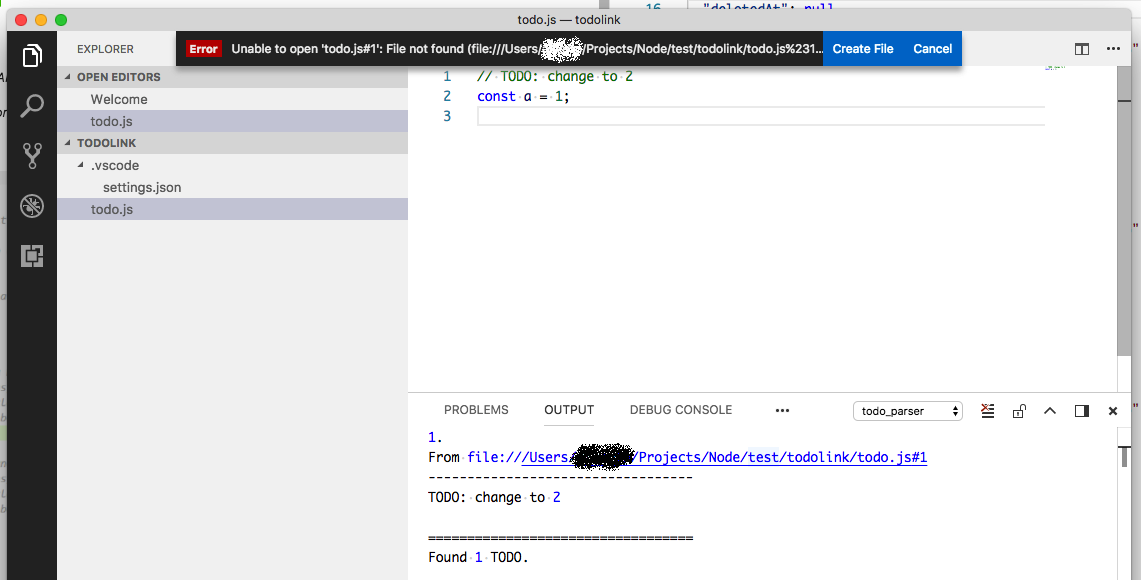
Thanks.

