

 msys2
msys2
Question: win-sudo in MSYS2 Repositories?
I have read on the wiki about win-sudo. I am curious why it hasn't been made available in the MSYS2 packages? According to the wiki, it is not 100% compatible with the traditional Posix sudo. Even so, it is still quite useful. It seems that it would be a good candidate for inclusion in the pacman respositories.


@AntumDeluge @lazka does not work in pipeline Example: add row "127.0.0.1 localhost.example" in /c/windows/system32/drivers/etc/hosts https://github.com/purplesyringa/win-sudo/issues/53
It works! https://github.com/gerardog/gsudo

@AntumDeluge @lazka does not work in pipeline Example: add row "127.0.0.1 localhost.example" in /c/windows/system32/drivers/etc/hosts purplesyringa/win-sudo#53
It works! https://github.com/gerardog/gsudo
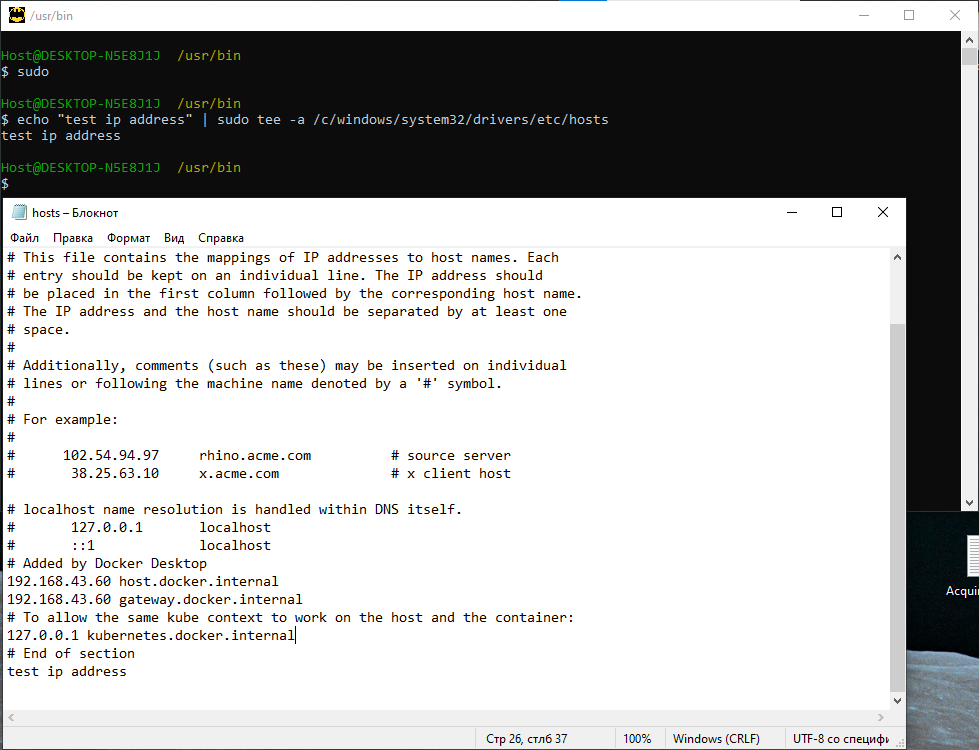
Sorry. The case described above works on a home PC. On a desktop PC, gsudo did not solve the problem.
Only today I realized that it was necessary to set permissions using chmod.
@TimurIskandarov commented yesterday:
does not work in pipeline Example: add row "127.0.0.1 localhost.example" in /c/windows/system32/drivers/etc/hosts purplesyringa/win-sudo#53
It works! https://github.com/gerardog/gsudo
I confirm that gsudo handles the STDIN just fine:
@TimurIskandarov commented 2 hours ago:
Sorry. The case described above works on a home PC. On a desktop PC, gsudo did not solve the problem.
Only today I realized that it was necessary to set permissions using chmod.

Do you have any related screenshot? My impression was that MSYS2 wasn't messing with *nix-like file permissions.

@sskras maybe it's really the msys2-runtime version. I'll try to update.
pacman -Syuu didn't help. You may need to update msys2-w32api-headers, msys2-w32api-runtime, but I've already run pacman -Syu coreutils (which also updates w32api among other things).
Can you run, actually, icacls on that file and its' dir to see their Windows permissions?
I remember to mess with the default values in the past, and here is mine current setup:
$ icacls /C/Windows/System32/drivers/etc/hosts
C:/Windows/System32/drivers/etc/hosts BUILTIN\Administrators:(I)(F)
                                      NT AUTHORITY\SYSTEM:(I)(F)
                                      BUILTIN\Users:(I)(RX)
                                      NT AUTHORITY\Authenticated Users:(I)(M)

Successfully processed 1 files; Failed processing 0 files
$ icacls /C/Windows/System32/drivers/etc
C:/Windows/System32/drivers/etc NT SERVICE\TrustedInstaller:(F)
                                NT SERVICE\TrustedInstaller:(CI)(IO)(F)
                                NT AUTHORITY\SYSTEM:(M)
                                NT AUTHORITY\SYSTEM:(OI)(CI)(IO)(F)
                                BUILTIN\Administrators:(M)
                                BUILTIN\Administrators:(OI)(CI)(IO)(F)
                                BUILTIN\Users:(RX)
                                BUILTIN\Users:(OI)(CI)(IO)(GR,GE)
                                CREATOR OWNER:(OI)(CI)(IO)(F)
                                APPLICATION PACKAGE AUTHORITY\ALL APPLICATION PACKAGES:(RX)
                                APPLICATION PACKAGE AUTHORITY\ALL APPLICATION PACKAGES:(OI)(CI)(IO)(GR,GE)
                                APPLICATION PACKAGE AUTHORITY\ALL RESTRICTED APPLICATION PACKAGES:(RX)
                                APPLICATION PACKAGE AUTHORITY\ALL RESTRICTED APPLICATION PACKAGES:(OI)(CI)(IO)(GR,GE)

Successfully processed 1 files; Failed processing 0 files
The screenshot/GUI version:
Also let's check the owners:
$ cmd //c 'dir/q C:\Windows\System32\drivers\etc'
 Volume in drive C is pagrindinis
 Volume Serial Number is 10FF-971D

 Directory of C:\Windows\System32\drivers\etc

2023-08-17  20:17    <DIR>          NT SERVICE\TrustedInsta.
2023-08-17  20:17    <DIR>          NT SERVICE\TrustedInsta..
2023-08-17  20:20             2 825 DESKTOP-O7JE7JE\saukrs hosts
2022-06-29  19:10             1 229 BUILTIN\Administrators hosts.default
2023-04-05  11:10               443 NT AUTHORITY\SYSTEM    hosts.ics
2022-02-08  14:17               824 NT AUTHORITY\SYSTEM    hosts.ORIG
2022-06-29  20:22             3 677 NT AUTHORITY\SYSTEM    lmhosts.sam
2019-12-07  12:12               407 NT AUTHORITY\SYSTEM    networks
2019-12-07  12:12             1 358 NT AUTHORITY\SYSTEM    protocol
2019-12-07  12:12            17 635 NT AUTHORITY\SYSTEM    services
               8 File(s)         28 398 bytes
               2 Dir(s)   1 849 794 560 bytes free
In my case the file owner is my local user: DESKTOP-O7JE7JE\saukrs.
And the dir owner is NT SERVICE\TrustedInstaller.
@sskras run icalcs
$ icacls /c/windows/system32/drivers/etc/hosts
C:/windows/system32/drivers/etc/hosts NT AUTHORITY\СИСТЕМА:(I)(F)
                                      BUILTIN\Администраторы:(I)(F)
                                      BUILTIN\Пользователи:(I)(RX)
                                      ЦЕНТР ПАКЕТОВ ПРИЛОЖЕНИЙ\ВСЕ ПАКЕТЫ ПРИЛОЖЕНИЙ:(I)(RX)
                                      ЦЕНТР ПАКЕТОВ ПРИЛОЖЕНИЙ\ВСЕ ОГРАНИЧЕННЫЕ ПАКЕТЫ ПРИЛОЖЕНИЙ:(I)(RX)

Успешно обработано 1 файлов; не удалось обработать 0 файлов
$ icacls /c/windows/system32/drivers/etc
C:/windows/system32/drivers/etc NT SERVICE\TrustedInstaller:(F)
                                NT SERVICE\TrustedInstaller:(CI)(IO)(F)
                                NT AUTHORITY\СИСТЕМА:(M)
                                NT AUTHORITY\СИСТЕМА:(OI)(CI)(IO)(F)
                                BUILTIN\Администраторы:(M)
                                BUILTIN\Администраторы:(OI)(CI)(IO)(F)
                                BUILTIN\Пользователи:(RX)
                                BUILTIN\Пользователи:(OI)(CI)(IO)(GR,GE)
                                СОЗДАТЕЛЬ-ВЛАДЕЛЕЦ:(OI)(CI)(IO)(F)
                                ЦЕНТР ПАКЕТОВ ПРИЛОЖЕНИЙ\ВСЕ ПАКЕТЫ ПРИЛОЖЕНИЙ:(RX)
                                ЦЕНТР ПАКЕТОВ ПРИЛОЖЕНИЙ\ВСЕ ПАКЕТЫ ПРИЛОЖЕНИЙ:(OI)(CI)(IO)(GR,GE)
                                ЦЕНТР ПАКЕТОВ ПРИЛОЖЕНИЙ\ВСЕ ОГРАНИЧЕННЫЕ ПАКЕТЫ ПРИЛОЖЕНИЙ:(RX)
                                ЦЕНТР ПАКЕТОВ ПРИЛОЖЕНИЙ\ВСЕ ОГРАНИЧЕННЫЕ ПАКЕТЫ ПРИЛОЖЕНИЙ:(OI)(CI)(IO)(GR,GE)

Успешно обработано 1 файлов; не удалось обработать 0 файлов
The screenshot/GUI version (Read & Execute):
$ cmd //c 'dir/q C:\Windows\System32\drivers\etc'
 Том в устройстве C не имеет метки.
 Серийный номер тома: 10D7-6544

 Содержимое папки C:\Windows\System32\drivers\etc

17.08.2023  18:00    <DIR>          NT SERVICE\TrustedInsta.
17.08.2023  18:00    <DIR>          NT SERVICE\TrustedInsta..
18.08.2023  11:20             1 117 NT AUTHORITY\СИСТЕМА   hosts
07.12.2019  12:12             3 683 NT AUTHORITY\СИСТЕМА   lmhosts.sam
07.12.2019  12:12               407 NT AUTHORITY\СИСТЕМА   networks
07.12.2019  12:12             1 358 NT AUTHORITY\СИСТЕМА   protocol
07.12.2019  12:12            17 635 NT AUTHORITY\СИСТЕМА   services
               5 файлов         24 200 байт
               2 папок  20 182 413 312 байт свободно
In my case the file owner is: NT AUTHORITY\SYSTEM.
And the dir owner is NT SERVICE\TrustedInstaller.
In my case the file owner is:
NT AUTHORITY\SYSTEM. And the dir owner isNT SERVICE\TrustedInstaller.
Is it the desktop PC (where it fails)?
Before changing things it would be interesting to compare this to the output on home PC (where it works).
At least the owner of hosts.
Is it the desktop PC (where it fails)?
Yes. I checked with a colleague at work, we have computers in the same domain, through sudo chmod 644 /c/windows/system32/drivers/etc/hosts writing to the file starts working. I still don't understand why it doesn't work for me.
I don't believe chmod is enough (because of the possibly insufficient Windows permissions/owner).
So it's still interesting to know the kind of hosts owner (not necessary the full username if it's security sensitive) on these computers.
I believe it would be different from NT AUTHORITY\SYSTEM (or at least the permission would be different).
@sskras The only difference in the behavior of the system is that it does not pop up windows when starting programs
Maybe that's the point?
No ideas about it, since this information is of level too high for me to understand=)
So is the owner NT AUTHORITY\SYSTEM or something different on the computer where chmod fixed things (where appending works) ?
@sskras
So is the owner NT AUTHORITY\SYSTEM or something different on the computer where chmod fixed things (where appending works) ?
$ icacls /c/windows/system32/drivers/etc/hosts
C:/windows/system32/drivers/etc/hosts NT AUTHORITY\СИСТЕМА:(I)(F)
                                      BUILTIN\Администраторы:(I)(F)
                                      BUILTIN\Пользователи:(I)(RX)
                                      ЦЕНТР ПАКЕТОВ ПРИЛОЖЕНИЙ\ВСЕ ПАКЕТЫ ПРИЛОЖЕНИЙ:(I)(RX)
                                      ЦЕНТР ПАКЕТОВ ПРИЛОЖЕНИЙ\ВСЕ ОГРАНИЧЕННЫЕ ПАКЕТЫ ПРИЛОЖЕНИЙ:(I)(RX)

Успешно обработано 1 файлов; не удалось обработать 0 файлов
$ icacls /c/windows/system32/drivers/etc
C:/windows/system32/drivers/etc NT SERVICE\TrustedInstaller:(F)
                                NT SERVICE\TrustedInstaller:(CI)(IO)(F)
                                NT AUTHORITY\СИСТЕМА:(M)
                                NT AUTHORITY\СИСТЕМА:(OI)(CI)(IO)(F)
                                BUILTIN\Администраторы:(M)
                                BUILTIN\Администраторы:(OI)(CI)(IO)(F)
                                BUILTIN\Пользователи:(RX)
                                BUILTIN\Пользователи:(OI)(CI)(IO)(GR,GE)
                                СОЗДАТЕЛЬ-ВЛАДЕЛЕЦ:(OI)(CI)(IO)(F)
                                ЦЕНТР ПАКЕТОВ ПРИЛОЖЕНИЙ\ВСЕ ПАКЕТЫ ПРИЛОЖЕНИЙ:(RX)
                                ЦЕНТР ПАКЕТОВ ПРИЛОЖЕНИЙ\ВСЕ ПАКЕТЫ ПРИЛОЖЕНИЙ:(OI)(CI)(IO)(GR,GE)
                                ЦЕНТР ПАКЕТОВ ПРИЛОЖЕНИЙ\ВСЕ ОГРАНИЧЕННЫЕ ПАКЕТЫ ПРИЛОЖЕНИЙ:(RX)
                                ЦЕНТР ПАКЕТОВ ПРИЛОЖЕНИЙ\ВСЕ ОГРАНИЧЕННЫЕ ПАКЕТЫ ПРИЛОЖЕНИЙ:(OI)(CI)(IO)(GR,GE)

Успешно обработано 1 файлов; не удалось обработать 0 файлов
$ cmd //c 'dir/q C:\Windows\System32\drivers\etc'
 Том в устройстве C не имеет метки.
 Серийный номер тома: D68C-6818

 Содержимое папки C:\Windows\System32\drivers\etc
 10.03.2022  12:24    <DIR>          NT SERVICE\TrustedInsta.
 10.03.2022  12:24    <DIR>          NT SERVICE\TrustedInsta..
 21.08.2023  10:05               847 NT AUTHORITY\СИСТЕМА   hosts
 07.12.2019  12:12             3 683 NT AUTHORITY\СИСТЕМА   lmhosts.sam
 15.09.2018  10:31               407 NT AUTHORITY\СИСТЕМА   networks
 15.09.2018  10:31             1 358 NT AUTHORITY\СИСТЕМА   protocol
 15.09.2018  10:31            17 635 NT AUTHORITY\СИСТЕМА   services
                5 файлов         23 930 байт
                2 папок  56 000 114 688 байт свободно
Screenshot
@sskras I managed to do it like this in the end
sudo -i System
echo "text" >> /c/windows/system32/drivers/etc/hosts
but it still doesn't work through the pipeline.
My version Windows10 Pro
Version: 2004
Build OS: 19041.1415
Communication: Windows Feature Experience Pack 120.2212.3920.0
Version Windows10 Pro where chmod fixed things
Version: 21H2
Build OS: 19044.1288
Communication: Windows Feature Experience Pack 120.2212.3920.0
p.s. I don't like the >> option because it's not cross-platform friendly. I want to write a Makefile that will write to /etc/hosts on FreeBSD, Ubuntu and Windows. If browsers in Windows took the /c/msys64/etc/hosts file to match the ip-domain, then this would be ideal for me. I needed all these things for local sites.
@sskras I managed to do it like this in the end
sudo -i System
echo "text" >> /c/windows/system32/drivers/etc/hosts
but it still doesn't work through the pipeline.
That's an interesting observation! I will need some time to think about it. Maybe MSYS2 core/dedicated folks could tell what's going on.
@TimurIskandarov, since no one has ideas about significant difference between these two setups on different machines at your hand, I want to suggest a workaround – changing owner of the hosts on the machine where it doesn't work.
This needs takeown.exe utility present on your machine.
-
Let's check the original owner (just in case):
$ cmd //c 'DIR/Q C:\Windows\System32\drivers\etc\hosts' -
Change the owner (I use gsudo here):
$ sudo ICACLS /c/windows/system32/drivers/etc/hosts //SETOWNER saukrs processed file: C:\Windows\System32\drivers\etc\hosts Successfully processed 1 files; Failed processing 0 files -
See if the file owner changed:
$ cmd //c 'DIR/Q C:\Windows\System32\drivers\etc\hosts'
After that you should be able to use tee for appending content to the hosts.
I used namely this workaround on my w10 setup.
Of course, you could do that graphical way too. Just:
- click the Change link in the 3rd window
- press Advanced... in the 4th window
- press Find Now and find your user in the 5th window
- double click
- press OK
@sskars I asked the network administrators to give access to the corporate network. And it helped! As far as I understand, echo "text" | sudo tee -a /c/windows/system32/drivers/etc/hosts starts working if there is a ping to the WSUS server. I didn't update the system, everything began to work, like my colleague.
Also wrote by Makefile
PROD_SERVER := $(shell grep -oEm2 "([0-9]{1,3}[\.]){3}[0-9]{1,3}" ./server/config/config.yml | head -n1)
PROD_POINT := your_domain.point
PROD_POINT2 := your_domain.point2
PROD_POINT3 := your_domain.point3
PROD_POINT4 := your_domain.point4

DEV_SERVER := $(shell grep -oEm2 "([0-9]{1,3}[\.]){3}[0-9]{1,3}" ./server/config/config.yml | tail -n1)
DEV_POINT := localhost.point
DEV_POINT2 := localhost.point2
DEV_POINT3 := localhost.point3
DEV_POINT4 := localhost.point4

OS := $(shell uname -o)

ifeq ($(OS), Msys)
	PATH_HOSTS := /c/windows/system32/drivers/etc/hosts
else
	PATH_HOSTS := /etc/hosts
endif

set_hosts:
	printf '\n%b\n'   '#prod server' | sudo tee -a $(PATH_HOSTS)
	printf '%b\t%b\n' $(PROD_SERVER) $(PROD_POINT) | sudo tee -a $(PATH_HOSTS)
	printf '%b\t%b\n' $(PROD_SERVER) $(PROD_POINT2) | sudo tee -a $(PATH_HOSTS)
	printf '%b\t%b\n' $(PROD_SERVER) $(PROD_POINT3) | sudo tee -a $(PATH_HOSTS)
	printf '%b\t%b\n' $(PROD_SERVER) $(PROD_POINT4)  | sudo tee -a $(PATH_HOSTS)

	printf '\n%b\n'   '#dev server'  | sudo tee -a $(PATH_HOSTS)
	printf '%b\t%b\n' $(DEV_SERVER)  $(DEV_POINT)  | sudo tee -a $(PATH_HOSTS)
	printf '%b\t%b\n' $(DEV_SERVER)  $(DEV_POINT2)  | sudo tee -a $(PATH_HOSTS)
	printf '%b\t%b\n' $(DEV_SERVER)  $(DEV_POINT3)  | sudo tee -a $(PATH_HOSTS)
	printf '%b\t%b\n' $(DEV_SERVER)  $(DEV_POINT4)   | sudo tee -a $(PATH_HOSTS)
Everything works fine on Windows 10, Linux, and Freebsd. Only on Freebsd should you run it via gmake set_hosts
I asked the network administrators to give access to the corporate network. And it helped! As far as I understand,
echo "text" | sudo tee -a /c/windows/system32/drivers/etc/hostsstarts working if there is apingto the WSUS server.
That probably means your account was assigned to some additional user/security groups. If you could check yours in both broken and working states, that would be interesting to compare.
Eg. mine currently are:
$ /C/Windows/System32/WHOAMI //GROUPS

GROUP INFORMATION
-----------------

Group Name                                                    Type             SID          Attributes
============================================================= ================ ============ ==================================================
Everyone                                                      Well-known group S-1-1-0      Mandatory group, Enabled by default, Enabled group
NT AUTHORITY\Local account and member of Administrators group Well-known group S-1-5-114    Group used for deny only
BUILTIN\Administrators                                        Alias            S-1-5-32-544 Group used for deny only
BUILTIN\Users                                                 Alias            S-1-5-32-545 Mandatory group, Enabled by default, Enabled group
NT AUTHORITY\INTERACTIVE                                      Well-known group S-1-5-4      Mandatory group, Enabled by default, Enabled group
CONSOLE LOGON                                                 Well-known group S-1-2-1      Mandatory group, Enabled by default, Enabled group
NT AUTHORITY\Authenticated Users                              Well-known group S-1-5-11     Mandatory group, Enabled by default, Enabled group
NT AUTHORITY\This Organization                                Well-known group S-1-5-15     Mandatory group, Enabled by default, Enabled group
NT AUTHORITY\Local account                                    Well-known group S-1-5-113    Mandatory group, Enabled by default, Enabled group
LOCAL                                                         Well-known group S-1-2-0      Mandatory group, Enabled by default, Enabled group
NT AUTHORITY\NTLM Authentication                              Well-known group S-1-5-64-10  Mandatory group, Enabled by default, Enabled group
Mandatory Label\Medium Mandatory Level                        Label            S-1-16-8192