

 msys2
msys2
[BUG] MSYS2 fails to access Windows reparse points with IO_REPARSE_TAG_APPEXECLINK
Describe the bug
MSYS shell fails to run UWP apps with "Permission denied" error.
Steps to Reproduce the Problem
- Install MSYS2 from https://www.msys2.org/
- Install Python 3 from https://www.microsoft.com/store/productId/9MSSZTT1N39L
- Run
/c/Users/Kagami/AppData/Local/Microsoft/WindowsApps/python3.exefrom MSYS2
Expected behavior: It should run Python 3
Additional Context: Operating System, Screenshots
If applicable, add screenshots to help explain your problem.
- OS: Windows 10 Pro version 2004 64bit
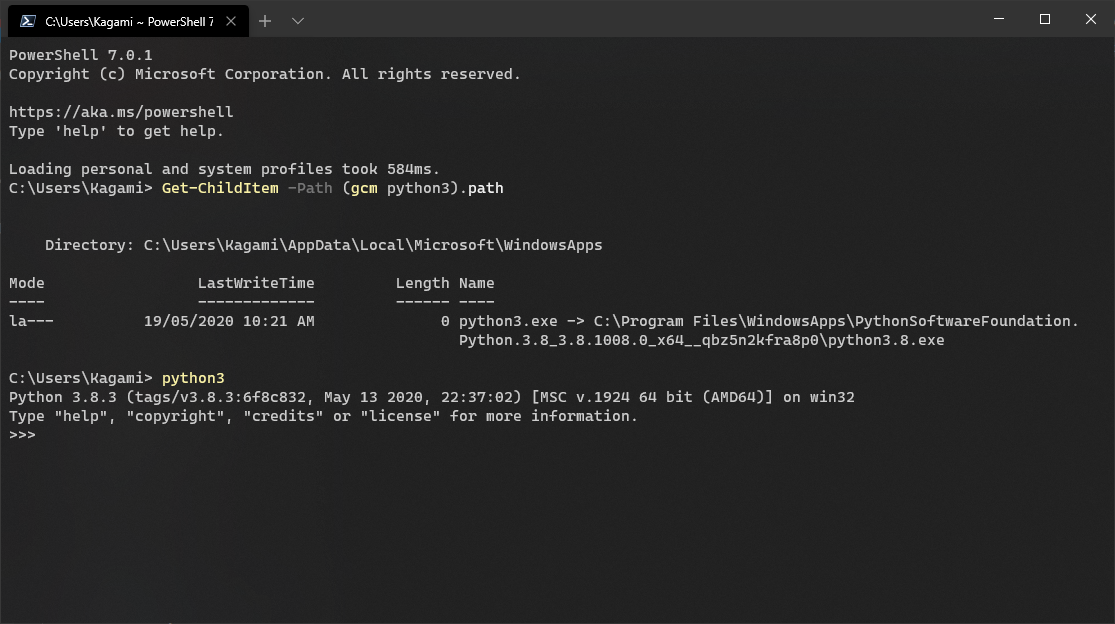

UWP apps creates reparse points for their executables in /c/Users/Kagami/AppData/Local/Microsoft/WindowsApps/, while MSYS fails to reparse them.
See the PowerShell side of patch: https://github.com/PowerShell/PowerShell/pull/10331

Read the error carefully. It says "Permission denied". Windows UWP realm is restricted from outer world unless the developer adds the permission in AppxManifest file, like Windows Terminal does.

Windows UWP realm is restricted from outer world unless the developer adds the permission in AppxManifest file
I think that mainly applies when the UWP app wants to access the system, not vise versa. Especially when cmd and pwsh can just access it.
It seems this part should be fixed to support the new tag.
https://github.com/msys2/Cygwin/blob/master/winsup/cygwin/path.cc#L2534-L2618
Edit: Okay, this is a cygwin bug.
Hi @dscho, I just saw your cygwin patch is released as 3.2.0 🚀! Does it mean this can be closed or is there a remaining work to be done?

Sorry for posting to old issue but there is still problem in executing alias. Reading and writing stdio seems broken. It seems that cygwin is creating stream handles with limited permissions when launching through an app execution alias.
https://github.com/python/pymanager/issues/210

@ynkdir the chances of getting this resolved will dramatically increase if you can come up with a tiny reproducer that you post here ;-)
Thank you for your reply. Reproducer is
On powershell terminal
# For example here is test application

PS C:\Users\yukih\Downloads\testapp> ls

    Directory: C:\Users\yukih\Downloads\testapp

Mode                 LastWriteTime         Length Name
----                 -------------         ------ ----
-a---          10/30/2025  8:57 PM           2349 AppxManifest.xml
-a---          10/30/2025  8:56 PM           1468 logo.png
-a---          10/30/2025  8:55 PM             65 testapp.c


# logo.png is some 150x150 image.

# Content of testapp.c is

PS C:\Users\yukih\Downloads\testapp> Get-Content testapp.c
#include <stdio.h>

int main() {
    printf("hello\n");
    getchar();
    return 0;
}

# Content of AppxManifest.xml is

PS C:\Users\yukih\Downloads\testapp> Get-Content AppxManifest.xml
<?xml version="1.0" encoding="utf-8"?>
<Package
    xmlns="http://schemas.microsoft.com/appx/manifest/foundation/windows10"
    xmlns:uap="http://schemas.microsoft.com/appx/manifest/uap/windows10"
    xmlns:uap5="http://schemas.microsoft.com/appx/manifest/uap/windows10/5"
    xmlns:uap10="http://schemas.microsoft.com/appx/manifest/uap/windows10/10"
    xmlns:desktop4="http://schemas.microsoft.com/appx/manifest/desktop/windows10/4"
    xmlns:rescap="http://schemas.microsoft.com/appx/manifest/foundation/windows10/restrictedcapabilities"
    xmlns:systemai="http://schemas.microsoft.com/appx/manifest/systemai/windows10"
    IgnorableNamespaces="uap rescap systemai desktop4">

    <Identity Name="Ynkdir.TestApp" Version="1.0.0.0" Publisher="CN=CommonName, O=Organization, L=City, S=State, C=Country" ProcessorArchitecture="x64" />

    <Properties>
        <DisplayName>Ynkdir.TestApp</DisplayName>
        <PublisherDisplayName>Ynkdir</PublisherDisplayName>
        <Description>TestApp</Description>
        <Logo>logo.png</Logo>
    </Properties>

    <Resources>
        <Resource Language="en-us" />
    </Resources>

    <Dependencies>
        <TargetDeviceFamily Name="Windows.Desktop" MinVersion="10.0.17763.0" MaxVersionTested="10.0.26226.0" />
    </Dependencies>

    <Capabilities>
        <rescap:Capability Name="runFullTrust"/>
        <systemai:Capability Name="systemAIModels"/>
    </Capabilities>

    <Applications>
        <Application
                Id="TestApp"
                Executable="testapp.exe"
                EntryPoint="Windows.FullTrustApplication"
                uap10:RuntimeBehavior="packagedClassicApp"
                uap10:TrustLevel="mediumIL">
            <uap:VisualElements
                DisplayName="TestApp"
                Description="TestApp"
                BackgroundColor="#464646"
                Square150x150Logo="logo.png"
                Square44x44Logo="logo.png"
                />
            <Extensions>
                <uap5:Extension Category="windows.appExecutionAlias">
                    <uap5:AppExecutionAlias desktop4:Subsystem="windows">
                        <uap5:ExecutionAlias Alias="testapp.exe" />
                    </uap5:AppExecutionAlias>
                </uap5:Extension>
            </Extensions>
        </Application>
    </Applications>

</Package>


# Compile testapp.c

PS C:\Users\yukih\Downloads\testapp> cl testapp.c
Microsoft(R) C/C++ Optimizing Compiler Version 19.50.35717 for x64
Copyright (C) Microsoft Corporation.  All rights reserved.

testapp.c
Microsoft (R) Incremental Linker Version 14.50.35717.0
Copyright (C) Microsoft Corporation.  All rights reserved.

/out:testapp.exe
testapp.obj


# Install as WindowsApp package. ( [You need to enable Developer Mode on Windows11](https://learn.microsoft.com/en-us/windows/apps/get-started/enable-your-device-for-development) )

PS C:\Users\yukih\Downloads\testapp> Add-AppxPackage -Register AppxManifest.xml

PS C:\Users\yukih\Downloads\testapp> where.exe testapp.exe
C:\Users\yukih\Downloads\testapp\testapp.exe
C:\Users\yukih\AppData\Local\Microsoft\WindowsApps\testapp.exe

# execute WindowsApps\testapp.exe

PS C:\Users\yukih\Downloads\testapp> testapp.exe
hello
a<enter>
PS C:\Users\yukih\Downloads\testapp>  # testapp.exe exit successfully.
On cygwin terminal
$ cygcheck -c cygwin
Cygwin Package Information
Package              Version    Status
cygwin               3.6.5-1        OK

$ which testapp.exe
/cygdrive/c/Users/yukih/AppData/Local/Microsoft/WindowsApps/testapp.exe

$ testapp.exe
a<enter>
b<enter>
c<enter>

# printf() is not displayed and it hangs at getchar().


# there is no problem in executing testapp.exe directly.

$ ls -l /cygdrive/c/Users/yukih/AppData/Local/Microsoft/WindowsApps/testapp.exe
lrwxrwxrwx 1 yukih yukih 53 Oct 30 21:18 /cygdrive/c/Users/yukih/AppData/Local/Microsoft/WindowsApps/testapp.exe -> /cygdrive/c/Users/yukih/Downloads/testapp/testapp.exe

$ /cygdrive/c/Users/yukih/Downloads/testapp/testapp.exe
hello
a<enter>
$
Windows 11 Home 25H2 26200.7019
An even simpler reproducer would be to install either the Python install manager or one of our Python packages from the Windows Store and run:
PS > py -c "print(input())"  # or e.g. python3.13 -c "print(input())"
abc<enter>
abc

PS >

$ py -c "print(input())"
abc<enter>
# appears to hang
Unfortunately, the only way to prove the standard streams permissions was with WinDBG and knowing the handle. But if you're happy to accept my debugging result there, then there isn't a need for you to build anything other than (I assume?) Bash in order to minimally reproduce the effect.

Hmm, I have forgotten this for years, and on 2025-08-30 x64 build on Windows 11 25H2 26200, my original steps to repro causes hang:
(with MSYS2_PATH_TYPE=inherit)
sasch@DESKINAZ-X470 UCRT64 ~
$ which python3
/c/Users/sasch/AppData/Local/Microsoft/WindowsApps/python3

sasch@DESKINAZ-X470 UCRT64 ~
$ python3

(... no python REPL appears, hangs forever, and Ctrl+C doesn't close it either ...)
@ynkdir thank you for the reproducer, and sorry for dropping the ball. Independently, a similar reproducer was posted to https://inbox.sourceware.org/cygwin/CAAM_cieBo_M76sqZMGgF+tXxswvT=jUHL_pShff+aRv9P1Eiug@mail.gmail.com.
I was able to reproduce the issue, and found a work-around (resolve the "symlink" before calling CreateProcessW()), but am not yet satisfied that I understand the problem thoroughly.
I think that executing resolved path does not work for specific application which requires package identity (or capability settings?). Some Windows API (e.g. AI) requires it.
Well, this is the work-around I was talking about, which seems to work with the reproducer, as well as with python.exe:
From 8a2e4f441e283a203df34f6eebe5daa0f2249a60 Mon Sep 17 00:00:00 2001
From: Johannes Schindelin <[email protected]>
Date: Fri, 12 Dec 2025 14:23:55 +0100
Subject: [PATCH] spawn: resolve appexec links to work around stdhandles issues

There is a problem when executing Microsoft Store command-line
applications from Cygwin in MinTTY: The standard handles (stdout/stdin)
seem not to be connected properly and user input is ignored, output not
even shown, as reported in
https://inbox.sourceware.org/cygwin/CAAM_cieBo_M76sqZMGgF+tXxswvT=jUHL_pShff+aRv9P1Eiug@mail.gmail.com/

Note: This seems specific to the Pseudo Console support in Cygwin, as
the same works when calling the command-line application in a regular
Windows Terminal (where a Win32 Console is present).

One work-around is to run the application through `winpty`.

The apparent reason for this problem is that executing such applications
through a regular `CreateProcessW()` seems not to connect the standard
handles as expected, even though the `STARTUPINFO` is configured
correctly.

Signed-off-by: Johannes Schindelin <[email protected]>
---
 winsup/cygwin/spawn.cc | 19 +++++++++++++++++++
 1 file changed, 19 insertions(+)

diff --git a/winsup/cygwin/spawn.cc b/winsup/cygwin/spawn.cc
index 71add8755c..2affe850b0 100644
--- a/winsup/cygwin/spawn.cc
+++ b/winsup/cygwin/spawn.cc
@@ -463,6 +463,25 @@ child_info_spawn::worker (const char *prog_arg, const char *const *argv,
 	}

       USHORT len = real_path.get_nt_native_path ()->Length / sizeof (WCHAR);
+
+      /* Work-around stdio issues when spawning appexec links directly */
+      if (real_path.issymlink () && real_path.is_known_reparse_point () && real_path.is_winapi_reparse_point ())
+	{
+	  tmp_pathbuf tp;
+	  char *target = tp.c_get ();
+	  ssize_t len = readlink (real_path.get_posix (), target, NT_MAX_PATH - 1);
+	  if (len > 0)
+	    {
+	       target[len] = '\0';
+	       path_conv resolved_path (target, PC_SYM_FOLLOW | PC_POSIX);
+	       if (!resolved_path.error && resolved_path.exists ())
+		 {
+		   real_path = resolved_path;
+		   len = real_path.get_nt_native_path ()->Length / sizeof (WCHAR);
+		 }
+	    }
+	}
+
       if (RtlEqualUnicodePathPrefix (real_path.get_nt_native_path (),
 				     &ro_u_natp, FALSE))
 	{
--
2.52.0.windows.1
Aha! The problem does lie elsewhere (and is only worked around by that code change, as I had suspected): is_console_app() fails to read the first 1024 bytes of the executable when given the app exec alias. Hence the stdio handles get set up incorrectly. That's all there is to it. Now to figure out the best way to fix this (apart from adding all the missing error checking)...
@ynkdir here is what I plan on sending to the Cygwin project: https://github.com/cygwingitgadget/cygwin/pull/5
The build artifact of https://github.com/msys2/msys2-runtime/pull/322's PR build can be used to verify that this will fix the issue; There is still a bit of a discussion going on on the Cygwin-patches mailing list how to best proceed (there are two competing approaches).