msracver
RPNL1Loss=nan
What does this mean? As I know it is not correct. In Epoch[0] RPNL1Loss = 0.403792. Then always nan
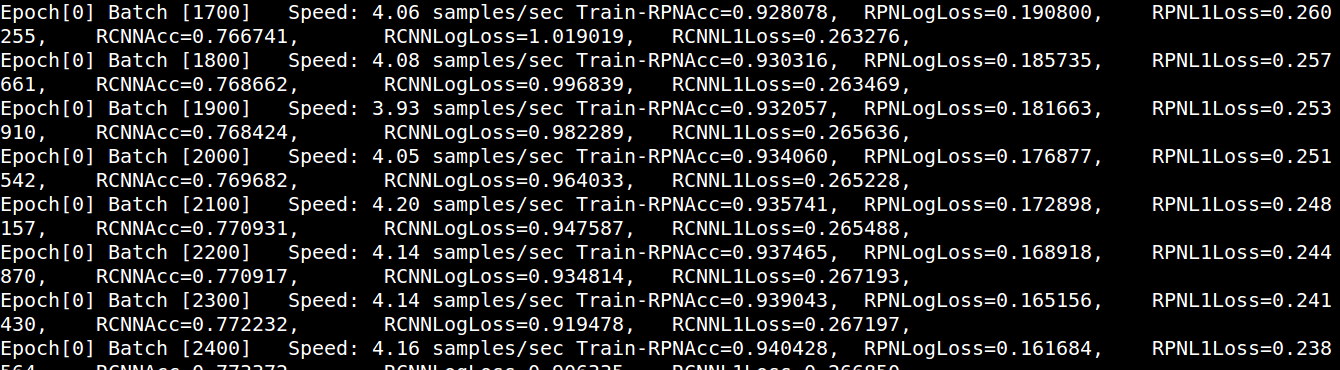
Epoch[0] Batch [300] Speed: 1.15 samples/sec Train-RPNAcc=0.812539, RPNLogLoss=0.570043, RPNL1Loss=nan, RCNNAcc=0.767390, RCNNLogLoss=3.596807, RCNNL1Loss=0.010698, Epoch[0] Batch [400] Speed: 1.16 samples/sec Train-RPNAcc=0.821910, RPNLogLoss=0.599778, RPNL1Loss=nan, RCNNAcc=0.818267, RCNNLogLoss=3.577709, RCNNL1Loss=0.008031, Epoch[0] Batch [500] Speed: 1.14 samples/sec Train-RPNAcc=0.828243, RPNLogLoss=0.617132, RPNL1Loss=nan, RCNNAcc=0.848381, RCNNLogLoss=3.396140, RCNNL1Loss=0.006434, Epoch[0] Batch [600] Speed: 1.15 samples/sec Train-RPNAcc=0.832391, RPNLogLoss=0.628403, RPNL1Loss=nan, RCNNAcc=0.869345, RCNNLogLoss=2.870057, RCNNL1Loss=0.005387, Epoch[0] Batch [700] Speed: 1.16 samples/sec Train-RPNAcc=0.834384, RPNLogLoss=0.636100, RPNL1Loss=nan, RCNNAcc=0.883437, RCNNLogLoss=2.499374, RCNNL1Loss=0.004622, Epoch[0] Batch [800] Speed: 1.16 samples/sec Train-RPNAcc=0.836050, RPNLogLoss=0.641726, RPNL1Loss=nan, RCNNAcc=0.894673, RCNNLogLoss=2.215910, RCNNL1Loss=0.004046, Epoch[0] Batch [900] Speed: 1.14 samples/sec Train-RPNAcc=0.837489, RPNLogLoss=0.645880, RPNL1Loss=nan, RCNNAcc=0.903519, RCNNLogLoss=1.994231, RCNNL1Loss=0.003597, Epoch[0] Batch [1000] Speed: 1.16 samples/sec Train-RPNAcc=0.838438, RPNLogLoss=0.649027, RPNL1Loss=nan, RCNNAcc=0.910550, RCNNLogLoss=1.816863, RCNNL1Loss=0.003238, Epoch[0] Batch [1100] Speed: 1.16 samples/sec Train-RPNAcc=0.839179, RPNLogLoss=0.650772, RPNL1Loss=nan, RCNNAcc=0.915993, RCNNLogLoss=1.673953, RCNNL1Loss=0.003987, Epoch[0] Batch [1200] Speed: 1.15 samples/sec Train-RPNAcc=0.839684, RPNLogLoss=0.650882, RPNL1Loss=nan, RCNNAcc=0.920535, RCNNLogLoss=1.553478, RCNNL1Loss=0.003658, Epoch[0] Batch [1300] Speed: 1.15 samples/sec Train-RPNAcc=0.840592, RPNLogLoss=0.649718, RPNL1Loss=nan, RCNNAcc=0.924115, RCNNLogLoss=1.452725, RCNNL1Loss=0.003903, Epoch[0] Batch [1400] Speed: 1.14 samples/sec Train-RPNAcc=0.841459, RPNLogLoss=0.647637, RPNL1Loss=nan, RCNNAcc=0.927468, RCNNLogLoss=1.363495, RCNNL1Loss=0.003740, Epoch[0] Batch [1500] Speed: 1.16 samples/sec Train-RPNAcc=0.841013, RPNLogLoss=0.645282, RPNL1Loss=nan, RCNNAcc=0.930463, RCNNLogLoss=1.284670, RCNNL1Loss=0.003492, Epoch[0] Batch [1600] Speed: 1.16 samples/sec Train-RPNAcc=0.841707, RPNLogLoss=0.642184, RPNL1Loss=nan, RCNNAcc=0.932781, RCNNLogLoss=1.216500, RCNNL1Loss=0.003344, Epoch[0] Batch [1700] Speed: 1.16 samples/sec Train-RPNAcc=0.841856, RPNLogLoss=0.638847, RPNL1Loss=nan, RCNNAcc=0.935341, RCNNLogLoss=1.151333, RCNNL1Loss=0.003149, Epoch[0] Batch [1800] Speed: 1.16 samples/sec Train-RPNAcc=0.842007, RPNLogLoss=0.635248, RPNL1Loss=nan, RCNNAcc=0.937574, RCNNLogLoss=1.095160, RCNNL1Loss=0.004580, Epoch[0] Batch [1900] Speed: 1.17 samples/sec Train-RPNAcc=0.842244, RPNLogLoss=0.631594, RPNL1Loss=nan, RCNNAcc=0.939325, RCNNLogLoss=1.043886, RCNNL1Loss=0.004343, Epoch[0] Batch [2000] Speed: 1.17 samples/sec Train-RPNAcc=0.842616, RPNLogLoss=0.627715, RPNL1Loss=nan, RCNNAcc=0.941225, RCNNLogLoss=0.996324, RCNNL1Loss=0.004129, Epoch[0] Batch [2100] Speed: 1.18 samples/sec Train-RPNAcc=0.843182, RPNLogLoss=0.623727, RPNL1Loss=nan, RCNNAcc=0.942862, RCNNLogLoss=0.953685, RCNNL1Loss=0.003934, Epoch[0] Batch [2200] Speed: 1.18 samples/sec Train-RPNAcc=0.843663, RPNLogLoss=0.619788, RPNL1Loss=nan, RCNNAcc=0.944095, RCNNLogLoss=0.915521, RCNNL1Loss=0.003757, Epoch[0] Batch [2300] Speed: 1.17 samples/sec Train-RPNAcc=0.844234, RPNLogLoss=0.615760, RPNL1Loss=nan, RCNNAcc=0.945496, RCNNLogLoss=0.879742, RCNNL1Loss=0.003595, Epoch[0] Batch [2400] Speed: 1.18 samples/sec Train-RPNAcc=0.844505, RPNLogLoss=0.611821, RPNL1Loss=nan, RCNNAcc=0.947011, RCNNLogLoss=0.846207, RCNNL1Loss=0.003446, Epoch[0] Batch [2500] Speed: 1.16 samples/sec Train-RPNAcc=0.844367, RPNLogLoss=0.608176, RPNL1Loss=nan, RCNNAcc=0.947858, RCNNLogLoss=0.819818, RCNNL1Loss=0.004606, Epoch[0] Batch [2600] Speed: 1.18 samples/sec Train-RPNAcc=0.844443, RPNLogLoss=0.604457, RPNL1Loss=nan, RCNNAcc=0.948941, RCNNLogLoss=0.791787, RCNNL1Loss=0.004434,

I got below:
- Train-RPNAcc=0.840520
- RPNLogLoss=0.726791
- RPNL1Loss=27352.047164
- RCNNAcc=0.905266
- RCNNLogLoss=nan
- RCNNL1Loss=nan,

And in the first 200 iterations, some value of ex_weights and ex_heights are 0, which caused overflow error. I add 1e-14 to ex_weights and ex_heights, it continue training with warning but very small dw and dh generated by nonlinear_pred, and the loss apparently abnormal
Try to use smaller learning rate, from my understanding, too large learning rate is the most common case when L1 loss get NaN

@hzh8311 Have you solved this problem yet? I encountered this problem too. @YuwenXiong Is there any method except using smaller learning rate?

@mursalal @hzh8311 I have solved this problem. I think you shoud check your training data again and again, write some code to avoid some extreme values. Besides, you can check your loss setting, which maybe unbalanced.
check if you use same data type as this. Try changing it to int16. It goes wrong with negative value.

@mursalal I have tried to use the smaller learning rate, but it does not work. Do you have any other advise?

I am using my own dataser for a experiment.I changed "uint16" to "int16", but i still meet this problem, how do I deal with my dataset to avoid extreme value?

@Franciszzj can you be more specific about the extreme values in training data? for example, what issues specifically you encountered in your training data? Besides, for the loss setting, I used the default loss setting, which I thought should be right? How can I check if it is unbalanced?


Make sure the coordinates of your data's ground truth is in the VOC's format.(not less than 1)

I solved the problem(at least it worked in my case) by changing source code in
- lib/dataset/pascal_voc.py, about 175~178 lines, comment
-1just like below:
x1 = float(bbox.find('xmin').text) #- 1
y1 = float(bbox.find('ymin').text) #- 1
x2 = float(bbox.find('xmax').text) #- 1
y2 = float(bbox.find('ymax').text) #- 1
- lib/dataset/imdb.py, about 210 lines, add code below:
for b in range(len(boxes)):
    if boxes[b][2]< boxes[b][0]:
        boxes[b][0] = 0
Because in VOC format, it's pixel indexes are 0-based, if you do not transfer your data accordingly, 0 minus 1 will result in 65535, which will cause training loss NAN. You can add print boxes before assert (boxes[:, 2] >= boxes[:, 0]).all() to see the wrong coords.
Hope it helps.

I encountered the same question as yours.I'm training faster-rcnn_dcn on my own dataset. As suggested above,I used lr =0.000125 with 1 GPU(default lr=0.0005 with 4 GPUS).And follow @maozezhong 's instructions,it doesn't work.
 After that I checked my own dataset bbox label<xmin, ymin, xmax, ymax>, maybe the box label has invalid value or xmin =0 or ymin =0.In order to avoid xmin or ymin equal to 0 , I added these codes in
 mydata2voc.py.It works.
xmin = 1 if xmin == 0 else xmin
ymin = 1 if ymin == 0 else ymin


Hi, i encountered the same question as yours and solve this problem.
 Following @Franciszzj , check the dataset again, however, the RPNL1Loss still equal nan, after
 rm ./data/cache/xxx_gt_roidb.pkl , the problem solved. It causes by previous bad cache model, so your should clean it before retraining