

 mschack
Graphics Problems
OS X 10.11.6 Rack 0.4.0
Many thanks for this. There is a problem in the mac build though with the graphics. Wrong SVG path?
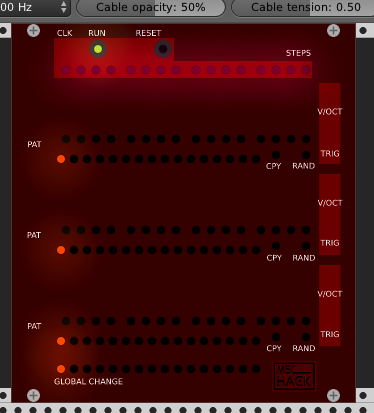
Other than that, just a couple of warnings:
src/CLog.cpp:114:14: warning: format string is not a string literal (potentially insecure) [-Wformat-security] fprintf( fp,(char*)buffer.c_str() ); ^ ~~~~~~~~~~~~~~ src/CLog.cpp:114:14: note: treat the string as an argument to avoid this fprintf( fp,(char*)buffer.c_str() ); ^ "%s", src/CLog.cpp:142:15: warning: format string is not a string literal (potentially insecure) [-Wformat-security] fprintf( fp, (char*)buffer.c_str() ); ^ ~~~~~~~~~~~~~~ src/CLog.cpp:142:15: note: treat the string as an argument to avoid this fprintf( fp, (char*)buffer.c_str() ); ^ "%s", 2 warnings generated.

This fixes the SVG links:
sed -i - 's//mschack///VCV-Rack-Plugins//g' src/mscHack_Controls.hpp
The Makefile needs to be:
SOURCES = $(wildcard src/*.cpp)
include ../../plugin.mk
dist: all mkdir -p dist/VCV-Rack-Plugins cp LICENSE* dist/VCV-Rack-Plugins/ cp plugin.* dist/VCV-Rack-Pluginsk/ cp -R res dist/VCV-Rack-Plugins/
Thank you very much. I am not as familiar with the MAC stuff. Will the make files be different on MAC / Windows? As for the log stuff I should just remove it.

The only problem bar the links in the Makefile is this:
mkdir -p dist/mscHack cp LICENSE* dist/mscHack/
The mac shell wants those commands on a separate line.
I'm sure that will be fine in Windows?
Sorry, but that binary IS NOT WORKING. I don't understand why but I have everything working fine in my source compiled 0.4.0, but it does not work when compiled into a binary distribution.
I will look again later.
The problem is that in the windows version resources go in Rack/plugin/this.plugin/res/ but on a Mac they go into ~/Documents/Rack/plugin/this.plugin/res/.
That changed in 0.4.0 iirc. I don't know how to fix it.
So the problem is the plugin is searching the wrong folder? This would require a code change for the MAC plugin?
Autodaf also posted a link to the MAC build. I will ask him if he had any issues.
I should say I am not a dev, just somebody with a bit of Unix sysadmin experience a decade ago.
I have looked through your source and compared it to that of others and can't see anything obvious.
What I don't understand is where the code is that moves the plugin and resource files to the correct location on a Mac.
I presume is it something handled in the call to ../../plugin.mk from Rack itself. If it is then I don't understand why it should be handling your files differently.
A bit stuck at the moment.
The only obvious difference I can find is that in other people's modules when loading SVG assets their call would be to 'res/mschack_screw.svg', whereas yours is to 'plugins/mschack/res/mschack_screw.svg'.
I was able to get your module up and running on my Mac with my sed command to replace 'mschack' with 'VCV-Rack-Plugins' but, as noted, this works in a source build but not when copied across to a binary distro.
If i remove the path 'plugins/mschack/' to give you the same format as other people then the resulting build loses the graphics both locally and in the binary.
I don't know if these observations are helping at all?
I think I have a working Mac version compatible with 0.4.0 if anyone wants to cross-check? mschack.zip

mscHack_Controls.hpp needed to be changed, but to where the code looks like this (notice the AssetPlugin argument structure):
//----------------------------------------------------- // Procedure: MySquareButton // //----------------------------------------------------- struct MySquareButtonSmall : SVGSwitch, MomentarySwitch { MySquareButtonSmall() { addFrame(SVG::load(assetPlugin(plugin,"res/mschack_square_button.svg"))); sw->wrap(); box.size = Vec(9, 9); } };
I am attaching the new one
@mschack have you fixed your source code as above? In theory this fix should work for windows or no?
If I change it on Windows it can't find the resources. Right now this seems to be a MAC issue only. I will at least put a define for the location at the top of the file so it is easy to change.
Ok. I don’t know enough about how other devs manage multiple platform comparability. I’d like to believe that there is one uniform way of specifying SVG file assets that is platform independent.