

 mrousavy
feat: Augmented camera frame
What
Vision Camera currently enables you to:
- Preview the frames directly from the capture session using a
AVCaptureVideoPreviewLayer - Record the frames to file using an
AVAssetWriter - Sample and analyse the frames in a Frame Processor that executes Frame Processor Plugin(s)
This works great, but in a lot of cases you may want to augment this frame before it is displayed in the preview view or written to file. For example you might want to apply a filter that inverts all the colours or composite something onto each frame such as a watermark or timestamp. This PR makes this possible for iOS 🚀
Changes
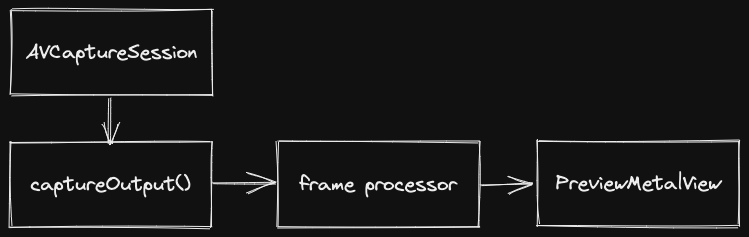
To achieve this there is a few modifications that have been made:
Metal Preview View
Typically the capture session passes frames directly to the AVCaptureVideoPreviewLayer. This leaves no opportunity to augment the frame before it gets displayed on screen. This PR therefore adds a custom preview view PreviewMetalView that receives frames from the captureOutput delegate method so that any kind of augmentation can be applied before it is rendered on screen. This can be optionally enabled as the backing for the preview view with the prop enableMetalPreview
Frame Processor return Augmented Frame
The camera frame can already be augmented in a frame processor using a frame processor plugin. But this augmented frame needs to be passed back to Vision Camera for displaying in the preview view and writing to file. To achieve this a frame can now be returned at the end of the frame processor (in useFrameProcessor). e.g:
const frameProcessor = useFrameProcessor((frame) => {
  const augmentedFrame = beautyFilterPlugin(frame);
  return augmentedFrame;
}, []);
Taks:
- [x] Create custom
MTKViewto render pixel buffer - [x] Allow the frame processor to return a
Frame - [x] Handle Metal preview transforms better when switching cameras (recalculate vertex buffer using resolution and orientation)
- [x] Frame processor queue when used to augment frame
- [ ] Update docs to reflect the changes
Tested on
iPhone 13 Pro
Related issues

Had to work out a few memory management issues with the Frame in those last few commits 😅 A few key fixes they addressed:
- ARC didn't count the
Frameas a reference to theCMSampleBufferwhen returned from the frame processor plugin leading to the sample buffer getting freed and anEXC_BAD_ACCESSerror. The frame now can be created withinitWithRetainedBufferwhich forces the sample buffer to be retained by the frame and releases it on the frame's dealloc. - In the frame processor callback code we can't invalidate the sample buffer before it returns the frame otherwise the sample buffer will not free its image buffer. Instead it just removes the frame host objects reference to the frame so that the frame can then be deallocated properly when it goes out of scope in the
captureOutputmethod by ARC.
Just thinking how we want to handle the frame processor callback in cases where we want to draw on the frame or just perform some inference. In the first case the frame processor callback needs to be run synchronously on the frame processor queue so that we get the processed frame before displaying and recording it. In the second case we want this to run async so that we are not blocking the display and recording if we have a long running (greater than 1 frame duration) frame processor that needs to run (as Vision Camera currently works).
This also raises the question how do we want to handle the case where you might want to have a frame processor plugin that runs asynchronously doing some intensive task at say 3 frame samples per second and then also have a frame processor that synchronously draws on the frame at the fps of the camera?
The latest changes add a separate useSyncFrameProcessor to handle any synchronous work we might want to do on the frame e.g. drawing and is the only type of frame processor that is allowed to return a new Frame for presentation and recording. I think this is the best way to allow for both sync/async frame processing - though we might want to rename the syncFrameProcessor to something more synonymous with drawing (as that's all it should actually be used for)


Hi @mrousavy @thomas-coldwell , I saw this pull still not available in V3, can u check it again @mrousavy


