

 mrlacey
How to modify the icon?
I modified both the .ico and .png and recompiled the extension, but it continued with the same icon: 

Is the link icon loaded by any base64 string or I'm missing something?

It should just be those files. If all you've done is change the icons, VS might not pick up the change. Try increasing the version number in the manifest. Or reset the experimental instance if that's where you're seeing it.
Out of curiosity, have you added or changed any functionality or just the icon?

I just changed the icon, but i figured out that its not really an icon, its a Unicode character: https://github.com/mrlacey/CommentLinks/blob/7c354aeee790101ee5448713da3cbad0104234ec/src/CommentLinkAdornment.cs#L26
I have never worked with any c# project before, I tried to modify the function to remove the highlight when the
mouse is over the TextBlock:
        internal CommentLinkAdornment(CommentLinkTag tag, int currentLineNumber)
        {
            this.Content = new TextBlock { Text = "📌" };
            this.Foreground = new SolidColorBrush(Color.FromRgb(71, 165, 10));
            this.BorderBrush = null;
            this.Padding = new Thickness(0);
            this.Margin = new Thickness(0);
            this.Background = Brushes.Transparent;
            this.Cursor = Cursors.Hand;
            this.CmntLinkTag = tag;
            this.currentLineNumber = currentLineNumber;

            // Add event handlers
            this.MouseEnter += this.CommentLinkAdornment_MouseEnter;
            this.MouseLeave += this.CommentLinkAdornment_MouseLeave;
        }

        private void CommentLinkAdornment_MouseEnter(object sender, MouseEventArgs e)
        {
            this.Background = Brushes.Transparent;
            ((TextBlock)this.Content).Foreground = new SolidColorBrush(Color.FromRgb(71, 165, 10));
        }

        private void CommentLinkAdornment_MouseLeave(object sender, MouseEventArgs e)
        {
            this.Background = Brushes.Transparent;
            ((TextBlock)this.Content).Foreground = new SolidColorBrush(Color.FromRgb(71, 165, 10));
        }
But the "icon" still get highlighted when the mouse is over it. Do you know how I could remove the highlight?

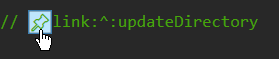
The behavior you're seeing is because the control is actually a button and that is the default behavior for a button. You'll need to retemplate it to remove this behavior. Although it's not good practice to remove indication that something is clickable when the cursor is over it.
I modified the trigger word to:
public string TriggerWord { get; set; } = "#";
As it didn't conflict with the regex you've set.
My attempt was to make it more 'clean' possible, i also tried removing the .Content TextBlock:
this.Content = new TextBlock { Text = "➡" };
So i could set the trigger word to 📌 and also could get rid of the #

It would look like
		 // Failed to register the thumbnail.
		 // 📌thumbnail.cpp:#t1
But it uses the .Content to render the button so i got lost