
mpv
 mpv copied to clipboard
 mpv-player
opengl performs terrible with gpu-next
Important Information
Provide following Information:
- mpv version d86bfeb
- Windows Version win11 release
- Source of the mpv binary shinchiro's toolchain
- If known which version of mpv introduced the problem
- Possible screenshot or video of visual glitches
Reproduction steps
./mpv --no-config --force-window --idle=once --vo=gpu --gpu-context=win
./mpv --no-config --force-window --idle=once --vo=gpu-next --gpu-context=win
play the hdr video
Expected behavior
No drop frames.
Actual behavior
with gpu-next, it crazily dropped frames.
Log file
Sample files

Can't reproduce. I get no performance difference (gpu-next is slightly faster for me).
I'm assuming --hdr-compute-peak=no fixes it, but what about --tone-mapping=clip?

Tried to start with ./mpv --no-config --force-window --idle=once --vo=gpu-next --gpu-context=win
and then ran command at runtime --hdr-compute-peak=no --hdr-compute-peak=no
still dropping
next.log
And I ran a benchmark, chose the common video (1080p sdr dscale) to test. gpu-next's speed is still lower.
vo=gpu # gpu-next
gpu-context=win
sub=no
audio=no
keep-open=always
video-sync=display-desync
interpolation=no
opengl-swapinterval=0
osd-msg1="FPS: ${estimated-display-fps}"
hidpi-window-scale=no
cscale=jinc
dscale=jinc
BTW, FPS 1000+ (gpu winvk) FPS 900+ (gpu-next winvk)
gpu and gpu-next use different default radius for jinc. (gpu-next uses the mathematically correct one, mpv rounds it to 3). Set the radius explicitly (e.g. --scale-radius=3.0) to make it a fair comparison.
Added scale-radius=3.0 dscale-radius=3.0 cscale-radius=3.0
Still no visible diff (143 vs 130) I'll try another amd gpu to check if it was related to nvidia.
Actually, 143 is so suspiciously close to your display FPS that I suspect what's happening is that vsync is not getting disabled for you (despite the swapinterval=0 option).
No idea why gpu-next gets you only 130 fps in that case though. Especially if it does 1000+ with vulkan. I wonder if you can figure out how to disable vsync and test again - does that make gpu-next also magically faster or does it still only render at 130 fps?
However, my another device with AMD gpu (5600M) performs better than the one with Nvidia (2070Slp). The hdr video I mentioned before didn't drop frames (--vo=gpu-next --gpu-context=win).
edit: I can disable vsync now... updating outcomes
vsync off 1080p sdr downscaling 2070sLP FPS 1100+ (gpu og) close to even faster than winvk... https://github.com/mpv-player/mpv/issues/9551#issuecomment-986062291 FPS 600+ (gpu-next og)
5600m (seems to be normal in amd gpu) FPS 700+ (gpu og) FPS 690+ (gpu-next og) FPS 780+ (gpu winvk) FPS 800+ (gpu-next winvk)

scale=lanczos
cscale=lanczos
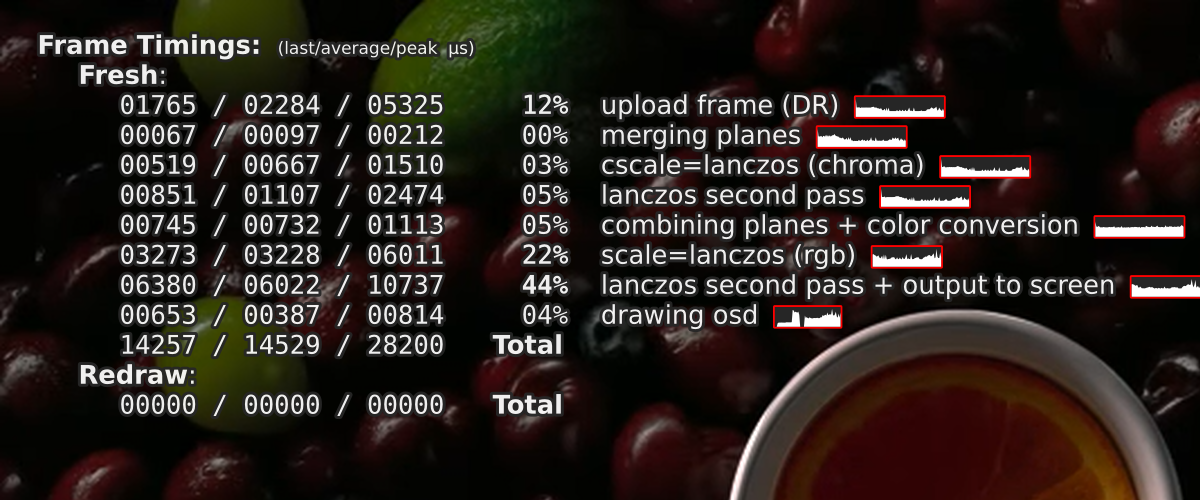
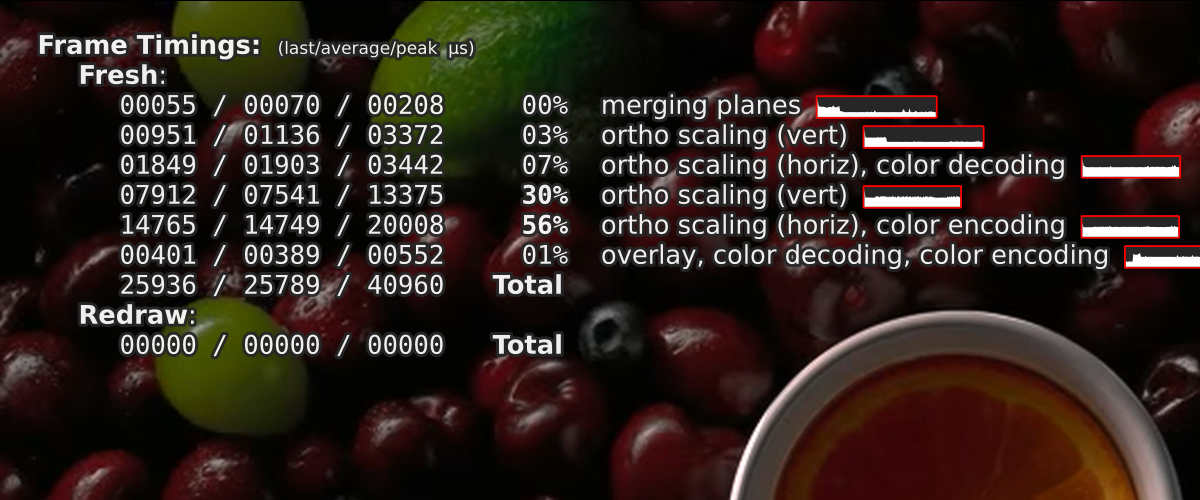
And there is this in the console:
[vo/gpu-next] Tried calling pl_swapchain_resizewith unknown size! This is forbidden for OpenGL. The first call topl_swapchain_resize must include the width and height of the swapchain, because there's no way to figure this out from within the API.
I can't reproduce this anymore, can you verify if this is still the case? opengl performance is more or less in line with vo_gpu


I cannot reproduce it. On my machine (Wayland on Intel Arc A750) with libplacebo v7.349.0-rc1, vo=gpu-next has higher FPS than vo=gpu using your bench method. I guess it is platform-specific.

There has been no performance difference for opengl on gpu/gpu-next for me either on linux (amd) for the past few months or so at least.

I can notice a steadily increasing number of delayed frames when watching 23.976fps videos on a 180Hz monitor. It is worth noting that this also happens with --vo=gpu --gpu-api=opengl and --vo=gpu-next --gpu-api=vulkan, though vulkan has a slower increasing rate. BTW I tried setting --opengl-swapinterval (as mentioned in #11122) but it had no effect. I'm using Mutter (GNOME) on Wayland. My current solution is setting a lower display refresh rate when watching videos.
OpenGL with my shaders is about twice as slow as DX11 and about 1.7x as slow as Vulkan. It's equally slow regardless of --vo on Windows 10 with AMD gpu. That said, without shaders GPU-next is twice as fast as vo=gpu and close to the speed of Vulkan.

opengl on windows is a meme, you should use d3d11 or vulkan. That said, I think we can close this since it doesn't seem like there's any difference on platforms with good opengl drivers
@hooke007 I have a hypothesis that this is caused by GPU power management. Can you rerun the benchmarks and this time also monitor how much power your GPU reports to consume to cross check my observations?
With the default amdgpu_pm settings, vo_gpu_next never uses more than 25-30W, while vo_gpu can go upto 50W and I can see vo_gpu having better perceived performance in this scenario.
If I force the performance profile to high (echo "high" | sudo tee /sys/class/drm/cardN/device/power_dpm_force_performance_level), vo_gpu_next gives me 5.5-6k frames per second with a h264 1080p file with --profile=fast, while vo_gpu gives me 4.5-5.5k frames per second with the same file. The big difference is that in this scenario, vo_gpu consumes upwards of 60-65W of power while vo_gpu_next stays at a static 51W.
This benchmarking is highly unscientific and not meant to be a comparison between the raw throughput or efficiency of both VOs, just meant to highlight that GPUs do power management different when either VO use opengl.
With vulkan, vo_gpu can consume upwards of 90W(!) with the same benchmark while vo_gpu_next stays at around 50-60W and they both render at roughly the same speeds.
Other fun observations: if hwdec is used, at least amdgpu will automatically switch profile to VIDEO. when this happens, neither vo consume more than 7-8Ws above idle but vo_gpu_next renders around 2k frames while vo_gpu does 1.5k. This is probably decoding speed bottlenecked and not very relevant..
ogl-next is also ~2x slower on Intel (fps and timers).
It has somewhat improved but it's still slower for me on Haswell igpu (which doesn't properly support vulkan, so there's that). With default lanczos and 1080p60 video upscaling, frame time for vo=gpu is 12.5 ms, and does not drop frame; frame time for vo=gpu-next is 19 ms, and drops frame. stats graphs are similar to what's already posted.
