
mpv
 mpv copied to clipboard
 mpv-player
Mismatch between progress on timeline and time remaining when speed != 1
Important Information
Provide following Information:
- mpv version:
mpv 0.34.1 - Linux Distribution and Version:
Ubuntu 22.04 - Source of the mpv binary:
sudo apt-get install mpv

In the attached image, whole video is roughly 10 minutes long, we've seen 3 minutes so far and progress in timeline shows 33% progression. We still have another 6 minutes to go but since we play at double the speed, it's being shown as 3 minutes.
Ideally, you'd still show the remaining time as 6 minutes. That's what all other players do.
If you still insist on showing it this way, have the display the equivalent ratio as well. In this example, we should be at 50% marker, not 33%.

Ideally, you'd still show the remaining time as 6 minutes. That's what all other players do.
Disagree. I use the speed adjusted remaining time a lot when watching lectures.

Ideally, you'd still show the remaining time as 6 minutes. That's what all other players do.
Disagree. I use the speed adjusted remaining time a lot when watching lectures.
I'm fine with either option. What I don't like is the mismatch between the speed-adjusted-elapse and what is being shown on the timeline.
Is this even an issue? An intended feature which is actually useful that other player seldom provide. You can use shortcut key to change player speed back to 1 to see the irrelevant remainng time when ur playing at higher speed, then back to higher speed.
If you still insist on showing it this way, have the display the equivalent ratio as well. In this example, we should be at 50% marker, not 33%.
Your suggestion is more confusing for the end user, the bar is ratio of progressed video regardless of the speed(ie frames watched/total frames). It means u watched 33% of the video content

@n-buna404
Your suggestion is more confusing for the end user, the bar is ratio of progressed video regardless of the speed(ie frames watched/total frames). It means u watched 33% of the video content
I can't tell if you're trolling, but:
If you've watched 3:40 of a video, and 3:40 is remaining, what percentage have you watched?
- 133%
- 233%
- 333%
- 50%
If you want to discuss frames count, which is meaningless in itself, once you have doubled the speed, you're going to have to either drop every other frame or somehow merge the next two frames into one, thus the number of frames you're going to see will be equal to what you've seen, not twice.
Also, I look at the timeline to give me relevant visual info regarding where I am in the video. Info regarding frames watched/total frames is useless to me.
This also changes the linear seeking behavior every woman, child, man, and whatnot is familiar with. You want to seek to the middle of video? Just click on 50% of timeline. 25%? Click on 25% of timeline. 75%? Click on 75% of timeline.
Here's where you have to click if your speed is 2x:
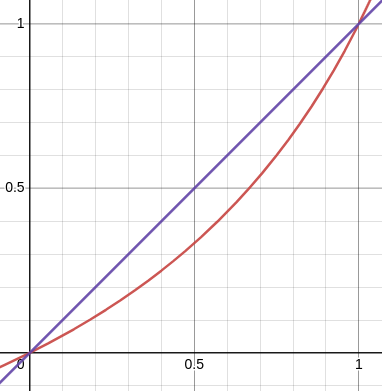
Try to guess for 25%, 50%, and 75% before revealing results.
25% -> click on 14%
50% -> click on 33%
75% -> click on 60%
This is only for 2x speed, and the curve change depending on your speed. This is totally broken.
You are assuming that if somebody wants to seek to the middle of a video while watching at 2x speed, they want to seek to the middle of time elapsed + time remaining (wall clock), but in reality they probably want to seek into the middle of time elapsed + time remaining (video at 1x speed), which is precisely what clicking on the middle of the seek bar is doing right now.
That makes zero sense. Why would I keep two accounts in my head, one for 1x speed and another for 2x speed?
You are assuming ...
Yes, me and virtually every other dev working on players. You've broken the mechanics (chart clearly demonstrates it) and perhaps the only reason you don't hear about it more often is because people don't normally watch stuff at higher speed.
You can't just go against common sense without a very good reason to do so.
I've just checked with youtube and increasing the playback speed also does not change what clicking into the middle of the seekbar does. Just because you don't like it doesn't mean you are the majority here.
Old but closing this as "working as intended". I guess a patch to osc to add an option to not adjust the displayed time with respect to playback speed could be accepted if you really feel strongly about this (doubt anybody on the team is going to spend time on it).

So actually I was going to add an option to do this... except it already exists! (hah). Just set --script-opts=osc-timetotal=yes and the osc won't adjust itself based on speed changes.
So actually I was going to add an option to do this... except it already exists! (hah). Just set
--script-opts=osc-timetotal=yesand the osc won't adjust itself based on speed changes.
mpv is my main player, and this issue still annoys me every time I see it.. was gonna add the option, but too busy atm.
Thank you so much, I am very grateful! :pray:
Thanks again for trying to help.
I just tried:
$ cat .config/mpv/mpv.conf
…
script-opts=osc-timetotal=yes
but the remaining time is still adjusted depending on speed, e.g. playing at 2x speed shows "-00:05:00" for a 10 minute video.
So actually I was going to add an option to do this... except it already exists! (hah). Just set
--script-opts=osc-timetotal=yesand the osc won't adjust itself based on speed changes.
It's not the same thing. timetotal (same as clicking that value at the OSC) shows the overall video duration. It's not "time-remaining, but not adjusted for speed".
However, as noted, it's not actually time-remaining of the video clip. it's the playtime-remaining property, which counts how long it would take at the wallclock to reach the end of this clip.
I personally think it's fine to count the remaining playtime, and if one's not sure how long the clip is in clip time, one could indeed click the playtime-remaining number to toggle total clip time.
If one wanted to make that configurable, that would need to switch between the playtime-remaining property, and the time-remaining property, but currently only playtime-remaining is supported.

Ok, gotcha.
I think this is what I need to change:
        if (state.rightTC_trem) then
            local minus = user_opts.unicodeminus and UNICODE_MINUS or "-"
            if state.tc_ms then
                ...
            else
-               return (minus..mp.get_property_osd("playtime-remaining"))
+               return (minus..(mp.get_property_osd("duration") - mp.get_property_osd("playback-time")))
            end
I tried find . -name "osc.lua" -type f and can't find that script file. Do I need to compile from src or is it somewhere on disk?
You don't need to calculate it, the property already exists - what I said:
switch between the
playtime-remainingproperty, and thetime-remainingproperty.
I tried
find . -name "osc.lua" -type fand can't find that script file. Do I need to compile from src or is it somewhere on disk?
No and no.
It's part of the source tree, but it's embedded as plain text at the mpv binary, so it's nowhere on disk if you got the mpv binary.
If you want to use an alternative OSC script (or a modified version of the original osc.lua), you need to disable the builtin one using --no-osc, and then add your other osc lua script either using --script=path/to/osc.lua or add it to your ~~/scripts/ dir.
ok, prepared a PR here https://github.com/mpv-player/mpv/pull/12134, please review.
this is an extra option, so doesn't change anything for anyone who prefers it the way it is.