
mpv

mpv copied to clipboard
 mpv-player
Does the path `~~exe_dir/` works normally?
Important Information
Provide following Information:
- mpv version https://github.com/shinchiro/mpv-winbuild-cmake/releases/tag/20220323
- Windows Version win11 21h2
- Source of the mpv binary https://github.com/shinchiro/mpv-winbuild-cmake/releases/tag/20220323
- If known which version of mpv introduced the problem N/A
- Possible screenshot or video of visual glitches see below
Reproduction steps
Original issue: https://github.com/shinchiro/mpv-packaging/issues/21 The behaviour shows different with the first time. Now it cannot output at all.
- install mpv by the bat file
- write the contents into mpv.conf
 log-file = "~~exe_dir/temp/mpv.log"
 screenshot-directory = "~~exe_dir/temp/"
 sharpen=2
 gpu-shader-cache-dir="~~exe_dir/temp/"
- open any video (i.e. a file in desktop) with mpv (windows context menu)
- try to create the screenshot
Expected behavior
The logfile/screenshot/caches should be saved where mpv.exe is located.
Actual behavior
Nothing could be saved.
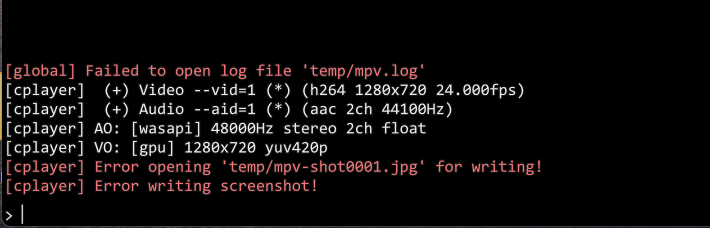
Log file
In this case it could not output the log.
Sample files
N/A

It works but you have to create the folder you are pointing to first otherwise it errors as shown above.

Old but what's likely happening here is that exe_dir is returning "" for some reason instead of an actual path for you. Looks like a bug.
