

 mpromonet
if I use param -o, it usually cannot show video
I use webrtc-streamer in lan and with a public ip in wan, the cameras are in lan, if I use cmd like: webrtc-streamer.exe -H 192.168.0.102:8000, I can visit videos in internet successfully, but if i use cmd with -o, like: webrtc-streamer.exe -H 192.168.0.102:8000 -o, I can visit videos in lan but cannot visit videos in internet and the cmd reports:
Unable to determine our source address: This computer does not have a valid IP (v4 or v6) address! Unable to determine our source address: This computer does not have a valid IP (v4 or v6) address! Requested URL : rtsp://admin:[email protected]:554/h264/ch01/main/av_stream Start playing sink for "video/H264" subsession markerSize:4 Unable to determine our source address: This computer does not have a valid IP (v4 or v6) address! Unable to determine our source address: This computer does not have a valid IP (v4 or v6) address! Requested URL : rtsp://admin:[email protected]:554/h264/ch01/main/av_stream [127:816][11144] (PeerConnectionManager.h:251): OnRenegotiationNeeded peerid:0.15099549486110275 [127:821][11144] (PeerConnectionManager.h:257): OnSignalingChange state:3 peerid:0.15099549486110275 [127:824][11144] (PeerConnectionManager.h:257): OnSignalingChange state:0 peerid:0.15099549486110275 [127:836][11144] (PeerConnectionManager.h:251): OnRenegotiationNeeded peerid:0.5098032805847752 [127:840][11144] (PeerConnectionManager.h:257): OnSignalingChange state:3 peerid:0.5098032805847752 [127:844][11144] (PeerConnectionManager.h:257): OnSignalingChange state:0 peerid:0.5098032805847752 [128:394][11144] (PeerConnectionManager.h:160): OnStateChange channel:ServerDataChannel state:open [128:412][11144] (PeerConnectionManager.h:247): OnDataChannel [128:412][11144] (PeerConnectionManager.h:160): OnStateChange channel:ClientDataChannel state:open [128:412][11144] (PeerConnectionManager.h:167): OnMessage channel:ClientDataChannel msg:local channel openned [128:417][11144] (PeerConnectionManager.h:167): OnMessage channel:ServerDataChannel msg:remote channel openned [128:430][11144] (PeerConnectionManager.h:160): OnStateChange channel:ServerDataChannel state:open [128:470][11144] (PeerConnectionManager.h:247): OnDataChannel [128:471][11144] (PeerConnectionManager.h:160): OnStateChange channel:ClientDataChannel state:open [128:471][11144] (PeerConnectionManager.h:167): OnMessage channel:ClientDataChannel msg:local channel openned [128:471][11144] (PeerConnectionManager.h:167): OnMessage channel:ServerDataChannel msg:remote channel openned [164:589][12320] (stun_port.cc:307): Port[816f23e0:0:1:0:local:Net[Realtek:192.168.0.x/32:Wifi:id=2]]: UDP send of 1207 bytes to host 123.113.47.x:57905 (123.113.47.x:57905) failed with error 10035 [164:589][12320] (stun_port.cc:307): Port[816f23e0:0:1:0:local:Net[Realtek:192.168.0.x/32:Wifi:id=2]]: UDP send of 1207 bytes to host 123.113.47.x:57905 (123.113.47.x:57905) failed with error 10035

The default streams of Hikvision's current devices are all H265. Go to the device management page and change the main stream to H264 to try.

@yangjieshao Thank you for your reply. This has nothing to do with the -o parameter. If you don’t adjust it to 264, you won’t be able to play it even without -o. To be able to broadcast it, you must first use H264.
@libofei2004 You can't see the intranet video on the public network? It seems that you have not configured the turn server.
@yangjieshao You can play without the -o parameter, but you can’t play if you use it.
DOCKER安装STUN和TURN服务器(打洞服务器)
turn server 安装状态验证 https://webrtc.github.io/samples/src/content/peerconnection/trickle-ice/
公网服务器安装turn服务 sudo yum install -y git git clone https://github.com/konoui/kurento-coturn-docker.git cd kurento-coturn-docker/coturn/ sudo docker build --tag coturn .
docker run --restart=always -d --network=host
--name coturn_server
--env TURN_USERNAME="账号"
--env TURN_PASSWORD="密码"
coturn
webrtc-streamer启动命令 .\webrtc-streamer.exe -o -s- -T账号:密码@turn服务器IP:3478
我的演示视频地址
https://yj2.yangjieshao.work/webrtc3/
链接的摄像头也是海康的

摄像头的配置
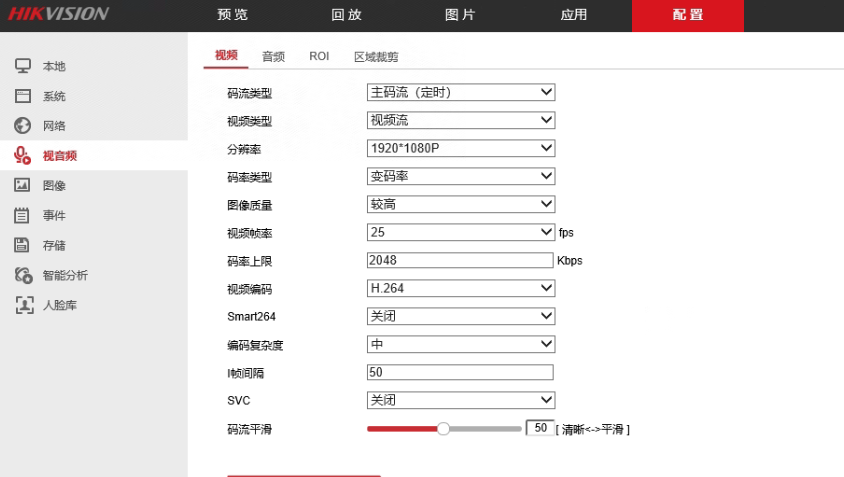
@libofei2004
@yangjieshao 嗯,turn我也配过。我现在主要试验不用turn的情况。你外网用的是动态域名映射服务吗?
@libofei2004 我turn服务器是部署在腾讯云. 然后 因为公司的路由器有公网IP 所以就用了ddns. 另一个项目上是用frp把内网的 8000 端口映射到公网服务器使用,效果一样.(即使是frp映射的,内网没有防火墙的情况下也是走P2P的) 但是要注意,如果内网有防火墙拦截,所有的流量会走turn服务做转发,没法走P2P,对turn服务器的带宽压力很大. 没防火墙的话,视频的流量是P2P的,对turn服务器压力就很小了
然后 不配置turn服务器 当然访问不到内网的视频了啊 - -||||

@yangjieshao 没有防火墙的情况下,如果不用turn服务转发,你试过加-o参数能播到外网吗
@libofei2004 不能 没有turn服务器 外网怎么访问你内网的设备 你的启动命令没有 -s- 所以看上去 应该用了默认的谷歌的STUN服务器 那玩意 - - 你咋连上的? 你不在大陆?
@yangjieshao 用STUN是可以做穿透的,turn应该只是中转。谷歌的STUN服务器在内地也能访问,就算不能访问,也可以使用其他的服务器
@yangjieshao 用STUN是可以做穿透的,turn应该只是中转。谷歌的STUN服务器在内地也能访问,就算不能访问,也可以使用其他的服务器
@libofei2004
谷歌的stun 反正我不开vpn是访问不到的
关掉它吧
只用turn服务就可以外网p2p访问内网的设备了
至于为什么不用别的stun服务器 - - 单纯只是因为我找不到可用安装包
@libofei2004
 https://github.com/mpromonet/webrtc-streamer/issues/493#issuecomment-1113150816
难道 可能是因为 取的流是tcp的?