

 mpetroff
Chrome 58.0.3029.81 - Your Browser does not have the necessary WebGL support to display this panorama.
Hello,
I am about to take a project wich includes panellum into production... Today I also rolled out the latest chrome-Browser and now all I see is the message mentioned above. No matter if I look at the examples at your website or the ones on mine... they are all sad black boxes...
It worked before the browser upgrade! I Use Windows systems with the latest Chrome: 58.0.3029.81. WebGL Report v1 and v2 is all green.
I have no idea what to do about it... Anyone?
Thanks!

Someone emailed me about this a few days ago, but I haven't been able to reproduce it. That person fixed it by making this change:

It seems to just try again if the WebGL creation fails with an INVALID_ENUM error. This seems to be a bug in Chrome. Is anything printed to the browser's developer console besides the message saying that there's no WebGL?

Hello,
I can recreate the issue over multiple websites:
- https://pannellum.org/documentation/examples/simple-example/
- http://badu-design.de/360-panoramen/
- as well as my Company-internal xampp- Server
I am using different Computers (windows 8 and Windows 2008R7 (win7 core) all with the Chrome mentioned above. In the previos Chrome Version it was no issue...
I have no Idea what your quickfix is doing, but I typed it down and it is working on my internal server, to try it at my public server I need our webdeveloper, so I cant do this until tuesday.
for those who want to copy the code not from the picture: ;-)
//tempfix for chrome 58 if (gl.getError() === gl.INVALID_ENUM) gl = canvas.getContext('webgl', {alpha: false, depth: false});
Thanks Martin
hi, got some problems here. I got the same error. Searched in my folders, and I found said lines as shown in the picture, but in my libpannelum.js file. I don't even have it on my server folder, so I don't know what to do right now. Any hints?
PS: by the way, even if says fix for Chrome, it doesn't work also with Explorer...

Matthew,
Is that an actual permanent fix or just a quick hack to make it work? I was about to roll out a demo and suddenly I came up with this error and since I was using the standalone version I need to replace and test it... by the way I have no Idea how to use the regular Source of the scripts.
Thanks

I'd definitely categorize it as a hack. I'm hoping the problem goes away with Chrome 59, since it seems to be due to a bug in Chrome.
I just tried it in Google Chrome 59 and still throws the error message and doesn't work.
I was finally able to find a machine on which I can reproduce this. Chrome seems to be throwing an erroneous INVALID_ENUM / code 1280 error on WebGL context creation, which Pannellum is catching. If I don't catch the error, everything seems to work fine.
While I can reproduce the issue in Pannellum 2.3.2, I can't reproduce it in the development version (a bug in 118c443ed5a2fdaa8145744b8c0de52ea139499a clears the error). Does anyone experience this issue in the development version? If not, I'll create a 2.3.3 release that ignores the WebGL error code.
When I tried the development version I was still getting the error. I actually have a demo running in a public server: checala.com/demo
The machine I found that doesn't work with 2.3.2 works fine with your demo.
Hmmm... weird. The error I'm getting is the following (there is some JS compressing so ignore the line numbers and file name for now):
Uncaught TypeError: Cannot read property 'getError' of null at Renderer.init (1495651433index.js:2893) at renderInit (1495651433index.js:1520) at onImageLoad (1495651433index.js:464) at HTMLImageElement.panoImage.onload (1495651433index.js:351)
It works fine in Safari and Firefox.
@moikirsch: This error is due to the WebGL context not being successfully created, which I was neglecting to check; fixed in e899596b5a649d87b2ed16682a906a721b3840aa.
Could you push a release with everything compressed? Or what is the best option? Thanks!
Ok... so I downloaded the latest master and I still get an error. A different one:
Error: no WebGL support detected! libpannellum.js:228
Testing the examples at the website, cube maps are working fine but the other examples don't. Does this help to narrow the problem?
The aforementioned fix was for a regression in the development version, so there's no need for a release.
Does https://get.webgl.org/ work for you?
get.webgl.org throws the following message:
Hmm. While your browser seems to support WebGL, it is disabled or unavailable. If possible, please ensure that you are running the latest drivers for your video card.
Is it possible that Chrome is not supporting webgl on my machine (it an old MacBook Air). This is the first time that I had an issue like this.... after some research there seems to be a list of blacklisted machines/graphic cards that are not supported (including mine - Intel HD Graphics 3000).
For anyone looking into this for future reference the full list is published here: https://cs.chromium.org/chromium/src/gpu/config/software_rendering_list.json
I'll test with Chrome Canary but in the meantime I'm considering my issue a non-issue for now unless I stumble with other machines.
Thanks!
Hi, I have the same issue with chrome 58 and 59 on windows.
On mac it works bot in chrome 58 and 59.
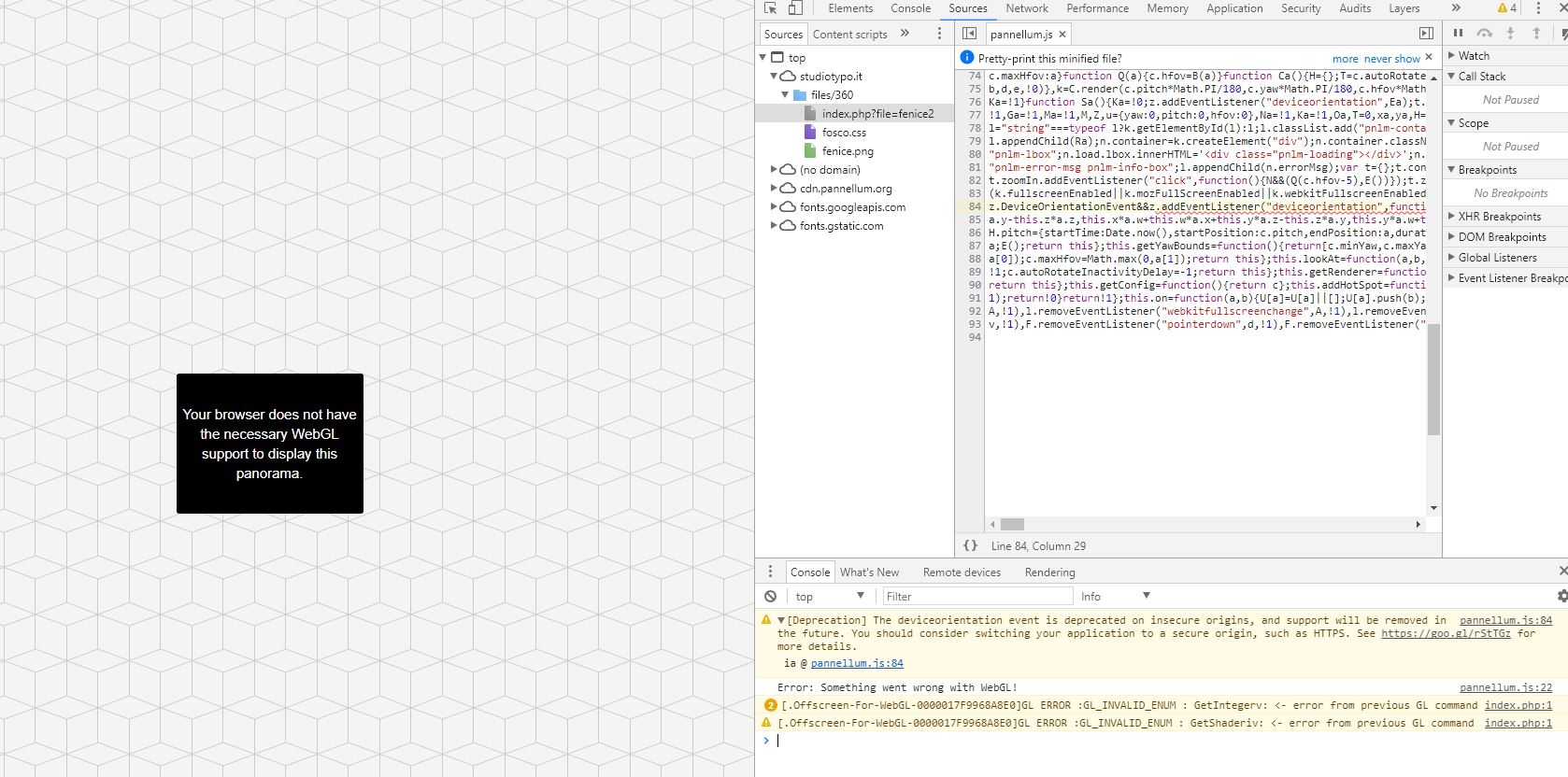

I am having the same issue in Chrome on my Dell Hackintosh. Turing on the setting in chrome://flags doesn't seem to fix it. Safari works fine.

Found a fix https://stackoverflow.com/questions/40472961/webgl-unavailable-gpu-process-unable-to-boot
Maybe we should check the size of images. When i use images with different width and height, 497 x 290, it gets the same problem. But it's OK, if i use six images of 497 x 497.

I encountered this error message today, leading me to this thread. However, it turns out that in my case the error message was misleading, and the real reason for the failure was that one of the requested panorama images was missing. I mention this for what it's worth.
I am running Chrome 118.0.5993.71 and am using Pannellum 2.5.6.
