

 mozilla
Container name length not restricted in Manage Containers
- Multi-Account Containers Version: 2.0.3
- Operating System + Version: Windows 10
- Firefox Version: 68.0.2
- Other installed Add-ons + Version + Enabled/Disabled-Status: Name Version Enabled ID Amazon.com 1.1 true [email protected] Bing 1.0 true [email protected] DuckDuckGo 1.0 true [email protected] eBay 1.0 true [email protected] Facebook Container 2.0.3 true @contain-facebook Firefox Multi-Account Containers 6.1.0 true @testpilot-containers Google 1.0 true [email protected] Twitter 1.0 true [email protected] Wikipedia (en) 1.0 true [email protected]
Actual behavior
If you long-click on the new tab button to create a new tab, then select Manage Containers and click the Add New Container button, it lets you enter a container name with an unlimited amount of characters.

Expected behavior
The amount of characters entered is restricted to be the same amount as when you create a new container by clicking the containers icon and then clicking the Create new container (+) button which restricts the container name to be 25 characters.
Steps to reproduce
- Long-click on the new tab (+) button until a dropdown menu appears
- Select Manage Containers from the dropdown menu
- Click the Add New Container button
- In the Name input, enter a container name with more than 25 characters
- Click the Done button and observe that the container has been created with a long name.
Notes
Red boxes have been added to screenshots in this issue to surround the area of concern.
This is an effect of having a container name that's too long:
If you try to use a container with a very long name, you won't be able to type anything into the address bar because the container name will be taking up all the space.
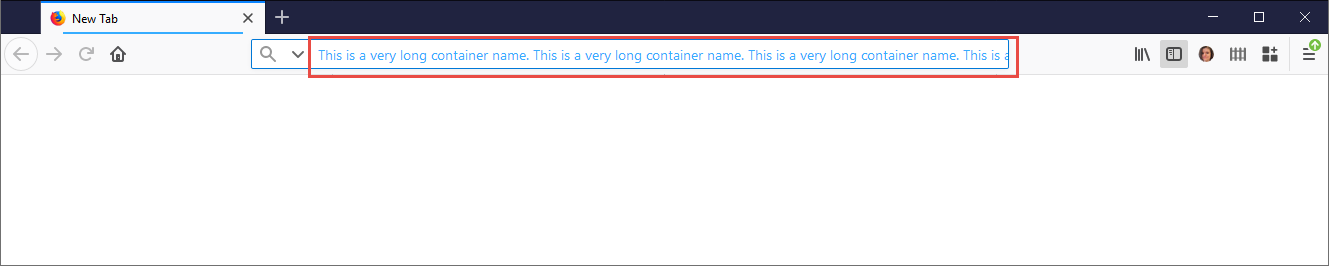

@maxxcrawford Can you please advise if the container name should be restricted to 25 characters when creating a container from Manage Containers?
If so, I would like to work on this issue for my Outreachy application.
Go ahead and take this issue. If we need to revise the character limit to be higher, I imagine it's an easy revision. Assigning this to you! 👍

@groovecoder Do you think 25 characters are a enough? Or should it be higher? (Thinking i18n)

Hi, @maxxcrawford and @groovecoder - it looks like the code for containers preferences, including the "Add New Container" window that has the problem mentioned in this issue is in the mozilla-central repository which I didn't know when I asked to do this as my first issue as an outreachy applicant. I only figured it out after I couldn't find the code.
I built mozilla-central on my PC and I installed the Containers add-on through the browser window that runs after building mozilla-central. But, I wonder if that's the correct process for installing add-ons when you're working with mozilla-central code?
Also, I have some more questions, but first I should ask is it OK to continue with this issue in the mozilla-central code, or should I pick something that has code in this multi-account-containers repository?
@kellim @groovecoder Yes – Working on dual-related issues between Github and Bugzilla is fine. Just be sure to cross-reference each other. If you open a bug on Bugzilla, be sure to CC us both on that bug. Thanks!
Thanks! @maxxcrawford @groovecoder When you build mozilla-central, what is the correct way to add multi-account-containers to the build for testing? (I'm not sure if what I did is correct where I just installed it as an add on from the browser that comes up after running ./mach run)
@maxxcrawford @groovecoder I created Bugzilla Bug 1589311 and CC'd you both. It is the first Bugzilla bug I've ever created and I'd be happy to hear feedback if anything could be improved.
Also want to make sure you saw the above question, that's currently where I'm stuck right now--you have to have the Multi Account Containers Add-on installed to get to Containers preferences, so on the Firefox build (mozilla-central), do you go ahead and install it as an add-on in the browser? I don't know if that will mess up the build/code.
@kellim
@groovecoder Do you think 25 characters are a enough? Or should it be higher? (Thinking i18n)
It should be longer. Or, to put it more humbly, please leave it up to each user. Why I'd like it longer: I use each container for various sites: For example, ContainerA will be RedditAliasA,GoogleAliasA, FacebookAliasA, twitterAliasA ContainerB will be RedditB, GoogleB, FacebookC, twitterB
Limiting to 25 characters may make sense for people with one or more of the following:
- small screens
- low resolution
- a busy toolbar (e.g., lots of extension buttons)
- wide density in Firefox ("touch" or "normal", as opposed to "compact" density)
- large text size
But others of us who have:
- large screen
- high resolution
- sparse toolbar
- compact density in Firefox
- small text size may appreciate a larger container-name length.
Please, developers, give us the option of increasing name length.

Please, developers, give us the option of increasing name length.
I 100% agree with this. 25 character limit kills a lot of functionality in how I'd like to use this extension.
For example, I use this for managing multiple AWS accounts where the account aliases are generated based on account type, environment, location, purpose, etc. which almost always ends up being > 25 characters. Being able to name the container the name of the account would be great.

@groovecoder Do you think 25 characters are a enough? Or should it be higher? (Thinking i18n)
No, its not enough at all!
