

 mozilla
Reliable crash using fast-switching on Android Chrome
When fast-switching between rooms on mobile, the web page eventually crashes. Before it crashes completely, some of the textures in the scene fail to load. This implies it's some sort of memory exhaustion or fragmentation.
This test room links to another room, which in turn links back to it. If you follow the links a number of times (about ten in testing) the problem should emerge.
It is possible that this is also an issue on desktop, but the available memory is much higher. I haven't seen it in testing though, and I transit between a large number of heavy scenes frequently.
Test environment was Chrome 95.0.4638.74 on Android 10 on a POCOPHONE F1.
┆Issue is synchronized with this Jira Task

This is reproducible as well on Oculus Quest, and causes the whole headset to malfunction, with the Quest menus appearing black, and the headset needs to be forcefully turned off. This seems to point towards vram exhaustion.

Relevant article that might be useful for investigating this issue: https://nolanlawson.com/2022/01/05/memory-leaks-the-forgotten-side-of-web-performance/
I can reproduce at least one significant leak. Here is a test room with a single link through to another test room that contains a large model. This room then links back to the first room.
If you enable fast room switching and follow the first link, then the second so that you end up back in the original room, you can see some significant (50MB) leaked allocations in the heap snapshot:
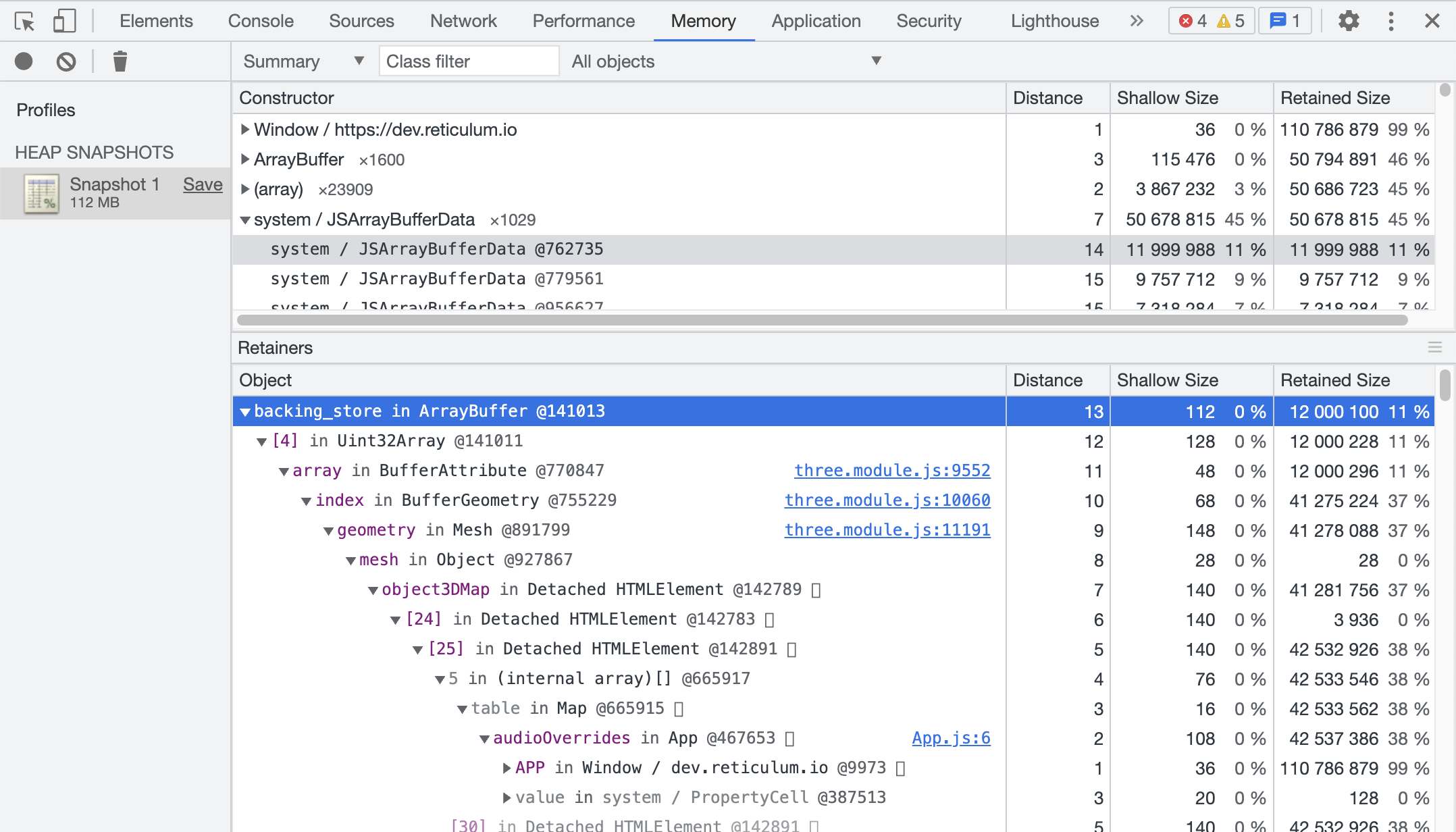
These leaks multiply every time you repeat the process.
The most visible leak is due to HTML elements being registered with various global maps in App.js and not being removed when changing rooms.
The next most visible of these are from stray networkEl properties not being nulled out when the component is removed, although there might be more pertinent roots below that (something must be keeping the component in scope). Either way, it's probably best practice to do this if the component has set networkEl at the very least to simplify leak investigations. An example assignment that should be undone on remove: https://github.com/mozilla/hubs/blob/master/src/components/media-loader.js#L73
Another root seems to be this failLoad closure, which is either attached directly to things like the MediaPlayer or is used within other dynamically defined functions.
Pathologically removing all of those roots from the code does seem to prevent the memory leak, but it isn't obvious how to properly fix each individual case.