

 mozilla
Provide a timeout option in CLI
System
- Version: 0.25.0
- Platform: win7-win10rs5 (x64, x86)
- Firefox: v64
Testcase
Hi!
Sometimes, the geckodriver can't start the browser in our environment.
We have found that the routine connect in marionette.rs has a hardcoded timeout:
pub fn connect(&mut self, browser: &mut Option<FirefoxProcess>) -> WebDriverResult<()> { let timeout = time::Duration::from_secs(60); ... }
After a timeout, the geckodriver kill the browser's process and return a internal server error response.
We have very slow hosts and the 60 seconds timeout does not enough.
Could you provide a option like "--connect-timeout=<...>" in the geckodriver CLI?
Trace-level log = trace
16:44:49.079 [1284-9] TRA KL.Selenium.DriverBuilders.FirefoxDriverServiceWithLogger+<>c__DisplayClass41_0 "1574430289079 geckodriver::marionette DEBUG Waiting 60s to connect to browser on 127.0.0.1:5213" <...> 16:45:50.344 [1284-26] TRA KL.Selenium.DriverBuilders.FirefoxDriverServiceWithLogger+<>c__DisplayClass41_0 "1574430350344 mozrunner::runner DEBUG Killing process 4696" 16:45:50.579 [1284-27] TRA KL.Selenium.DriverBuilders.FirefoxDriverServiceWithLogger+<>c__DisplayClass41_0 "1574430350579 webdriver::server DEBUG <- 500 Internal Server Error {""value"":{""error"":""unknown error"",""message"":""connection refused"",""stacktrace"":""""}}"

Can you help me understand what the circumstances are on your system that necessitates a 60 second connect time to Firefox?
I’m struggling to picture why it would take Firefox 60 seconds or more to start and initialise Marionette?

Hi! I attach geckodriver logs that I collected: geckodriver_logs.zip We make three attempts to start session. geckodriver_success_01 (1 attempt).txt - geckodriver start session on first try geckodriver_success_03 (2 attempt).txt - geckodriver start session on second try geckodriver_success_02 (3 attempt).txt - geckodriver start session on third try geckodriver_fail_01 (3 attempt).txt - geckodriver can't start session after 3 attempts
You can see, that in first attempt about 30s spend the block: 16:42:22.158 "1574430142158 geckodriver::marionette DEBUG Waiting 60s to connect to browser on 127.0.0.1:5213" 16:42:45.033 "1574430165031 addons.manager DEBUG Application has been upgraded"
In each attempt about 20s spend the block: 16:42:54.954 "1574430174966 Marionette DEBUG Init aborted (running=false, enabled=true, finalUIStartup=false)" 16:42:57.158 "1574430177159 Marionette DEBUG Received observer notification toplevel-window-ready" 16:43:08.751 "1574430188752 addons.repository DEBUG No addons.json found." 16:43:20.720 "1574430200724 addons.manager DEBUG Registering upgrade listener for [email protected]"
The rest of the time is divided between other routines.
How often does that happen to you? Only for the very first time a specific Firefox version gets started, or each time after a reboot? Does the same happen when you don't specify a pre-configured profile, but let geckodriver do it for you?
Also your Firefox version is very outdated. Please upgrade to the most recent release first.

Thank you for the quick response!
Only for the very first time a specific Firefox version gets started, or each time after a reboot?
We use VM for testing. We install Firefox and reboot VM for each test's session.
Does the same happen when you don't specify a pre-configured profile, but let geckodriver do it for you?
I have ran 100 sessions without specify a pre-configured profile with two version firefox (64 and 67) and get next result: Firefox v64: Geckodriver started successfully on first try for all sessions; Time spended on start geckodriver: 20 - 50 seconds Firefox v67: Geckodriver failed first start in 12% sessions;
I note, that we need a pre-configured profile because we set many settings. How can we setup they after start driver?
Also your Firefox version is very outdated. Please upgrade to the most recent release first.
As you can see above, the newer version of firefox give the same result in our environment (
How often does that happen to you?
With pre-configured profile about 20% sessions fail on first try and 1% fail after 3 attempts.
So I ask you to provide a way to set custom timeout.
Only for the very first time a specific Firefox version gets started, or each time after a reboot?
We use VM for testing. We install Firefox and reboot VM for each test's session.
That doesn't answer my question. Please follow-up on it.
Does the same happen when you don't specify a pre-configured profile, but let geckodriver do it for you?
I have ran 100 sessions without specify a pre-configured profile with two version firefox (64 and 67) and get next result: Firefox v64: Geckodriver started successfully on first try for all sessions; Time spended on start geckodriver: 20 - 50 seconds Firefox v67: Geckodriver failed first start in 12% sessions;
How do Firefox 65 and 66 behave? I assume you always used geckodriver 0.26 for both the above tests?
I note, that we need a pre-configured profile because we set many settings. How can we setup they after start driver?
This is just for investigation right now. As lesser factors we have here and which reproduce the problem as better it is for us to get it investigated and fixed. Given those above results I assume the 100% completion rate for 64 is a huge improvement for you? As next step try to strip down the pre-configured profile while keep using Firefox 64, and check when the startup always works. There might be two different factors here maybe.
How often does that happen to you?
With pre-configured profile about 20% sessions fail on first try and 1% fail after 3 attempts.
Please provide a new tracelog of such a failure without a pre-configured profile. Feel free to just attach the log file without zipping, that should be fine.
I assume you always used geckodriver 0.26 for both the above tests?
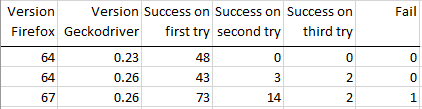
I make mistake and run v64 with 0.23, but v67 with 0.26. So, I rerun session on v64 with 0.26.
Summary result:
Only for the very first time a specific Firefox version gets started, or each time after a reboot?
Perhaps, I didn't understand your question. We found this problem after first reboot after install Firefox, but we did not test this case for second or more reboot.
Please provide a new tracelog of such a failure without a pre-configured profile.
I linked logs for each type of session result: v64_0.23_first_try (1).txt v64_0.23_first_try (2).txt v64_0.26_first_try (1).txt v64_0.26_first_try (2).txt v64_0.26_second_try (1).txt v64_0.26_second_try (2).txt v64_0.26_third_try (1).txt v64_0.26_third_try (2).txt v67_0.26_first_try (1).txt v67_0.26_first_try (2).txt v67_0.26_second_try (1).txt v67_0.26_second_try (2).txt v67_0.26_third_try (1).txt v67_0.26_third_try (2).txt v67_0.26_fail.txt
How do Firefox 65 and 66 behave?
I did not test on these versions yet. Is it necessary?
Thanks for all those tests! As it looks like some change between geckodriver 0.23 and 0.26 might have caused this problem. Could you please continue with Firefox 64 and also test geckodriver 0.24 and 0.25? I assume geckodriver 0.23 with Firefox 67 works also fine?
I have ran sessions on Firefox v64 with 0.23, 0.24, 0.25:
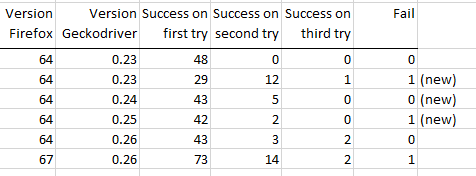
I think that problem doesn't depend on version driver or version browser. I have note that many timeout causes on step "Marionette DEBUG Received observer notification toplevel-window-ready". Do you try to set foregroung browser's window on this step? I researched a problem when user32.dll function SetForegroundWindow on Windows 10 does not always work.
New logs: v64_0.23_first_try (1).txt v64_0.23_first_try (2).txt v64_0.23_second_try (1).txt v64_0.23_second_try (2).txt v64_0.23_third_try.txt v64_0.23_fail.txt v64_0.24_first_try (1).txt v64_0.24_first_try (2).txt v64_0.24_second_try (1).txt v64_0.24_second_try (2).txt v64_0.25_first_try (1).txt v64_0.25_first_try (2).txt v64_0.25_second_try (1).txt v64_0.25_second_try (2).txt v64_0.25_fail.txt
Oh! Is that the last observer notification which you get when Firefox gets started? Is there no marionette-startup-requested notification listed afterward? If that is the case it would be https://bugzilla.mozilla.org/show_bug.cgi?id=1382162, and I would really appreciate if you could help us to investigate this bug! So far it happens that rarely that we never made progress on it all the last months.
Great. First thing I would like to know what happens visually when you have this problem. Does Firefox startup correctly, is its main window visible and displayed correctly? When Firefox opens do you see some failures in the browser console (see developer tools | browser toolbox | console)?
I can't take screenshot and open browser console because geckodriver kill it before.
Marionette DEBUG Received observer notification toplevel-window-ready" mozrunner::runner DEBUG Killing process 7376"
Could you provide a special geckodriver's build which writing same log, but doesn't kill browser process actually?
As you said geckodriver kills the Firefox process after 60s of waiting. As such there is enough time to do a screenshot of it, given that Firefox should be up after a couple of seconds already.
If you want a special build you might want to build geckodriver yourself. See https://firefox-source-docs.mozilla.org/testing/geckodriver/Building.html for details. In such a case you could simply bump the timeout to some really huge value.
@ferzisdis will you have a chance to have another look and check my second last comment from 17 days ago? Thanks a lot!
Hi, @whimboo I will provide the results during a week. I increased the timeout to 1800 seconds, but marionette is killing the browser anyway because of error "Failed to decode response from marionette" Now, I try fix marionette code so that it doesn't kill the browser process if error is occured
I have taken screenshot and attach log, when geckodriver has started for 2 minutes:
 2 minute start geckodriver.txt
If I hadn't increased timeout to 1800 s, geckodriver would be failed on "Received observer notification toplevel-window-ready"
Thanks a lot! It is very interesting! There is a huge delay during startup of Firefox which never should happen. See these log entries:
16:16:10.820	1576502170820	mozrunner::runner	INFO	Running command: ""C:\\Program Files\\Mozilla Firefox\\firefox.exe"" ""-marionette"" ""-foreground"" ""-no-remote"" ""-profile"" ""C:\\Users\\AUTOTE~1\\AppData\\Local\\Temp\\rust_mozprofile.4OyTW6lXkOX5"""
..
16:17:08.086	1576502228098	Marionette	DEBUG	Received observer notification profile-after-change"
..
16:17:15.289	1576502235271	Marionette	DEBUG	Init aborted (running=false, enabled=true, finalUIStartup=false)"
16:17:19.601	1576502239605	Marionette	DEBUG	Received observer notification toplevel-window-ready"
..
16:18:03.337	1576502283347	Marionette	DEBUG	Received observer notification sessionstore-windows-restored"
What is suspicious is already the 1 minute delay between starting Firefox and seeing the profile-after-change notification. Usually that has to happen within seconds. Also there is sessionstore-windows-restored listed which we don't make use of for a while. Means you are running a kinda old Firefox release. @ferzisdis can you please run the same with Firefox 72, or even a Firefox Nightly?
Whatever that is the part which needs a fix. It's not geckodriver. As such please have a look at https://developer.mozilla.org/en-US/docs/Mozilla/Performance/Profiling_with_the_Built-in_Profiler#Profiling_Firefox_Startup and try to create a startup profile. Upload it and please share the link. That should help us to identify where in the startup code Firefox is hanging. As best do that with a nightly build of Firefox. Thanks a lot!
@whimboo, I tried to use the Firefox Nightly build, but it can't navigate to any url. Maybe it because we are using corporate proxy?
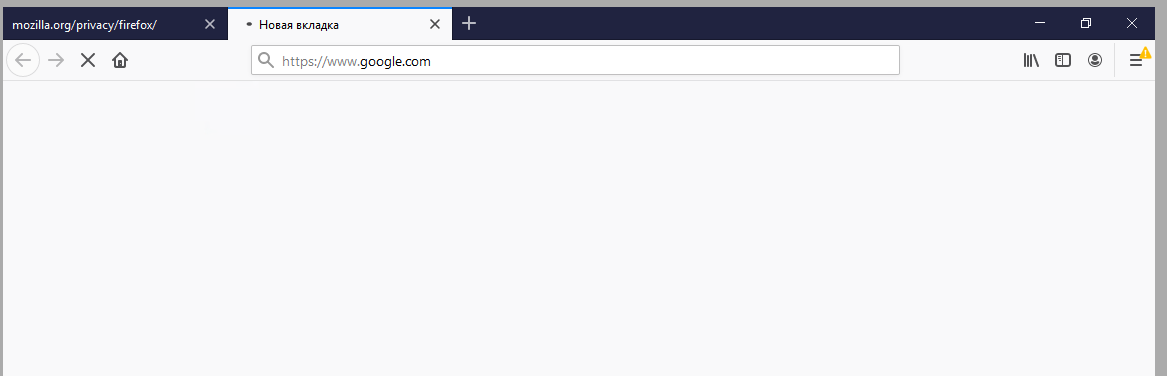
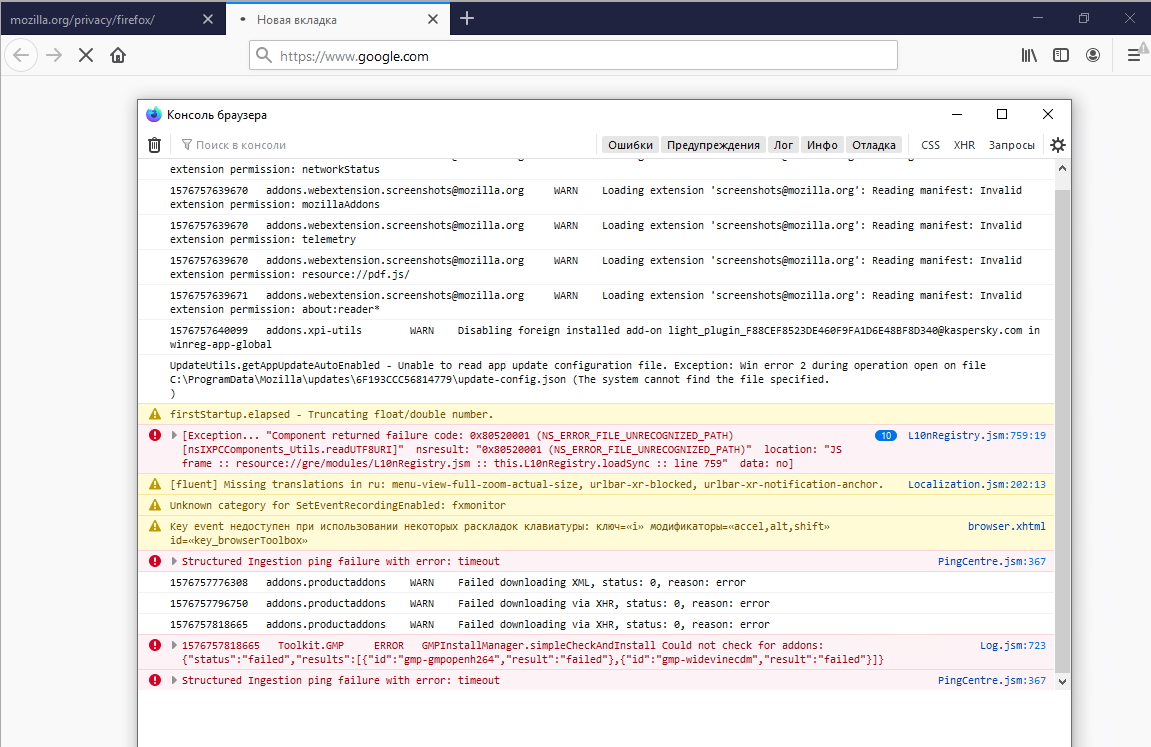
There shouldn't be a difference between a beta/release build and Nightly build. Would you mind running it again with trace logs, and provide those to us? I think that this should already help. Nevertheless you can also use Firefox 72 for testing.
Hey @ferzisdis. We would really appreciate if you could have a look at this issue again. Thanks.
Hi, @whimboo. I need some time for develop automate deploy the firefox v72 with installed the profile plugin. I will write when get any result.
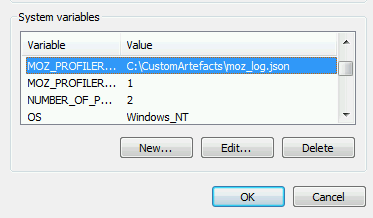
You do not have to install the addon. Just call your test script with the following two environment variables and the profiled data will be written to a file:
- MOZ_PROFILER_STARTUP=1
- MOZ_PROFILER_SHUTDOWN=%abs_file_path_for_json_data%
Then just attach the JSON file on that issue. Thanks.
We have seen this too.
Do we think it would be worth sending a message of the form "Startup aborted because it took longer than 60s" back to the client rather than the final "connection refused" message?
Our test fails with:
org.openqa.selenium.WebDriverException: connection refused Build info: ... Driver info: driver.version: FirefoxDriver remote stacktrace: at sun.reflect.NativeConstructorAccessorImpl.newInstance0(Native Method) at sun.reflect.NativeConstructorAccessorImpl.newInstance(NativeConstructorAccessorImpl.java:62) at sun.reflect.DelegatingConstructorAccessorImpl.newInstance(DelegatingConstructorAccessorImpl.java:45) at java.lang.reflect.Constructor.newInstance(Constructor.java:423) at org.openqa.selenium.remote.W3CHandshakeResponse.lambda$new$0(W3CHandshakeResponse.java:57) at org.openqa.selenium.remote.W3CHandshakeResponse.lambda$getResponseFunction$2(W3CHandshakeResponse.java:104) at org.openqa.selenium.remote.ProtocolHandshake.lambda$createSession$0(ProtocolHandshake.java:123)
It would have been very helpful to know immediately that we'd intentionally killed the firefox process.

@josephmacfarlane can you please attach a trace log? See https://firefox-source-docs.mozilla.org/testing/geckodriver/TraceLogs.html how to do it. It would be good to get more feedback. Also does the slow startup only happen with geckodriver, or also when you start Firefox yourself on that affected machine? Thanks.
Hi @whimboo, thanks for your response.
The browser log is: 1579004389373 addons.manager DEBUG Starting provider: GMPProvider 1579004389376 addons.manager DEBUG Registering shutdown blocker for GMPProvider 1579004389376 addons.manager DEBUG Provider finished startup: GMPProvider 1579004389376 addons.manager DEBUG Starting provider: PluginProvider 1579004389376 addons.manager DEBUG Registering shutdown blocker for PluginProvider 1579004389376 addons.manager DEBUG Provider finished startup: PluginProvider 1579004389377 addons.manager DEBUG Completed startup sequence 1579004389386 Marionette DEBUG Received observer notification profile-after-change 1579004449180 mozrunner::runner DEBUG Killing process 5797 1579004449444 webdriver::server DEBUG <- 500 Internal Server Error {"value":{"error":"unknown error","message":"connection refused","stacktrace":""}}
The slow startup happens very intermittently (<1%) in a docker container, but our volume of integration tests means that we see it every few days.
We can see from the above that startup sequence completes quite quickly, and the 60 seconds are spent waiting for observer notifications at the end - sometimes it gets past the first and we also see notifications for 'command-line-startup' and 'nsPref:changed'.
I've set up MOZ_PROFILER_STARTUP and MOZ_PROFILER_SHUTDOWN to capture the profile for the next failure.
Hi, @whimboo! I set up MOZ_PROFILER_STARTUP and MOZ_PROFILER_SHUTDOWN, but if I start browser using geckodriver it doesn't write the json file. But, if I start browser manually, json file is created. What should I do that the json file is created when I using geckodriver?
Please note that I removed most of the trace log given that it didn't contain the necessary information and wasted space in this issue. In the future please attach files.
Hm, in geckodriver it won't work as I noticed lately when fixing https://bugzilla.mozilla.org/show_bug.cgi?id=1608370. Could you do me a favor, and maybe get a Marionette test running on your machine which is affected by that? The test, which I would still have to write, would start Firefox a lot of times until finally this this problem. Let me know and we can figure out that test.
Hi @whimboo, Thank you for reviewing those logs and tidying up the comment.
I have captured a startup profile - ffStartupProfile.json.txt.
One item stands out - libxul.so - the interval between its start and end is the largest by an order of magnitude.
Did you have any thoughts about my suggestion to send the "Startup aborted because it took longer than 60s" message back to geckodriver's client? I imagine that would reduce the volume of issues that get logged about the current mode of failure (which is just "webdriver exception: connection refused").
Sadly this is not a valid startup profile, so I cannot upload it to https://profiler.firefox.com/. Which command did you use to create it? I assume it is just from a manual start of Firefox? If you do that please also add the argument -marionette, so that Marionette specific start-up code is also run. Also where is the binary located? On the same disk or a network drive?
Thanks for the quick response @whimboo !
No, this was not a manual startup. This was from our integration test run for an instance of Firefox started by geckodriver (I set the MOZ_PROFILER_STARTUP and MOZ_PROFILER_SHUTDOWN environment variables on GeckoDriverService).
- Regarding the invalid JSON:
I did notice that the file terminated abnormally - presumably because geckodriver killed the process before startup was complete... I tweaked it to be valid JSON and re-uploaded to https://profiler.firefox.com/ but that lead to another error:
Error: Unserializing the profile failed: TypeError: Cannot read property 'version' of undefinedPresumably this indicates that the profiler will only accept a profile for a startup which has progressed further than geckodriver allows. The conclusion seems to be that if startup performance issues occur, then geckodriver will kill the FF process before a valid startup profile can be captured. In order to allow capture of the startup profile, would it be worth implementing @ferzisdis ' suggestion to make the startup timeout configurable so that we could temporarily increase it and profile a slow startup? - Regarding the file location: The problem occurs in a docker container run by a VM. It could well be a network disk. I will check.