

 motioneye-project
Unable to open video device /grey output with otherwise verified working camera and compute module.
cannot get official raspberry camera modules to recognize the devices or display video...
motionEyeOS Version
I am running motionEyeOS version: (dev20201026).
Board Model
I am using the following board/model: (Picam module for compute module4 with a compute module 4 ) (also attempted to use official CM4 carrier board)
Camera
I am using the following type of camera: (choose from V4L2, MMAL, Network Camera, Fast Network Camera and Simple MJPEG Camera).
My camera model is: (Raspberry HQ cam).
Network Connection
My motionEyeOS unit is connected to the network via: (wifi).
Peripherals
I am using the following peripherals that I consider relevant to this issue:
- (e.g. USB WiFi adapter)
- (e.g. External Hard Disk)
Log Files
I consider the following log files relevant to this issue:
-
(attach e.g. motioneye.log) motioneye.log
-
(attach e.g. boot.log) boot.log

Unfortunately, the motionEyeOS has not been tested with CM4, AFAIK. I would confirm it works with RaspberryPiOS (Buster or Bullseye) and motionEye. See instructions here: https://github.com/ccrisan/motioneye/wiki/Installation (in the right hand column) There is unique hardware and requirements for CM4 boards that may not have been in the buildroot at the time of the last build, this would make sure that the motioneye and motion and ffmpeg works.

I have found a potential solution to this using the PiCam board and a CM4. Extract the dt-blob.bin file from the provided image for the carrier board found here: https://www.ledato.de/shop_content.php?coID=24&language=en
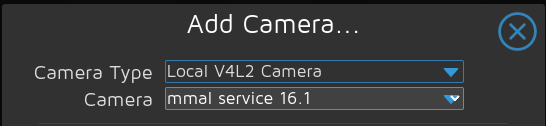
Drop the dt-blob.bin into the /boot directory and reboot. The camera should show up now as /dev/video0. I was able to add the camera in MotionEye as a local v4l2 Camera type using the mmal service 16.1 camera. Hope this helps.

Thank you @thartman83. Hopefully the Devs pick this up when re-building mEOS.
I have found a potential solution to this using the PiCam board and a CM4. Extract the dt-blob.bin file from the provided image for the carrier board found here: https://www.ledato.de/shop_content.php?coID=24&language=en Drop the dt-blob.bin into the /boot directory and reboot. The camera should show up now as /dev/video0. I was able to add the camera in MotionEye as a local v4l2 Camera type using the mmal service 16.1 camera. Hope this helps.
Were you able to use it as a drop-in in the motioneyeos img for RPi4? (say dev20201026 release) if so then did it work in fast camera mode?
I must regrettably report that this method is not working with my picam CM4 board using dev20201026 img. I managed to add the necessary start.elf and fixup.dat files (including the extension files) to make it boot and loaded motioneyeOS webUI. No lock getting camera enabled, even tried making my own dt-blob.bin from reference IO board documentation.
Since I had to make changes to even boot this img, I wonder whether I used mismatched .elf and .dat files for the kernel. those are from rather new sources... Could use some help here.
