

 motioneye-project
Resource temporarily unavailable
I've configured a JPEG snapshot camera based on HTTP URL As soon as I configure the HTTP route, BASIC user and password authentication it detects that it is a JPEG Camera So far, so good.
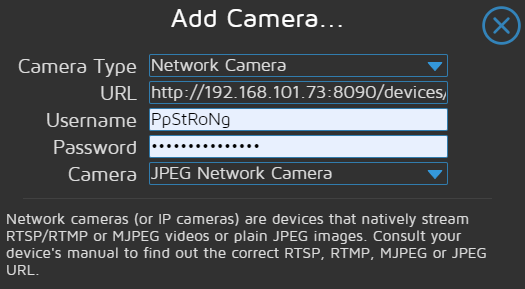
And if I input a wrong password, it says "authentication failed", so there is a clear good communication with the cam.
But once I confirm adding the cam to the system I can only see a green result cam
If I dig in the motion.log I see this error constantly logging:
netcam_read_first_header: Error sending 'connect' request: Resource temporarily unavailable
This is a docker installation with these parameters: motionEye Version | 0.42 Motion Version | 4.2.2 OS Version | Ubuntu 18.10
Just for extra information, the password of the cam is extremely weird: it is like this: #%&fd1@*tz1234hb I've had a lot of issues with other systems to accept this password. With the basic auth in the browser it works fine and in Home Assistant Generic Cam Integration also works fine. Maybe this is not the issue because, as I say, as soon as I input right auth parameters it auto-detects the JPEG Camera.
Any ideas on what can be going on?

Can you please try the new Python 3 version of motionEye: https://github.com/motioneye-project/motioneye/tree/dev#installation

I'm using the docker image, which strangely doesn't have configured networking capabilities by default, so I cannot update (it has not been updated that docker image for 1year+)
We have a new Docker image here: https://github.com/motioneye-project/motioneye/pkgs/container/motioneye
We have a new Docker image here: https://github.com/motioneye-project/motioneye/pkgs/container/motioneye
motionEye Version | 0.43.0 Motion Version | 4.3.2 OS Version | Linux 5.10.16.3-microsoft-standard-WSL2
Ok, built from there, but similar issue:
netcam_read_first_header: Error sending 'connect' request: Broken pipe
There might be something wrong with the JPEG cam profile I can't understand
-
I've tried installing CamON app in my phone and configured a RTSP stream. Working fine 👍
-
I've also tried to configured via Motion JPEG stream and fails with a very weird error (although the cam is configured 1280x720, the system recognizes 1278 x 718 and throws a multiple of 8 error.
[NET] netcam_start: Width/height(1278x718) must be multiples of 8
But I'm not really concerned about this error because what I'm truly interested is in the JPEG camera that throws the Broken Pipe issue and not sure why. Not much more info to debug, just this message spammed in the motion.log file.
But I'm not really concerned about this error because what I'm truly interested is in the JPEG camera that throws the Broken Pipe issue and not sure why. Not much more info to debug, just this message spammed in the motion.log file.
Don't break your head
MotionEye don't really support JPEG Cameras. Try Zone Minder better.
