

 mooltipass
Unlock Windows 10 computer is not fully working
Expected behavior
Enter my pin on Mooltipass, the computer is unlocked with the password stored in the unlock entry.
Actual behavior
It partially works, only if no key of the keyboard has been hit before entering the Mooltipass pin. If any key has been hit, Windows 10 is entering the password field, and then when the Mooltipass tries to gain access to the password field by pressing ENTER it validates an empty password which fails to log in.
Step by step guide to reproduce the problem
Configure the unlock feature with "Enter + password" or "Enter + password / Win + L". If not done, create in the Mooltipass an unlock entry with your password for opening your Windows session. Hit any key on the keyboard, for example CTRL then try to unlock your session with the unlock feature. It will not work (unless your password is actually empty).
Note: as far as I know there is no way on Windows 10 to go back to the locked state (presenting the picture), otherwise this would have been a valid and useful workaround.
Proposed solution: add an option to use CTRL key to gain access to the password field which works also when the field has already the focus instead of ENTER which obviously does not.
Moolticute Version
v0.53.7
Operating System
Windows 10
Mooltipass Device
Mooltipass Mini BLE

I digged around into the code of Moolticute and Mooltipass mini BLE and did understand how the Lock/Unlock feature actually works. I was not aware that it was the Mooltipass which was typing also the additionnal keys before and after. Then implementing my request would need a modification in both Moolticute and embedded firmware of devices.
By seeing the code I understood that CTRL + ATL + DEL is doing the trick for my case because it does enter into the password field onto Windows 10 without entering any character even if the focus has been already acquired. I tested this option and it works well in my use case.
I did not used that feature option before because it does not mention "Password" in the ComboBox as seen in the picture here:
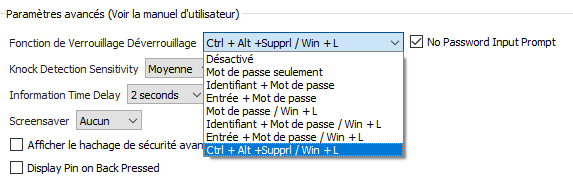
I though it could be only a translation mistake for french, but I checked in the .ts file, the original text in english does not mention "Password" too.
That said, the code is explicit enough to know that the password is actually entered after the key combination:
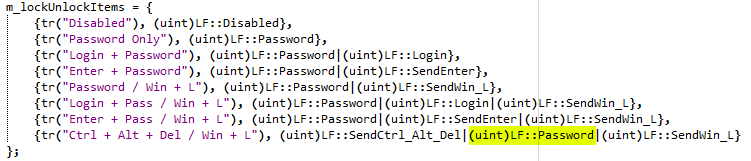
But for some reason (maybe text length?) the "Password" or at least "Pass" word has been omitted. It is not clear enough for the user (at least to me) what it actually does.
The remaining thing I miss now is the similar feature without the Win+L lock after, because some of my users prefer locking the screen manually. I do not know why CTRL + ALT + DEL did not had the mirror option like ENTER key had but this is an easier modification since it only impacts Moolticute source by adding the corresponding entry to the ComboBox with the right bitfield which should already be handled properly by the device without any modification in the firmware.
If you want I can myself branch, dev and propose the fixes. I know you guys may be busy by other more important features or fixes.
ohhh very good catch!!! thanks a lot!! oh yeah, feel free to to make PRs on both moolticute and the mini ble repository :)

Hi there,
I am working on it. I propose the following notation:
- Adding brackets for a key or a key combination, it makes it more clear of what it is.
- Removing spaces for key combinations, it makes it more condensed too.
I tested the following code, it works well with Mooltipass mini and Mooltipass mini BLE.
m_lockUnlockItems = {
    {tr("Disabled"), (uint)LF::Disabled},
    {tr("Password Only"), (uint)LF::Password},
    {tr("Login + Password"), (uint)LF::Password|(uint)LF::Login},
    {tr("[Enter] + Password"), (uint)LF::Password|(uint)LF::SendEnter},
    {tr("[Ctrl+Alt+Del] + Pass"), (uint)LF::SendCtrl_Alt_Del|(uint)LF::Password},
    {tr("Password / [Win+L]"), (uint)LF::Password|(uint)LF::SendWin_L},
    {tr("Login + Pass / [Win+L]"), (uint)LF::Password|(uint)LF::Login|(uint)LF::SendWin_L},
    {tr("[Enter] + Pass / [Win+L]"), (uint)LF::Password|(uint)LF::SendEnter|(uint)LF::SendWin_L},
    {tr("[Ctrl+Alt+Del] + Pass / [Win+L]"), (uint)LF::SendCtrl_Alt_Del|(uint)LF::Password|(uint)LF::SendWin_L}
};
I noticed by the way that french translation is a bit outdated. May I propose also an update or should I post it in another issue/PR?