

 mooltipass
Wrong Serial Number
Expected behavior
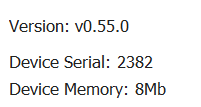
The about tab show the serial number on the back side of the MiniBLE.
Actual behavior
On the about tab, the showing serial number is not the same as the one on the back side.
To get the bundle updated, I need to change the serial number automatically entered in the link, for example. And rename the downloaded file with the serial number displayed by Moolticute.
Step by step guide to reproduce the problem
Open Moolticute Connect the device Open about tab Compare between the back side of the device and the serial number displayed on the software.
Moolticute Version
0.55
Operating System
Mention if you are using either:
- Windows 10
Mooltipass Device
Mention if you are using either:
- The Mooltipass Mini BLE

Hello there!
So during our final device assembly step we "reprogram" our internal serial number with the one written on the case. For some reason we're not sure about yet, it seems that a few devices have the same issue as you do. We'll therefore soon release a moolticute update allowing reprogramming of said initial serial number when we detect this issue.

Hello there!
Could you update your moolticute install and head to the about tab? in it you'll notice a warning sign. Click on it and reach out to us to get the code :)