

 mono
mono
[BUG] SkiaSharp is 50-75% less performant than Processing when drawing lines
Description
In Processing, you can find a performance example demonstrating the rendering of 50,000 lines in an 800x600 window in Examples -> Demos -> Performance -> LineRendering. This runs at 60fps. And processing can maintain this 60fps performance up to 70,000 lines being drawn, only dropping off of 60fps after that.
I am using SkiaSharp with GLFW for windowing to do cross-platform windowing and graphics in F#. I wanted to check the performance of my windowing library, so I tried to replicate this Processing example. I was surprised that I couldn't hit 60fps, so I decided to drop down to using a raw for loop with just GLFW and SkiaSharp. To my surprise (since I originally assumed the performance was due to my framework), the performance didn't improve at all, so the performance bottleneck is in SkiaSharp. I was able to replicate the poor performance with Silk.NET's GLFW bindings (code is below) in place of my custom bindings.
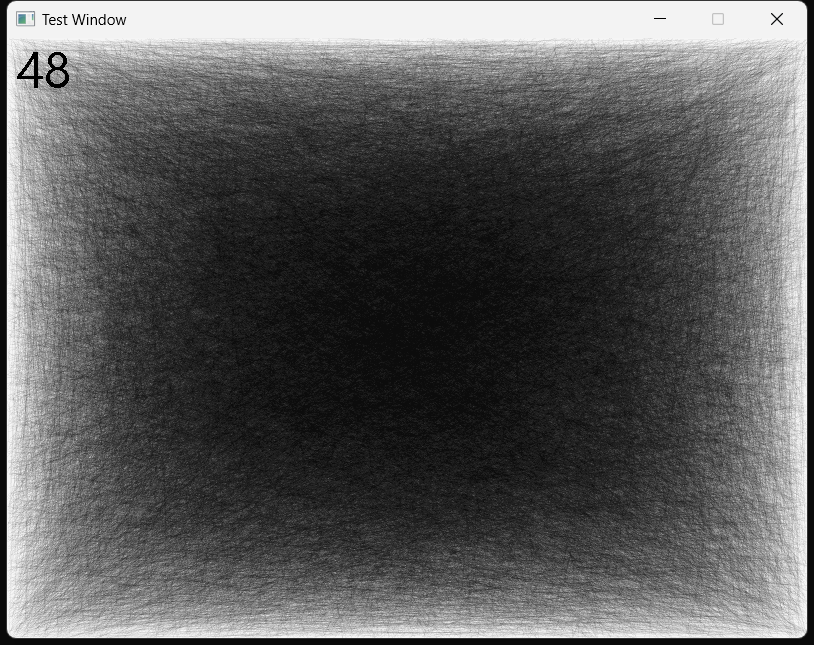
The SkiaSharp performance ranges between 30-50fps and can even dip down below 30fps and seems to bounce around a lot. It hovers around 35-45fps. It also only uses 20-30% of the GPU and seems to default to using integrated graphics. For example, on my laptop and others, the SkiaSharp code defaults to Intel graphics instead of NVIDIA unless I force NVIDIA via the NVIDIA control panel or by disabling the Intel GPU. However, using the NVIDIA GPU does not increase the performance. These tests were done on a laptop with a 12th Gen i7, integrated Intel Iris Xe graphics, and a discrete NVIDIA RTX 3050.
Code
Processing code:
public void setup() {
  size(800, 600, P2D);
}

public void draw() {
  background(255);
  stroke(0, 10);
  for (int i = 0; i < 50000; i++) {
    float x0 = random(width);
    float y0 = random(height);
    float z0 = random(-100, 100);
    float x1 = random(width);
    float y1 = random(height);
    float z1 = random(-100, 100);

    // purely 2D lines will trigger the GLU
    // tessellator to add accurate line caps,
    // but performance will be substantially
    // lower.
    line(x0, y0, x1, y1); // this line is modified from the example to use a 2D line
  }
  if (frameCount % 10 == 0) println(frameRate);
}
F# code that uses only the SkiaSharp and Silk.NET NuGet packages:
open FSharp.NativeInterop
open Silk.NET.GLFW
open SkiaSharp
#nowarn "9"

let width, height = 800, 600

let glfw = Glfw.GetApi()
glfw.Init() |> printfn "Initialized?: %A"

// Uncomment these window hints if on macOS
//glfw.WindowHint(WindowHintInt.ContextVersionMajor, 3)
//glfw.WindowHint(WindowHintInt.ContextVersionMinor, 3)
//glfw.WindowHint(WindowHintBool.OpenGLForwardCompat, true)
//glfw.WindowHint(WindowHintOpenGlProfile.OpenGlProfile, OpenGlProfile.Core)

let window = glfw.CreateWindow(width, height, "Test Window", NativePtr.ofNativeInt 0n, NativePtr.ofNativeInt 0n)
printfn "Window: %A" window
glfw.MakeContextCurrent(window)
let mutable error = nativeint<byte> 1uy |> NativePtr.ofNativeInt
glfw.GetError(&error) |> printfn "Error: %A"

let grGlInterface = GRGlInterface.Create(fun name -> glfw.GetProcAddress name)

if not(grGlInterface.Validate()) then
    raise (System.Exception("Invalid GRGlInterface"))

let grContext = GRContext.CreateGl(grGlInterface)
let grGlFramebufferInfo = new GRGlFramebufferInfo(0u, SKColorType.Rgba8888.ToGlSizedFormat()) // 0x8058
let grBackendRenderTarget = new GRBackendRenderTarget(width, height, 1, 0, grGlFramebufferInfo)
let surface = SKSurface.Create(grContext, grBackendRenderTarget, GRSurfaceOrigin.BottomLeft, SKColorType.Rgba8888)
let canvas = surface.Canvas
grContext.ResetContext()

let random = System.Random()

let randomFloat (maximumNumber: int) =
    (float (maximumNumber + 1)) * random.NextDouble()
    |> float32

// Setup up mutable bindings and a function to calculate the framerate
let mutable lastRenderTime = System.DateTimeOffset.Now.ToUnixTimeMilliseconds()
let mutable currentRenderTime = System.DateTimeOffset.Now.ToUnixTimeMilliseconds()
let mutable numberOfFrameRatesToAverage = 30
let mutable frameRates = Array.zeroCreate<float>(numberOfFrameRatesToAverage)
let mutable frameRateArrayIndex = 0

let calculateFrameRate () =
    lastRenderTime <- currentRenderTime
    currentRenderTime <- System.DateTimeOffset.Now.ToUnixTimeMilliseconds()
    let currentFrameRate = 1.0 / (float(currentRenderTime - lastRenderTime) / 1000.0)
    frameRates[frameRateArrayIndex] <- currentFrameRate
    frameRateArrayIndex <- (frameRateArrayIndex + 1) % numberOfFrameRatesToAverage
    (Array.sum frameRates) / (float numberOfFrameRatesToAverage)

let linePaint = new SKPaint(Color = SKColor(0uy, 0uy, 0uy, 10uy))

let frameRatePaint = new SKPaint(Color = SKColor(byte 0, byte 0, byte 0, byte 255))
frameRatePaint.TextSize <- 50.0f

while not (glfw.WindowShouldClose(window)) do
    glfw.PollEvents()

    canvas.Clear(SKColors.WhiteSmoke)

    for _ in 1..50_000 do
        canvas.DrawLine(
            SKPoint(randomFloat <| int width, randomFloat <| int height),
            SKPoint(randomFloat <| int width, randomFloat <| int height),
            linePaint)
    let frameRate = calculateFrameRate()

    canvas.DrawText(sprintf "%.0f" frameRate, 10.0f, 50.0f, frameRatePaint)

    canvas.Flush()
    glfw.SwapBuffers(window)

glfw.DestroyWindow(window)
glfw.Terminate()
Expected Behavior
I would have expected SkiaSharp to easily beat the performance of Processing or at least match it on this test.
Actual Behavior
SkiaSharp's drawing of 50,000 lines is at least 50-75% of that of Processing. I don't know how to get Processing to exceed 60fps, but it's likely it could. SkiaSharp can only draw the lines at around 30-50fps with a lot of bouncing around in the performance and some dips below 30fps. I would say the screenshot above was the most generous framerate I saw.
Basic Information
- Version with issue: 2.88.3
- Last known good version: unknown
- Platform Target Frameworks:
- Linux: I can't get SkiaSharp to work on Linux, so no testing there.
- Windows Classic: Windows 11, version 22H2, OS Build 22621.1265
Detailed IDE/OS information (click to expand)
Screenshots
Running the Processing code and printing the framerate to Processing's console:

Running the SkiaSharp code and displaying the framerate in the window:
Reproduction Link

Have you tried an older version, such as 2.80.3, and see if it is faster?

I can try that. Are there some changes that might be expected to have affected this, or is it more trying to see if there was a change in performance?
Well, we have a game that draws the canvas using SkiaSharp and we have been unable to upgrade it from 2.80.3 because of performance reasons.
Oh, I see. Thanks for the heads up. I'll give it a whirl later. It should be a simple thing to test.
Any update on this? I find surface flush seems to be the big bottleneck and it's barely doing anything (clear screen, and a simple drawimage).

This thought may or may not be relevant:
On current .Net implementations, all it takes is a single Task.Delay(1); to limit performance to at best 15 ms / frame. 60 fps.
Because the code that executes that Delay won't be considered for execution again until the next "Task time slice".
Even though the code asks only for a 1 millisecond delay.
Fortunately, an app can have multiple independent/simultaneous pieces of code with Task.Delay(1);, without further cost.
It's just that none of those tasks will be considered again until the next time slice.
And if the code takes more than 15 ms, performance will immediately drop to at best (2x15) ms / frame. 30 fps.
I got badly bitten in a situation where one piece of code "delayed a millisecond" to allow other stuff to run, then a bit more code was run, then another delay. TWO time slices had to pass, before this sequence could run again. Immediately dropped to 30 fps. Before I did any real work. When I chained that with computation that exceeded 15 ms, it was down to 20 fps. awful.
I had to redesign my code to ensure that no path through the code had more than a single Task.Delay in a frame!
And I'll likely redesign again to move any code that might need 15 ms (or more) to a separate thread.
I'll have to use the result of that code whenever it is ready. Make sure no animation is dependent on it.
I haven't looked at any code; just mentioning this as a possible suspect to look for.
(It's a severe limitation of Task.Delay, for my purposes.)
(Oops - I tested in a Debug build. I need to verify in a Release build. And re-do it in a new sample app. That doesn't use any third-party nugets. Not even SkiaSharp. Make sure it isn't interacting with something else in my code, or in SkiaSharp.)
