

 mono
mono
[BUG] Pen Pressure always 1
Description
I creating a vector drawing app, and while testing on my MS Surface I cannot get the pen pressure to work at all.
Code
I use the Touch Event of SKCanvasView
private void OnTouch(object sender, SKTouchEventArgs args)
{
    var penIsUsed = args.DeviceType == SKTouchDeviceType.Pen;
    float pressure = 10;

    if (penIsUsed)
    {
        pressure = args.Pressure * 10;
    }
[...]
Expected Behavior
The pressure varies between 0 and 1
Actual Behavior
The pressure is always at 1 even when an actual pen is used and even recognised as SKTouchDeviceType.Pen
Basic Information
-
Version with issue: 2.80.3
-
Last known good version: none
-
IDE: Visual Studio
-
Platform Target Frameworks:
- UWP: 19041
-
Target Devices:
- Windows Tablets and PCs with Tablets
- Android
- iOS
Screenshots
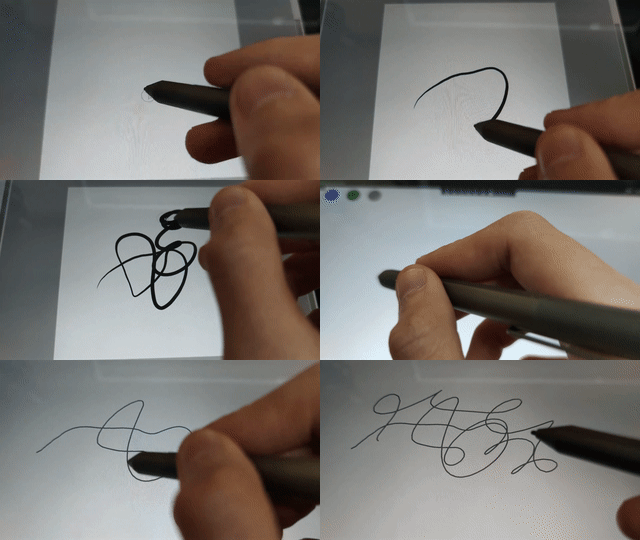
First I draw in PaintToolSai2 to prove that pressure works, then in my App which should react to pressure, but doesn't.
Reproduction Link
<skia:SKCanvasView x:Name="canvasView"
     PaintSurface="OnCanvasViewPaintSurface"
     EnableTouchEvents="True"
     Touch="OnTouch"
with
private void OnTouch(object sender, SKTouchEventArgs args)
{
    var penIsUsed = args.DeviceType == SKTouchDeviceType.Pen;
    float pressure = 10;

    if (penIsUsed)
    {
        pressure = args.Pressure * 10;
    }
[...]
    args.Handled = true;
}

I am still Investigating, but with WinAPI I got a usable result
Also nice to know: The event ID is the same as the underlying pointer event message ID, so it can just be passed through
[StructLayout(LayoutKind.Sequential)]
public struct POINT
{
    public int X;
    public int Y;
}

public enum POINTER_INPUT_TYPE
{
    PT_POINTER = 0x00000001,   //generic pointer type, this never appears in pointer messages or pointer data
    PT_TOUCH = 0x00000002,   //Touch pointer type
    PT_PEN = 0x00000003,   //Pen pointer type
    PT_MOUSE = 0x00000004    //Mouse pointer type
}

[StructLayout(LayoutKind.Sequential)]
public struct POINTER_INFO
{
    public POINTER_INPUT_TYPE pointerType;
    public UInt32 pointerID;
    public UInt32 frameID;
    public UInt32 pointerFlags;//Pointer flags
    public IntPtr sourceDevice; //handle
    public IntPtr hwndTarget; //hwnd
    public POINT ptPixelLocation;       //The predicted screen coordinates of the pointer, in pixels.
    public POINT ptHimetricLocation;    //The predicted screen coordinates of the pointer, in HIMETRIC units.
    public POINT ptPixelLocationRaw;    //The screen coordinates of the pointer, in pixels. For adjusted screen coordinates, see ptPixelLocation.
    public POINT ptHimetricLocationRaw; //The screen coordinates of the pointer, in HIMETRIC units. For adjusted screen coordinates, see ptHimetricLocation.
    public UInt32 dwTime;               //A message time stamp assigned by the system when this input was received.
    public UInt32 historyCount;
    public Int32 inputData;
    public UInt32 dwKeyStates;
    public UInt64 PerformanceCount;
    public UInt32 ButtonChangeType;     //POINTER_BUTTON_CHANGE_TYPE
}

[StructLayout(LayoutKind.Sequential)]
public struct POINTER_PEN_INFO
{
    public POINTER_INFO pointerInfo;
    public UInt32 penFlags;
    public UInt32 penMask;
    public UInt32 pressure;
    public UInt32 rotation;
    public Int32 tiltX;
    public Int32 tiltY;
}


public class PointerPressureService : IPointerPressureService
{

    [DllImport("user32.dll", CharSet = CharSet.Auto)]
    unsafe extern static bool GetPointerPenInfo(UInt32 pointerId, [In, Out] ref POINTER_PEN_INFO penInfo);

    [DllImport("kernel32.dll")]
    static extern uint GetLastError();

    public unsafe float GetPressure(uint pointerId)
    {
        POINTER_PEN_INFO ppPointer = new POINTER_PEN_INFO();
        var success = GetPointerPenInfo(pointerId, ref ppPointer);

        if (!success)
        {
            var error = GetLastError();
            return 1;
        }

        return ppPointer.pressure / 1024f; // pressure returns actual pressure levels from 0 to 1024 or whatever your pen is capable of
    }
}
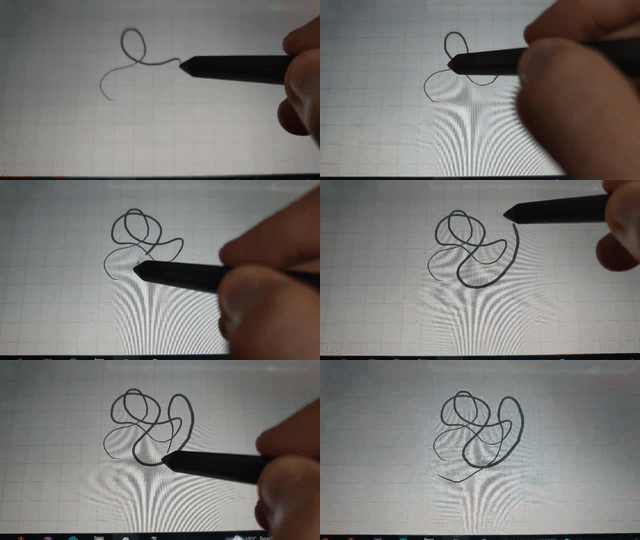
Sadly with this method the preformance ~~far away from optimal~~ is with a bit of optimization not so bad.
I got myself an iPad with an Apple Pen. And I have to say this also does not work. I will share my solution to this once I get it working, but I am not impressed with how little the pressure/pen stuff works
EDIT: After going through the source, I saw, that pressure is not even used in the iOS implementation, so it never gets even set. But it is used in the MAUI variant so I assume this bug will never get fixed
anyway it should be easy fixable if one edits the SKTouchHandler and includes the force of the touch as pressure
I would love to see this bug fixed also! I bought a surface pro to develop a sketching app for kids using .NET MAUI - finding this issue in its current state was a little disheartening :(

Putting together a cross-platform app using MAUI, .NET 10 and SkiaSharp .
Pressure works as intended on my Android device (Samsung Fold 5 with S Pen Fold Edition).
Pressure does not work at all in Windows using a Wacom tablet (tested against other apps to make sure pressure works).
Attached image shows the graphic tablet using a different SKTouchEventArgs.Id than the mouse, but Pressure being constantly 1.
I did not test this on macOS with the Wacom tablet, but can do if it helps. I don't own an iPad to test there but based on @hrkrx 's comment I will assume it still doesn't work.
