
SkiaSharp
 SkiaSharp copied to clipboard
 mono
mono
[QUESTION] Retain color in images with alpha of 0
I am using an SKSurface to plate several textures into a single image. These textures contain encoded non-color data in their alpha channel, which needs to be preserved in the plated image. However, when I create a snapshot of the surface and export it to a .png file, all areas with an alpha of 0 have their color values set to (0,0,0). Is it possible to prevent this from happening?
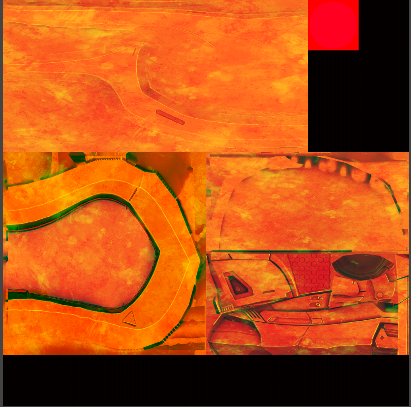
Color channels as they should appear:
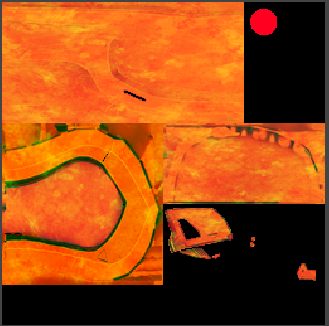
Exported color channels (disregard difference in resolution, it's due to a difference in texture source):
Edit: Build info, if needed:
- Version: SkiaSharp 1.68.1.1
- Building with: .NET core 3.1 CLI
- Build target: win-x64
- Target device: Windows 64-bit PC

Also experiencing this, I'm pretty certain the RGB data is completely missing from the bitmap in memory and then the file on disk, it is not some image viewer error or similar.

Thumbs up.
I want to retain all pixel colours upon encoding and saving partially transparent images as WebP.
I use ImageSharp, which has TransparentColorMode amongst encoder settings:
new SixLabors.ImageSharp.Formats.Webp.WebpEncoder {
    FileFormat = SixLabors.ImageSharp.Formats.Webp.WebpFileFormatType.Lossless,
    Quality = ...,
    TransparentColorMode = SixLabors.ImageSharp.Formats.Webp.WebpTransparentColorMode.Preserve,
}
I'd like to switch to SkiaSharp for better performance, but currently missing the feature.

Thumbs up. Experiencing the same issue. The black pixels do cause artifacts when linear interpolation is used at drawing time. A simple Test that shows the rgb 0 pixels:
[TestMethod]
    public void TestRgb0WhenAlpha0()
    {
        SKBitmap bmp = new SKBitmap(1, 1, SKColorType.Rgba8888, SKAlphaType.Unpremul);
        bmp.SetPixel(0, 0, new SKColor(red: 255, green: 17, blue: 99, alpha: 0));
        byte[] bytes = bmp.Bytes;

        Assert.AreEqual(255, bytes[0]);
        Assert.AreEqual(17, bytes[1]);
        Assert.AreEqual(99, bytes[2]);
        Assert.AreEqual(0, bytes[3]);
    }
The best workaround i found so far is to set the lowest possible alpha value of 1 in such case, hoping that a low alpha will not be visible.
var px = bitmap.GetPixel(x, y);
bool anyColor = px.Red != 0 || px.Green != 0 || px.Blue != 0;
if (anyColor && px.Alpha == 0)
{
    bitmap2.SetPixel(x, y, new SKColor(px.Red, px.Green, px.Blue, 1));
}
else
{
    bitmap2.SetPixel(x, y, px);
}
But definitely this behaviour should be controllable in Skia / SkiaSharp with a parameter at least.
