

 moleculerjs
Apparently moleculer cannot write a log inside the docker container
Prerequisites
Please answer the following questions for yourself before submitting an issue.
- [ ] I am running the latest version
- [ ] I checked the documentation and found no answer
- [ ] I checked to make sure that this issue has not already been filed
- [ ] I'm reporting the issue to the correct repository
Current Behavior
No log file is writed in the folder.
Expected Behavior
Log file writed in a folder.
Failure Information
No failure information, only the console log works.
This configuration works when I run the project without docker.
Steps to Reproduce
Inside the moleculer.config.ts
logger: [
		{
            type: "Console",
            options: {
                level: "info",
            }
        },
        {
            type: "File",
            options: {
                level: "info",
                folder: "/logs/moleculer",
                filename: "all.log",
                formatter: "{timestamp} {level} {nodeID}/{mod}: {msg}"
            }
        },
	],
DockerFile
FROM node:lts-alpine

# Working directory
WORKDIR /app

# Install dependencies
COPY package.json package-lock.json ./
RUN npm ci --silent

# Copy source
COPY . .

# Build and cleanup
ENV NODE_ENV=production
RUN npm run build \
 && npm prune

# Start server
CMD ["node", "./node_modules/moleculer/bin/moleculer-runner.js"]
docker-compose.yml
version: "3.3"

services:

  api:
    restart: always
    build:
      context: .
    image: foo-connect-platform:1.0.0.0
    #container_name: foo-connect-platform
    env_file: docker-compose.env
    environment:
      SERVICES: api,$node,message-logs,message-processor,tcp-endpoint
    #depends_on:
    #  - redis
    labels:
      - "traefik.enable=false"
      - "traefik.http.routers.api-gw.rule=PathPrefix(`/`)"
      - "traefik.http.services.api-gw.loadbalancer.server.port=8090"
    networks:
      - internal
    ports:
      - "8090:8090"
      - "8091:8091"
      - "8092:8092"

networks:
  internal:
    internal: false

This is more than likely an issue with your Docker image. You configuration is trying to place logs in /logs/moleculer but that directory most certainly does not exist in a standard Alpine image (which I believe is what node:lts-alpine is built on).
Consider ensuring the full path as an extra step in your run directive; for example:
RUN npm run build \
 && npm prune \
 && mkdir -p /logs/moleculer

No, it does not work. Also it does work when I put the log file in the app folder or in another existing folder.
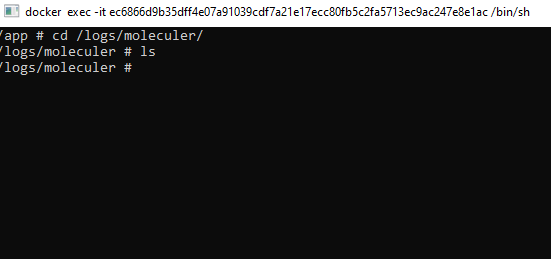
check this
RUN npm run build \
 && npm prune \
 && mkdir -p /logs/moleculer \
 && touch /logs/moleculer/all.log

No, that not the issue. I put this thing in my stack of TODO when I will need yes or yes the log feature for my development.