

 mohzy83
Not be able to collect the plug-in project NppMarkdownPanel
Not be able to collect the plug-in project NppMarkdownPanel, the Assembly happens with the warnings and the plugin is not working. Maybe not enough of any of the components in VS2017?
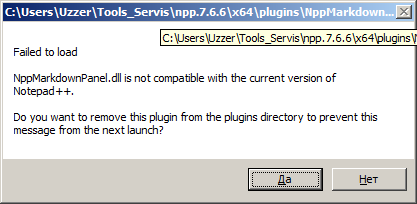
Error when starting Notepad++
C:\Tools Servis\npp.7.6.6\x64\plugins\NppMarkdownPanel\NppMarkdownPanel.dll

Failed to load

NppMarkdownPanel.dll is not compatible with the current version of Notepad++.

Do you want to remove this plugin from the plugins directory to prevent this message from the next launch?
Project build Information
1>------ Build started: Project: NppMarkdownPanel, Configuration: Debug x64 ------
1>C:\Users\Uzzer\Downloads\NppMarkdownPanel-master\NppMarkdownPanel\MarkdownPanelController.cs(101,30,101,32): warning CS0168: The variable 'ex' is declared but never used
1>C:\Users\Uzzer\Downloads\NppMarkdownPanel-master\NppMarkdownPanel\MarkdigMarkdownGenerator.cs(36,30,36,31): warning CS0168: The variable 'e' is declared but never used
1>  NppMarkdownPanel -> C:\Users\Uzzer\Downloads\NppMarkdownPanel-master\NppMarkdownPanel\bin\Debug-x64\NppMarkdownPanel.dll
========== Build: 1 succeeded, 0 failed, 0 up-to-date, 0 skipped ==========
Debug info notepad ++
Notepad++ v7.6.6   (64-bit)
Build time : May  1 2019 - 23:51:03
Path : C:\Tools Servis\npp.7.6.6\x64\notepad++.exe
Admin mode : ON
Local Conf mode : ON
OS : Windows 7 (64-bit)
Plugins : ComparePlugin.dll DSpellCheck.dll HTMLTag.dll JSMinNPP.dll mimeTools.dll NppConverter.dll NppExport.dll NppMarkdownPanel.dll VisualStudioLineCopy.dll XMLTools.dll _CustomizeToolbar.dll
VS2017 configuration file
{
	"version": "1.0",
	"components": [
		"Microsoft.VisualStudio.Workload.ManagedDesktop",
		"Microsoft.VisualStudio.Workload.NativeDesktop",
		"microsoft.net.component.4.targetingpack",
		"microsoft.net.component.4.5.targetingpack",
		"microsoft.net.component.4.5.1.targetingpack",
		"microsoft.net.component.4.5.2.targetingpack",
		"microsoft.net.component.4.6.targetingpack",
		"microsoft.net.component.4.7.sdk",
		"microsoft.net.component.4.7.targetingpack",
		"microsoft.net.component.4.7.1.sdk",
		"microsoft.net.component.4.7.1.targetingpack",
		"microsoft.net.component.4.7.2.sdk",
		"microsoft.net.component.4.7.2.targetingpack",
		"microsoft.visualstudio.component.vc.tools.x86.x64",
		"microsoft.visualstudio.componentgroup.nativedesktop.winxp",
		"microsoft.visualstudio.componentgroup.windows10sdk.16299",
		"microsoft.visualstudio.component.vc.140",
		"microsoft.visualstudio.component.aspnet45",
		"microsoft.net.component.3.5.developertools",
		"microsoft.component.codeanalysis.sdk"
	]
}
What are the missing components in my VS2017?

The output states that the NppMarkdownPanel.dll is compiled successfully and is located in C:\Users\Uzzer\Downloads\NppMarkdownPanel-master\NppMarkdownPanel\bin\Debug-x64\NppMarkdownPanel.dll. Just copy that file to your Npp/plugins/NppMarkdownPanel folder. Does that help you?

@mohzy83 It doesn't help me at all
Why then do I see these errors? What are the required VS2017 packages to build your plugin?
Thank you for understanding
@mohzy83
I reinstalled my VS2017 configuration file
		{
			"version": "1.0",
			"components": [
				"Microsoft.VisualStudio.Workload.ManagedDesktop",
				"Microsoft.VisualStudio.Workload.NativeDesktop",
				"microsoft.net.componentgroup.targetingpacks.common",
				"microsoft.componentgroup.blend",
				"microsoft.visualstudio.component.entityframework",
				"microsoft.visualstudio.component.debugger.justintime",
				"microsoft.visualstudio.component.vc.tools.x86.x64",
				"microsoft.visualstudio.componentgroup.nativedesktop.winxp",
				"microsoft.visualstudio.component.vc.140",
				"microsoft.visualstudio.component.diagnostictools"
			]
		}
@mohzy83 I had to change the language settings of the operating system: "Control Panel > Language and Regional Settings > Additional > Change language for applications that dont support Unicode" change to english
if the default is Russian Cyrillic, then the plugin build fails!
reference to the solution ru.stackoverflow.com reference to the solution stackoverflow.com
I have Windows 7 Russian version, Visual Studio 2017 Russian + English Can you explain to me the reason for this behavior of the plugin?