

 moby
moby
Process in buildkitd occasionally stucked when building Dockerfiles
Hi, When I use buildkit to build Dockerfiles (try on both native mode and root mode), the execution of a certain layer is stucked for a long time occasionally (no more log output, so I have to shut down build process manually). In this case, most of the the processes in build container (buildkitd) are in the sleeping state and the CPU usage is close to 0%. Has anyone had a similar problem?
ENV:
  buildKit-0.10.3
  kernel version: 3.10.0-862.14.1.5.h328.eulerosv2r7.x86_64  but use root
Examples
For example, during the creation of the conda environment, the installation of the python package is stucked.



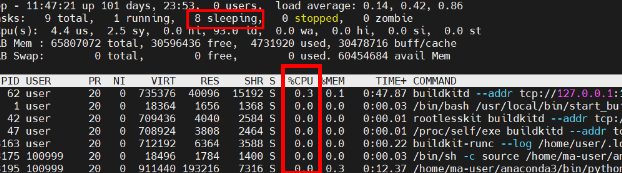


@crazy-max This happened occasionally when creating conda environment, about with one-in-tenth probability.
Dockerfile
ARG UBUNTU_VERSION=18.04
FROM ubuntu:${UBUNTU_VERSION}

USER root

RUN default_user=$(getent passwd 1000 | awk -F ':' '{print $1}') || echo "uid: 1000 does not exist" && \
    default_group=$(getent group 100 | awk -F ':' '{print $1}') || echo "gid: 100 does not exist" && \
    if [ ! -z ${default_user} ] && [ ${default_user} != "test-user" ]; then \
        userdel -r ${default_user}; \
    fi && \
    if [ ! -z ${default_group} ] && [ ${default_group} != "test-group" ]; then \
        groupdel -f ${default_group}; \
    fi && \
    groupadd -g 100 test-group && useradd -d /home/test-user -m -u 1000 -g 100 -s /bin/bash test-user && \
    chmod -R 750 /home/test-user

RUN apt-get update && \
    apt-get install -y zip wget && \
	rm /bin/sh && ln -s /bin/bash /bin/sh

USER test-user

RUN cd /home/test-user/ && \
    wget --no-check-certificate https://repo.anaconda.com/miniconda/Miniconda3-4.6.14-Linux-x86_64.sh && \
    bash Miniconda3-4.6.14-Linux-x86_64.sh -b -p /home/test-user/anaconda3 && \
    rm -rf Miniconda3-4.6.14-Linux-x86_64.sh

RUN source /home/test-user/anaconda3/bin/activate && \
    conda create -y --name pytorch_1_8 python=3.7 && \
    conda activate pytorch_1_8 && \
    pip install torch==1.8.1 torchvision==0.9.1 && \
    pip install ipykernel==6.7.0 && \
    conda init bash && \
    conda deactivate
Do I get it correctly that the build is stuck because the conda create process is stuck and you don't know why?
Not really familiar with it but maybe there is a debug flag or you can try running it through strace.

Seems to be an issue with conda and not directly linked to BuildKit. And yes it looks stuck at conda create -y --name pytorch_1_8 python=3.7 but I can't repro after many attempts.
@ShoupingShan Can you set -v -v for conda create cmd to have some debug output or -v -v -v for trace if doesn't give enough info?: https://docs.conda.io/projects/conda/en/latest/commands/create.html#Output,%20Prompt,%20and%20Flow%20Control%20Options