
ocpp
 ocpp copied to clipboard
 mobilityhouse
Start Transcation by real Charger and get the error message
First Thanks for the great work, I have some problem when I use this system with my real charger, It's works great when I connect to the charger, I can get the charger information and the status:
INFO:ocpp:EA702C1TF8P2D204111151B2: receive message [2,"c2d6e365-ac1v-4ea9-96ee-c0df52dbt312","BootNotification",{"chargePointVendor":"Phihong Technology","chargePointModel":"EA702CxTFxPx","chargePointSerialNumber":"EA702C1TF8P2D204111151B2","firmwareVersion":"V0.35.70.x007.PH","iccid":"","imsi":"","meterSerialNumber":"N/A","meterType":"AC"}]
INFO:ocpp:EA702C1TF8P2D204111151B2: send [3,"c2d6e365-ac1v-4ea9-96ee-c0df52dbt312",{"currentTime":"2021-07-06T07:31:22.301252","interval":10,"status":"Accepted"}]
But When I start charging I get the error:
INFO:ocpp:EA702C1TF8P2D204111151B2: receive message [4,"5c2d6e365-ac1v-4ea9-96ee-c0df52dbt312","FormationViolation","Unable to process action",{}]
How can I fix this error ?
My charger is Phihong AH Series https://www.phihong.com.tw/en/index.php?route=product/product&path=60_112&product_id=758

Hi, thanks for your message.
We need a bit more info than that, if you want us to help you. Can you provide a traceback of the communication?

@tropxy
OK, What do you need?
I can get them now!
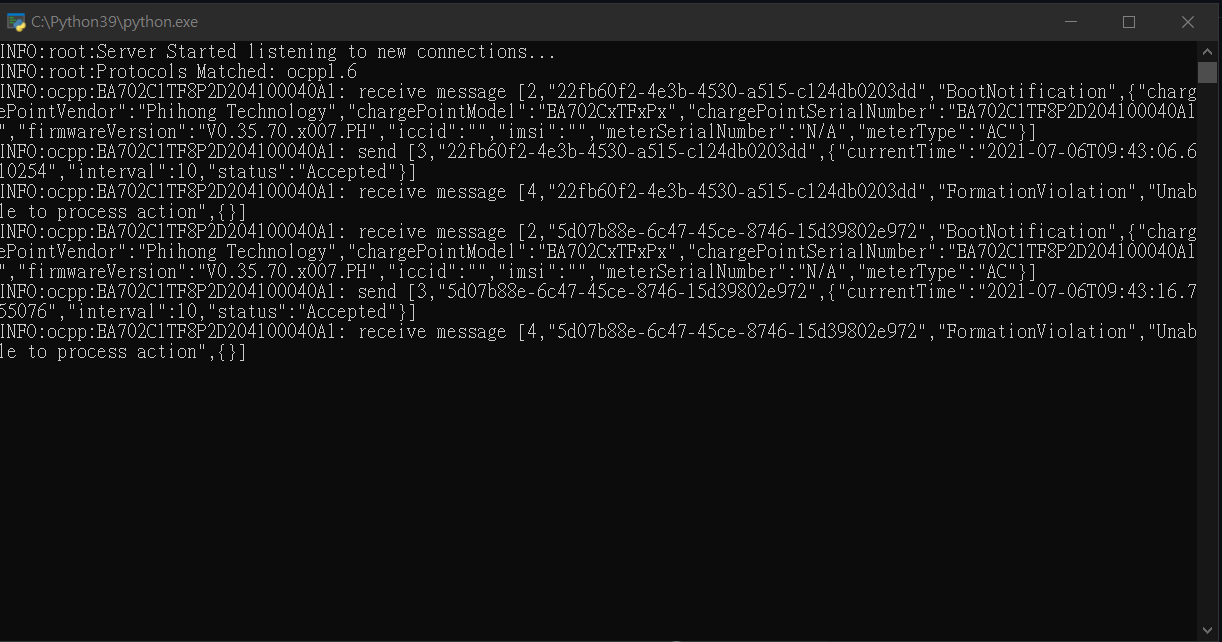
Here is the image when I run
And I found that when I start charing , it show the same as the front image I gave,there is no more new update information
So, I would assume the data format of the currentTime is not acceptable by that charger. can you use this format?
In [133]: from datetime import datetime

In [134]: datetime.utcnow().strftime("%Y-%m-%dT%H:%M:%SZ")
Out[134]: '2021-07-06T10:25:30Z'
I am in Taiwan and my Timezone is UTC+8,my charger use this too. So I should put
In [133]: from datetime import datetime

In [134]: datetime.utcnow().strftime("%Y-%m-%dT%H:%M:%SZ")
Out[134]: '2021-07-06T10:25:30Z'
In the central system.py ?
yes, try UTC time and check what is the outcome. I am actually suspecting that is just rejecting due to the float precision of the milliseconds, but try as I said and then we see
Not sure what you were trying to achieve with calling the time on top, but you need to substitute the 'current_time' attribute of the BootNotification by datetime.utcnow().strftime("%Y-%m-%dT%H:%M:%SZ")
Sorry I am new in Python,Just try to bulid this system for my charger,
Should I change in Line 27
current_time=datetime.utcnow().isoformat(), to current_time=datetime.utcnow().strftime("%Y-%m-%dT%H:%M:%SZ"),
Is this change that you want?
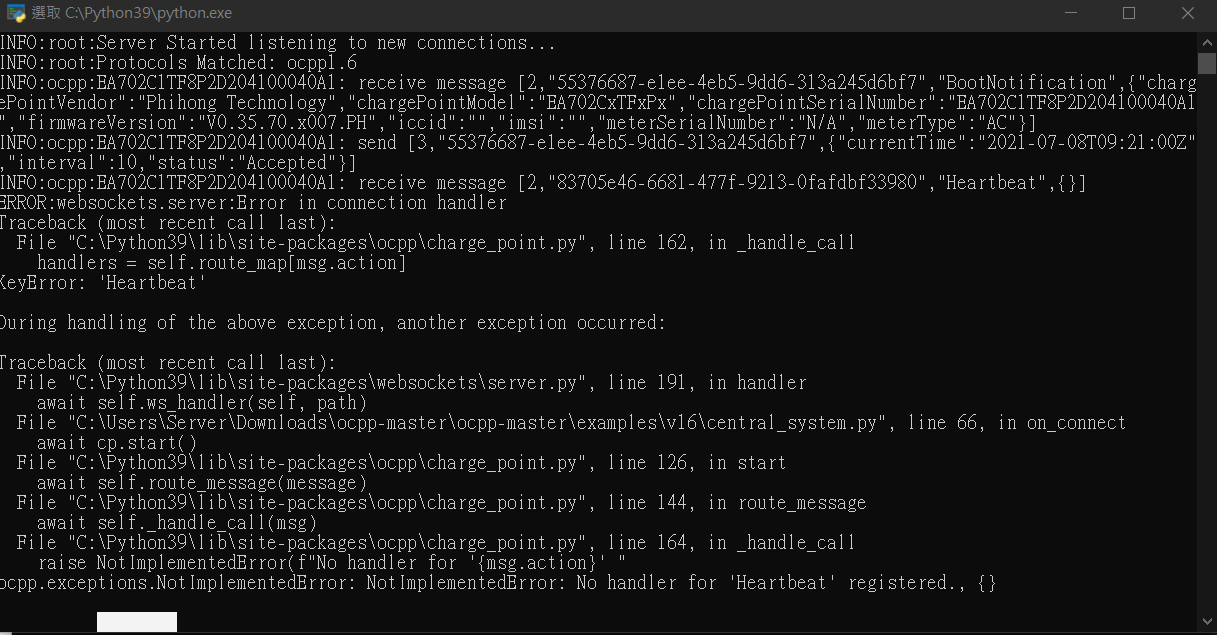 And I get this.
Sorry for your inconvenience,and thanks for your help
And I get this.
Sorry for your inconvenience,and thanks for your help
So, as you see it worked, you got through the BootNotification without an error, which means I was right and the charger was complaining about the Datetime format.
Now, the problem you are facing is because you have no code to handle the Hearbeat request. Same way you have an handler for the BootNotification, you need to create a method to handle the HeartBeat and any other messages the charger may send, like StatusNotification or MeterValues,...
Ok I got it, I build this system because I want to know what my charger sent from ocpp, like voltage , charge time, user id. Is there any suggest or example I can use?
Sure. @lbbrhzn integreated OCPP in the HomeAssistant. Here you can see how they used a ChangeConfiguration request to configure the measurands that the charge point reports..

@OrangeTux Thanks! I have been try some function But now I want to remote start the charger I know step is call remote_start_ Transaction and then call start_Transaction to start the charger My start_Transaction works well and remote_start_Transaction can call start_Transaction, But the charger still can't start

@lbbrhzn
Actually I just want to test it, so all of the numbers like meter、connectid ,I'll give them the default number (like id=10)
and all of the status I will give them the accept signal , my ChangeAvailability can't work so I skip it to try the next fuction I'll need
know step is call remote_start_ Transaction and then call start_Transaction to start the charger My start_Transaction works well and remote_start_Transaction can call start_Transaction,
I don't know the code of these functions, so my assumptions might be wrong. It seems that
you send a StartTransaction from the CSMS to the charger. That is not correct.
Only the charger can send this message.
If you want to start a transaction from the CSMS you should send a RemoteStartTransaction request to the charger.
Usually the charger responds with Accepted. Next the charger sends a StartTransaction requests. The CSMS should
answer with Accepted.
Of course, make sure that a car connected to the charger during this process.
I add at the front of the code but the time is the same.
你好,我也是台灣人。最近剛好也在研究充電樁的通訊系統,可以請教您一些問題嗎?

你好,我也是台灣人。最近剛好也在研究充電樁的通訊系統,可以請教您一些問題嗎?
請email與我聯繫: lai89123#gmail.com