
mne-python
 mne-python copied to clipboard
 mne-tools
ENH: Use something other than FreeSurfer for BEM extraction
Dear MNE expert,
I am working with a EEG dataset and I wish to run source on that. Unfortunately the T1w are not FLASH and I know that in the absence of FLASH images, MNE offers a somewhat less accurate solution based on the watershed algorithm (see Jas et al., 2018).
Indeed for some subjects in my dataset (see attached 1) I got the following error when I am going to run make_bem_model.
RuntimeError: Surface inner skull is not completely inside surface outer skull
For other subject instead the surfaces are simply wrong (see attached 2), even though make_bem_model hadn't give me any error


I was wondering whether if you have some tips on how to fix them.
Thanks
Dave

@Davi1990 it's better to report these in the mailing list. Unless you are sure it's a bug, I recommend asking there. You can also search the archives and find that similar issues were already answered:
https://mail.nmr.mgh.harvard.edu/pipermail//mne_analysis/2019-April/005805.html https://mail.nmr.mgh.harvard.edu/pipermail/mne_analysis/2019-November/006317.html
hope that helps

Hi @jasmainak!! I posted few weeks ago but I haven't received any reply message. I am going to ask again right now. I am deadlocked!
Hope to receive some helps this time
Dave
Hi @jasmainak!!
Thanks for your reply. Unfortunately I already saw the question that you posted.
I have done some work on the surfaces trying to get the best result possible.
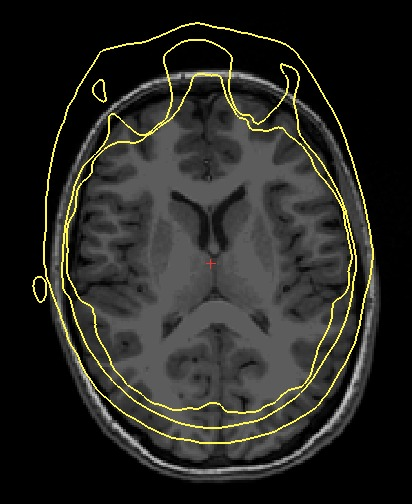
This looks reasonable to me but I would like to listen your opinion on that. I don't understand why the surfaces are not registered with the main T1w though.
Moreover, when I am reconstructing the bem model in MNE I got the following error:
"Cannot decimate to requested ico grade 4. The provided BEM surface has 78784 triangles, which cannot be isomorphic with a subdivided icosahedron. Consider manually decimating the surface to a suitable density and then use ico=None in make_bem_model"
Maybe the meshes have too many triangles so I need to down sample the vertices to below 10000....
Any tips would be highly appreciate
Thanks
This looks reasonable to me but I would like to listen your opinion on that. I don't understand why the surfaces are not registered with the main T1w though.
How did you make this plot? If you aren't using mne.viz.plot_bem or freeview in Freesurfer, it's likely that the plotting is wrong because of MRI surface RAS coordinates versus standard RAS/affine that other software might use.

Regarding the number of vertices, #7259 will probably / hopefully have some solutions for suitable decimation
@larsoner thanks for your suggestions. As for the number of vertices I am gonna try this once I have all the surfaces registered and I'll let you know
As for the visualization, I've used freeview
Your surfaces in the first post are properly coregistered. How are they different from the ones in your more recent post? Differences in processing these surfaces probably gave rise to the alignment mismatch.
For ideas on how to fix meshes, the ideas we have were recently consolidated here:
https://mne.tools/dev/overview/faq.html#my-watershed-bem-meshes-look-incorrect
I have worked in putting down a script that use different tools and in the end the surfaces right now are nicely coregistered with the T1w (see attached). Even though the outer skin is going a little bit outside but it should not be a big deal.
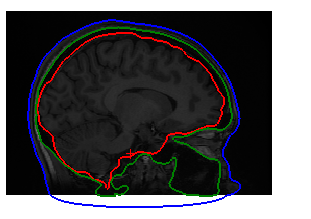
Anyway now I was trying to import them in MNE reconstructing the bem model in MNE I got the same error than before:
"Cannot decimate to requested ico grade 4. The provided BEM surface has 78784 triangles, which cannot be isomorphic with a subdivided icosahedron. Consider manually decimating the surface to a suitable density and then use ico=None in make_bem_model"
@larsoner I saw your suggestions but I wasn't able to find a solution and any other idea would be highly appreciated
Thanks
Did you see this above?
Regarding the number of vertices, #7259 will probably / hopefully have some solutions for suitable decimation
In particular this comment has some code you could use to decimate your surface. Soon it will be adapted to mne.decimate_surface because it seems to be a necessary use case.
@christian-oreilly this issue makes me think that we might want to make the BEM mesh extraction we discussed more publicly available. If it takes hours then just some description in our FAQ would be good. If it takes about a minute then we should turn it into an example.
Would you be able to make a PR for this? If you don't have time but have a notebook / some code to share with the marching cubes plus smoothing approach, I can see if either of these of these documentation ideas make sense
@larsoner You mean to document the cube marching + laplacian smoothing + decimation approach and the FS tessellation approach? I should be able at least to provide an initial PR. What often ends up taking longer for me is debugging the CI stuff and editing to adjust for project specific standards on naming and format that I am not familiar with. I will be happy to provide the PR, but will be happy to have a bit of help to push it through if it drags on these latter topics. Hopefully, these things will get smoother as I gain a bit of experience with contributing code to MNE...

@larsoner yes I saw your comment above. I've run mne.decimate_surface so that the new surfaces have the same number of faces and vertices of the original. However I still get the same error.
Moreover if I run the make_bem_model command with ico=None I got the following error instead:
Surface outer skin has topological defects
Sorry but this issue is keeping me stuck
@Davi1990 you have to play around with the Freesurfer commands until you get better surfaces. Alternatively you can also edit the surfaces manually. There are demos online: https://www.youtube.com/watch?v=AR83_Bt04VQ
@christian-oreilly any chance to make a WIP PR with the Python solution for creating BEM surfaces? I'm happy to take over once there is something that more or less works.
@larsoner Ok, sure, I'll get to it right away else it will never happen.
@larsoner To clarify, the code I have is to get from a voxelized BEM solution to BEM surfaces through marching cube + laplacian filtering + mesh repairs. I don't have anything for going from T1 to volumetric BEM solutions because I used directly the volumetric BEM solution from John Richards. Does this (volumetric BEM to surface BEM) correspond to what you are expecting me to provide as a PR or you were expecting a solution for the whole process, from the original MRI to the BEM surfaces? If I recall well, I was not quite satisfied with how the watershed algorithm was performing on Richards' dataset and I was fortunate enough to have access to these pre-computed solutions so I just by-passed the whole issue.
Oh, that's funny, I got the EXACT same issue than the one we can see on the first figure of this issue! We see the inner surface (yellow) making an excursion out of the two other surfaces at the surface where the MRI is cut (toward the throat). That was the case for almost all my MRI. So I wrote a snippet of code to correct exactly that. It is a fairly specifically tailored piece of code because generalizing it for all possible orientations, convex/concave sections and all possible unexpected cases seemed like a real pain. But it does the job well for this specific case...
Hmm... maybe for now just posting public gists of your scripts for correction is good enough. Then if there are things that could help people we can generalize and include in MNE. That's presumably lowest effort for you but already gives people things to try and adapt.
I "dumped" the repair code from the infants template here: https://gist.github.com/christian-oreilly/d0ba7acc74ae780367ec4a4d9ae58a3d
As soon as I am done with the analysis of these templates and that the corresponding paper is sufficiently well written that I am confident that I won't change significant part of the analysis, I will add the Jupiter notebook that includes this code, but also the complete "documented" procedure I used... so I guess it will be more useful at that point. But, in the meantime, this dump include the relevant functions I used in my analysis pipeline.
The correction of the surface intersection I discussed previously implemented for a different project where MRI bounding boxes around the head were tighter than ideal. I created a separate gist for it: https://gist.github.com/christian-oreilly/f0c3e262343ecd580d92f4c8244cc87f
I say that I "dumped" these snippets of code because they are little more than copy-and-paste from in-progress analyses. So it is a very "dirty" code... I am afraid that the "clean" version of this code will be ready just when my analyses are closer to completion... but, if it can be useful to other people at this stage, I am always happy to share!
@christian-oreilly am I right that process_bem is where all the code for the BEM surface extraction landed?
https://github.com/christian-oreilly/infant_template_paper/blob/d907822cdd50695838a7b03e9f50764862a83eb4/template_building.py#L109-L176
Any preliminary thoughts on whether we should just package this and helpers up in mne/_bem_extraction.py and let people try it as an alternative to FreeSurfer functions to do the same?
am I right that process_bem is where all the code for the BEM surface extraction landed?
@larsoner Yes, process_bem and the functions it calls from the same file (e.g., fix_all_defects).
Any preliminary thoughts on whether we should just package this and helpers up in mne/_bem_extraction.py and let people try it as an alternative to FreeSurfer functions to do the same?
You are most welcome to reuse this code in MNE. I would say that this code is probably at a "beta" level, so proposing it as an experimental and potential alternative might be a reasonable thing to do. It has some additional dependencies (e.g., trimesh, pymeshfix). For an analysis script like this, I don't give a second though about adding whatever dependencies I need to get the job done, but I know that for a package, it is desirable to keep the dependencies to a minimum. So I leave it to you to judge whether it is desirable to add these additional dependencies to MNE-Python. I have no doubt about trimesh. I think it is a powerful package with a lot of functionalities and being very actively developed and used by many people. I even use it (in combination with pyrender if I remember well) for viewing sources on the cortical meshes in jupyter notebook and to generate PNG for publications. I think it is a great match with MNE-Python for the meshing tasks. pymeshfix is a mush smaller project, which provide a wrapper around the C++ MeshFix software. At the time I was working on that, it was allowing fixing holes that trimesh could not fix. Trimesh has a repair function to fix holes in case they are constituted of one missing triangle, but it had nothing for more complex holes. If you use this code it might be worth considering submitting a feature requestion for hole repair on Trimesh GitHub page to eventually be able to drop the pymeshfix dependency. I am not implying here that the pymeshfix is a bad software, just that since we would be using just one of its feature, it might be better not to add it as a dependency.
@Davi1990 in your image above how did you get those three surfaces? From @christian-oreilly's code it's clear that we can go from a binarized/labeled MRI to usable suitably smooth surfaces, but he started from MRI data that was already labeled with each compartment. I'm curious how you got your compartment definitions and (of secondary importance) then turned them into surfaces.
Some exploration so far -- I've had decent luck with FieldTrip + SPM (worked on 157/158 subjects), but this requires MATLAB so it's a bit of a no-go.
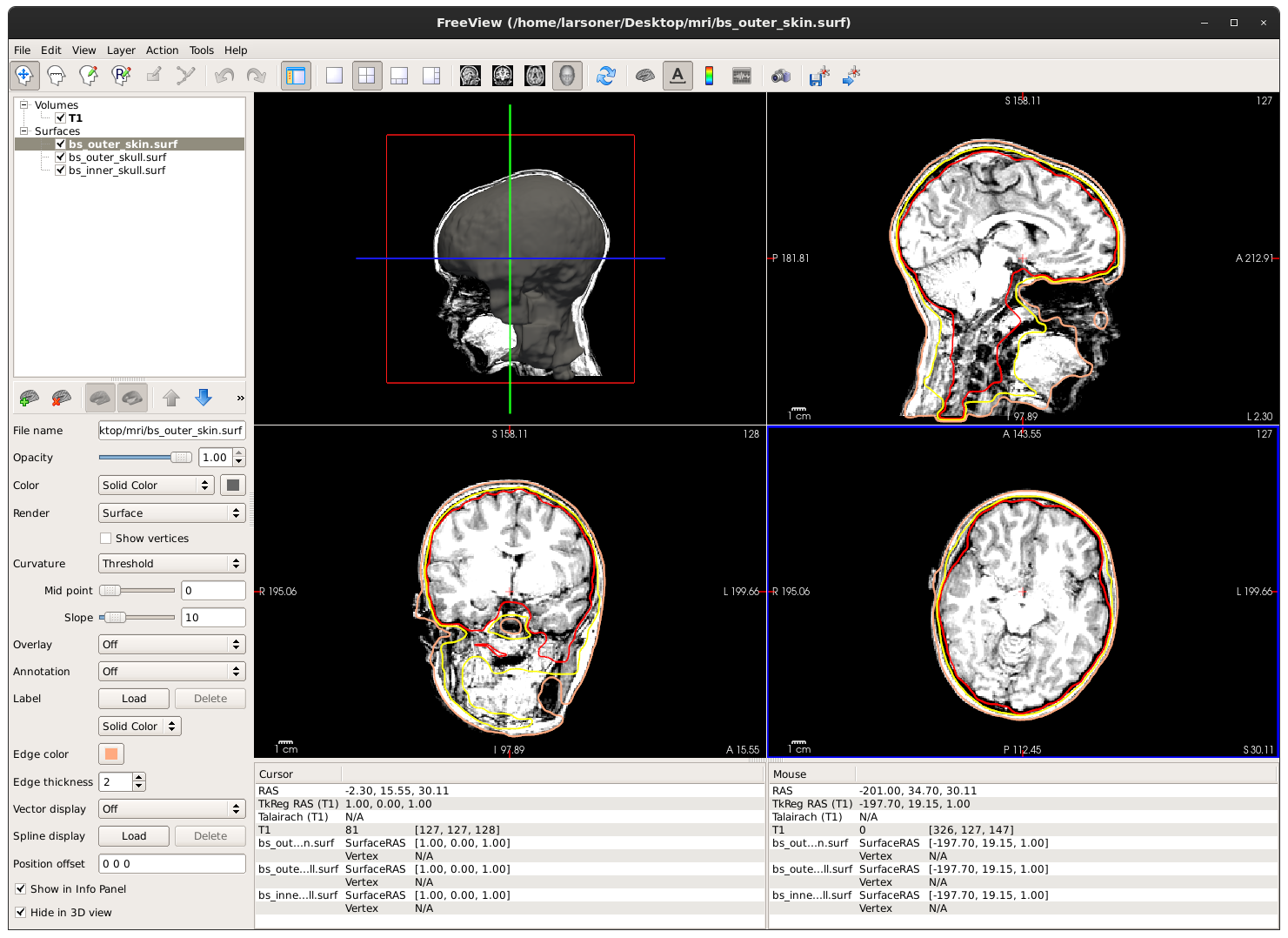
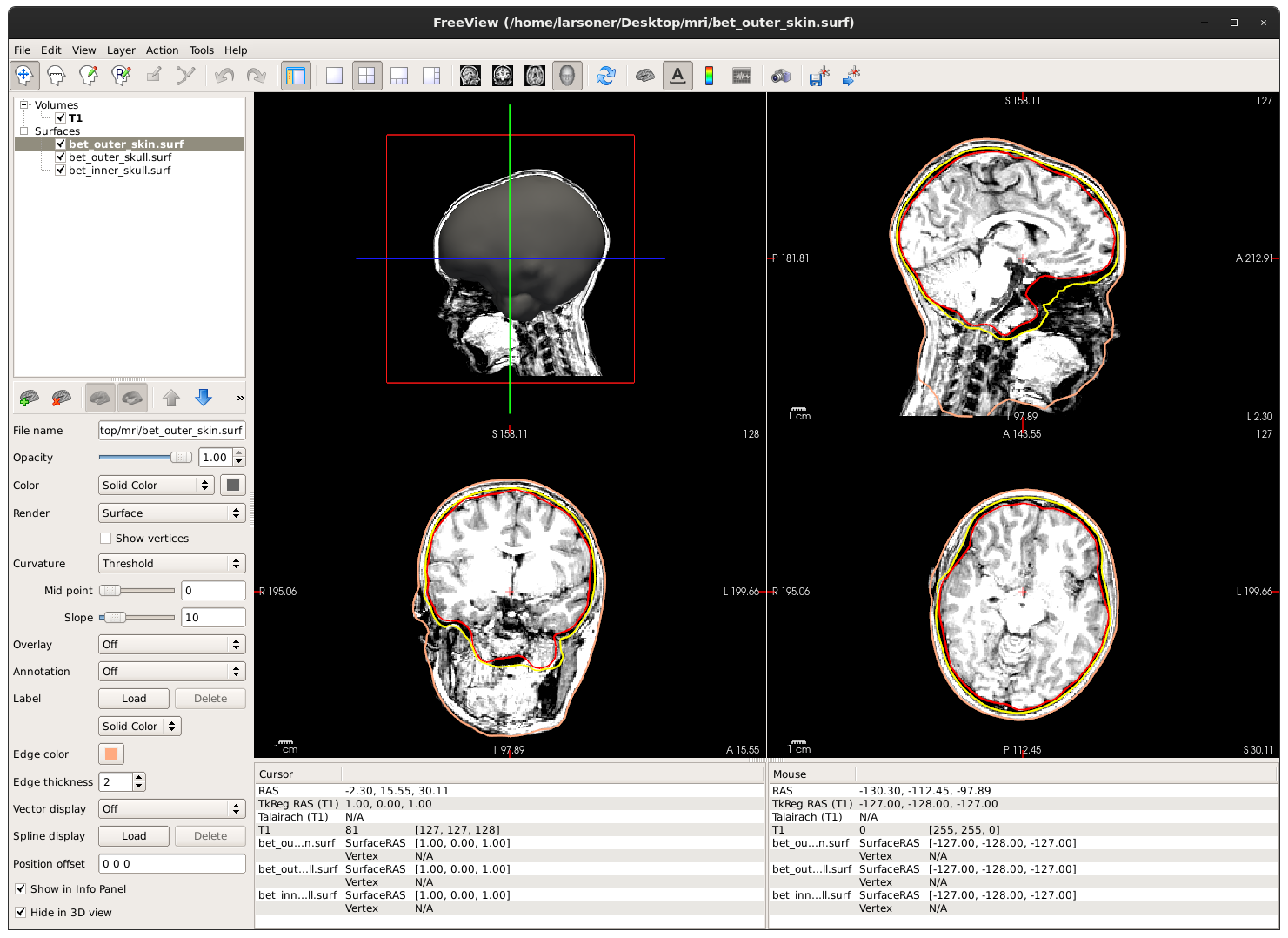
I then tried brainsuite and fsl using this gist. brainsuite skullfinder is very fast (1-2 sec) but produces a questionable output, whereas fsl seems to work well in about a minute of run-time.
Subject 1
brainsuite skullfinder:
$ freeview -v T1.mgz -f bs_inner_skull.surf:edgecolor=red -f bs_outer_skull.surf:edgecolor=yellow -f bs_outer_skin.surf:edgecolor=255,170,128:hide_in_3d=true
fsl bet:
FieldTrip + SPM could not process this subject because it couldn't determine the orientation (the head is tilted about the Z axis is probably the issue?).
Subject 2
brainsuite:
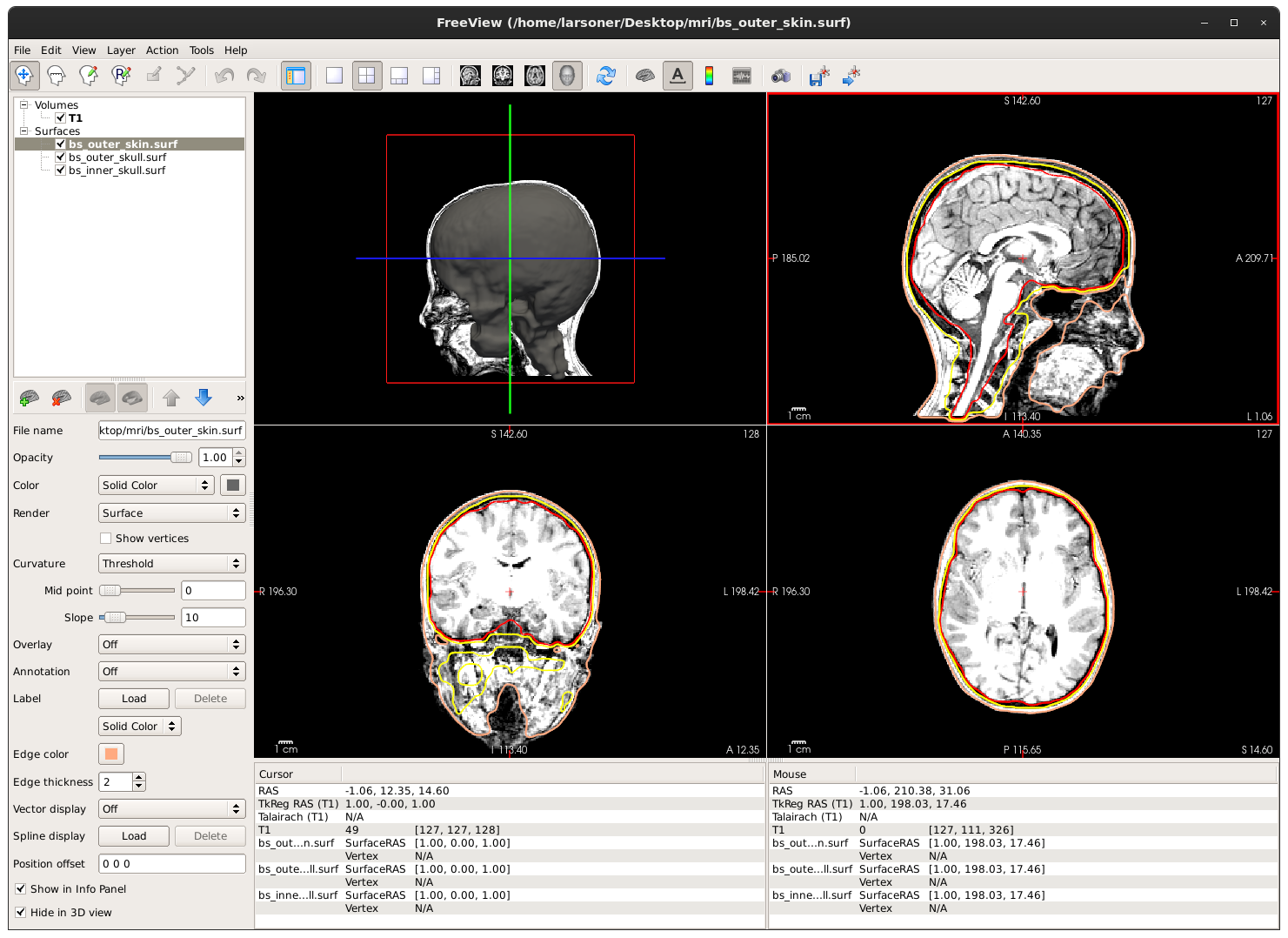
fsl:
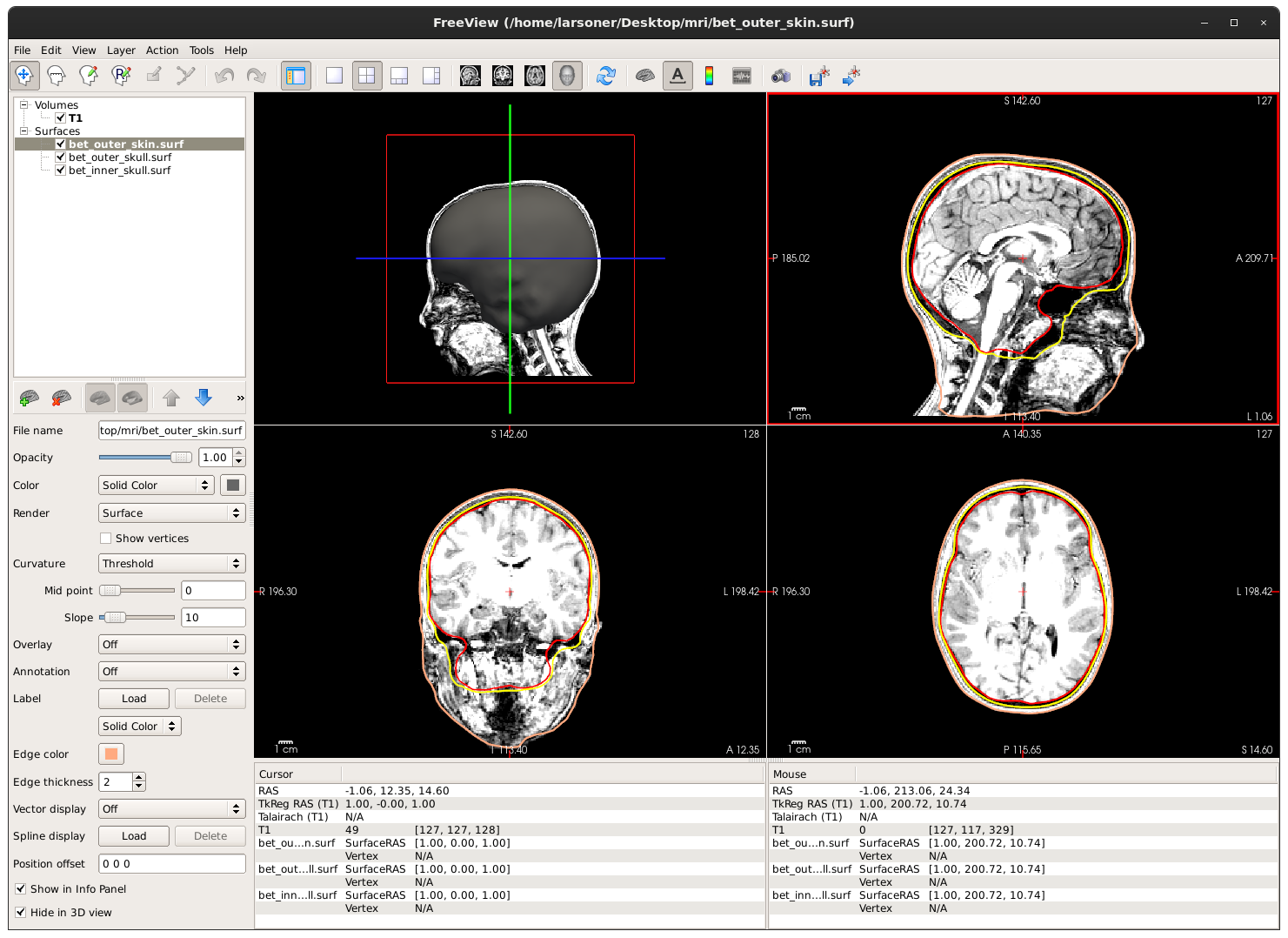
FieldTrip + SPM + Python mesh code to marching_cubes + smooth + decimate:
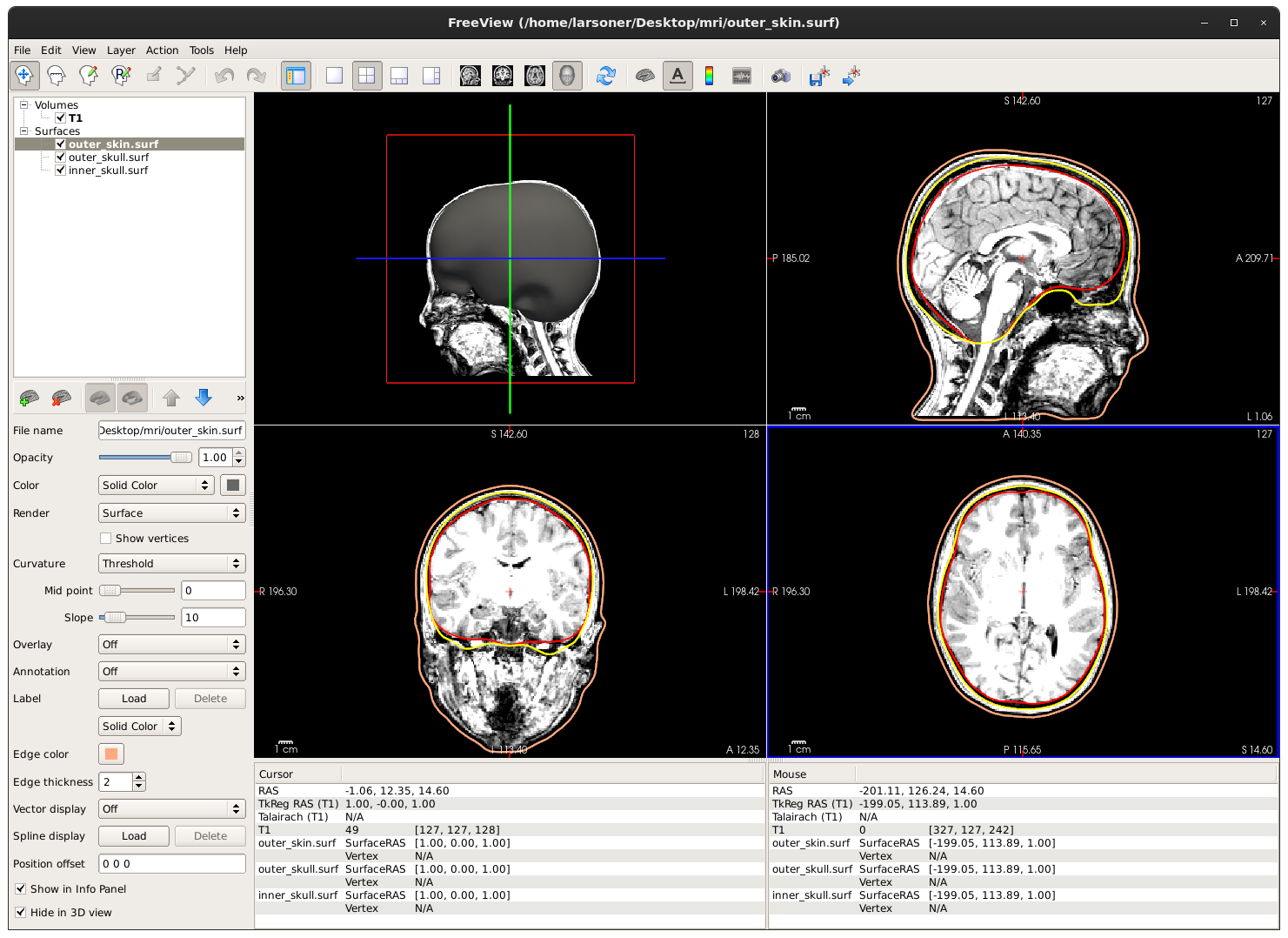
Overall I think I like the idea of adding a mne fsl_bem function that uses fsl to generate BEM surfaces. It already puts out ones that are smoothed and 5120 triangles, writes to a standard format (vtk) that can by read by pyvista, etc. It even makes sure that the meshes don't intersect:
the mesh is self-intersecting
thus will rerun with higher smoothness constraint
Amazing work, @larsoner!! Would very much love to see this added to MNE
