

 mne-tools
memory leak in mne.viz.create_3d_figure?
Describe the bug
I am creating several 3d figures and closing them, but the memory usage keeps increasing until the computer basically freezes or python crashes.
Steps to reproduce
import mne
fsaverage_path = mne.datasets.fetch_fsaverage()
for i in range(100):
    fig = mne.viz.create_3d_figure(size=(1000,1000))
    mne.viz.plot_alignment(fig=fig, subject='', subjects_dir=fsaverage_path,
                         surfaces={'pial':1}, coord_frame='mri', show_axes=True)
    mne.viz.close_all_3d_figures()
output:
Using pyvistaqt 3d backend.
3d brain figures opening and closing.
Expected results
I would expect the memory usage to stay fairly stable.
Actual results
The memory usage keeps increasing, the plotting gets slower and slower, making the jupyter notebook not usable anymore and needing a restart. The memory usage can be tracked, for example, in the Activity monitor.app on a macos for the process python. Is there some other command to clean up the memory related to plotting after a figure is closed?
Additional information
Platform: macOS-11.6.6-x86_64-i386-64bit Python: 3.9.12 | packaged by conda-forge | (main, Mar 24 2022, 23:23:20) [Clang 12.0.1 ] Executable: /Users/***/opt/anaconda3/envs/mne/bin/python CPU: i386: 12 cores Memory: 16.0 GB
mne: 1.0.0 numpy: 1.21.5 {blas=NO_ATLAS_INFO, lapack=lapack} scipy: 1.8.0 matplotlib: 3.5.1 {backend=module://matplotlib_inline.backend_inline}
sklearn: 1.0.1 numba: 0.55.1 nibabel: 3.2.2 nilearn: 0.9.0 dipy: 1.5.0 cupy: Not found pandas: 1.4.2 pyvista: 0.33.3

This sounds like https://github.com/pyvista/pyvistaqt/issues/57 :(
The workaround is to open one window at a time

Thanks for the quick reply! Yes, looks quite related. Am I not opening one window at a time in my code? I am doing: mne.viz.create_3d_figure and mne.viz.close_all_3d_figures() inside the same scope. Or am I misunderstanding something? So looking at https://github.com/pyvista/pyvistaqt/issues/57 - it seems there is no solution yet and it is a problem inside pyvistaqt?
Am I not opening one window at a time in my code? I am doing: mne.viz.create_3d_figure
Can you try modifying the code like this:
import mne
import gc
fsaverage_path = mne.datasets.fetch_fsaverage()
for i in range(100):
    fig = mne.viz.create_3d_figure(size=(1000,1000))
    mne.viz.plot_alignment(fig=fig, subject='', subjects_dir=fsaverage_path,
                         surfaces={'pial':1}, coord_frame='mri', show_axes=True)
    del fig
    mne.viz.close_all_3d_figures()
    gc.collect()
The del fig should allow the garbage collector to remove all resources related to that figure, which might help.
Unfortunately it's the same. Memory usage continues to increases until the execution basically freezes...
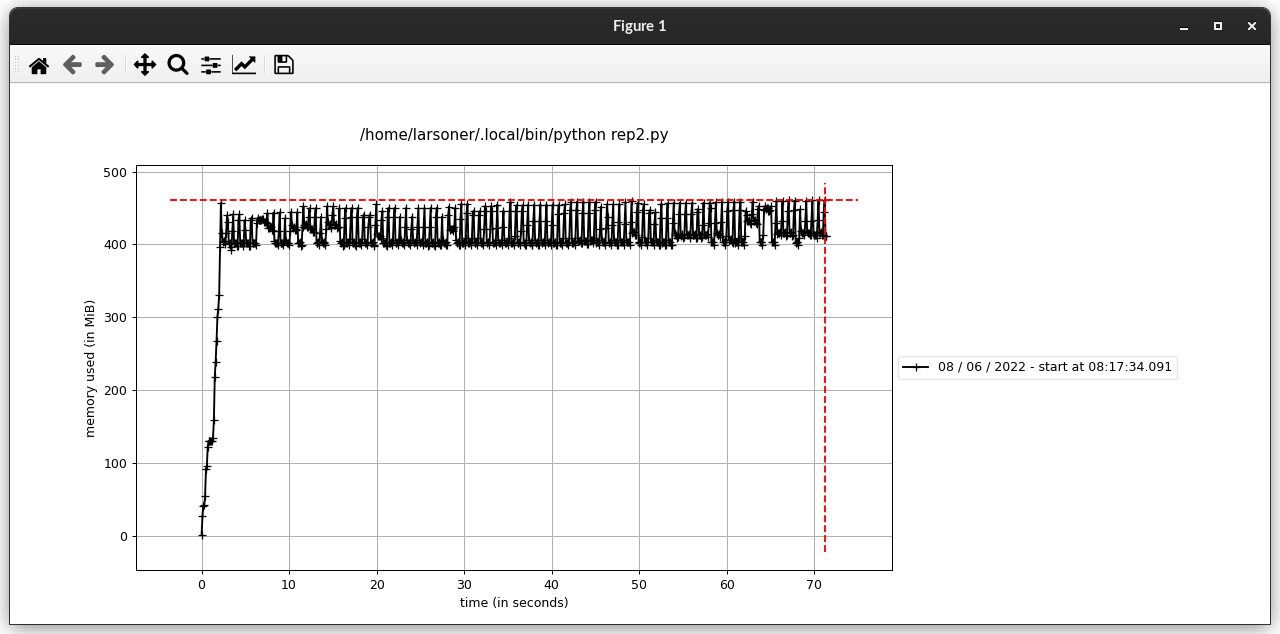
When I run the code above with mprof run rep2.py and then mprof plot on Linux I don't get any memory increase:
Okay but on macOS M1 I can replicate the issue:
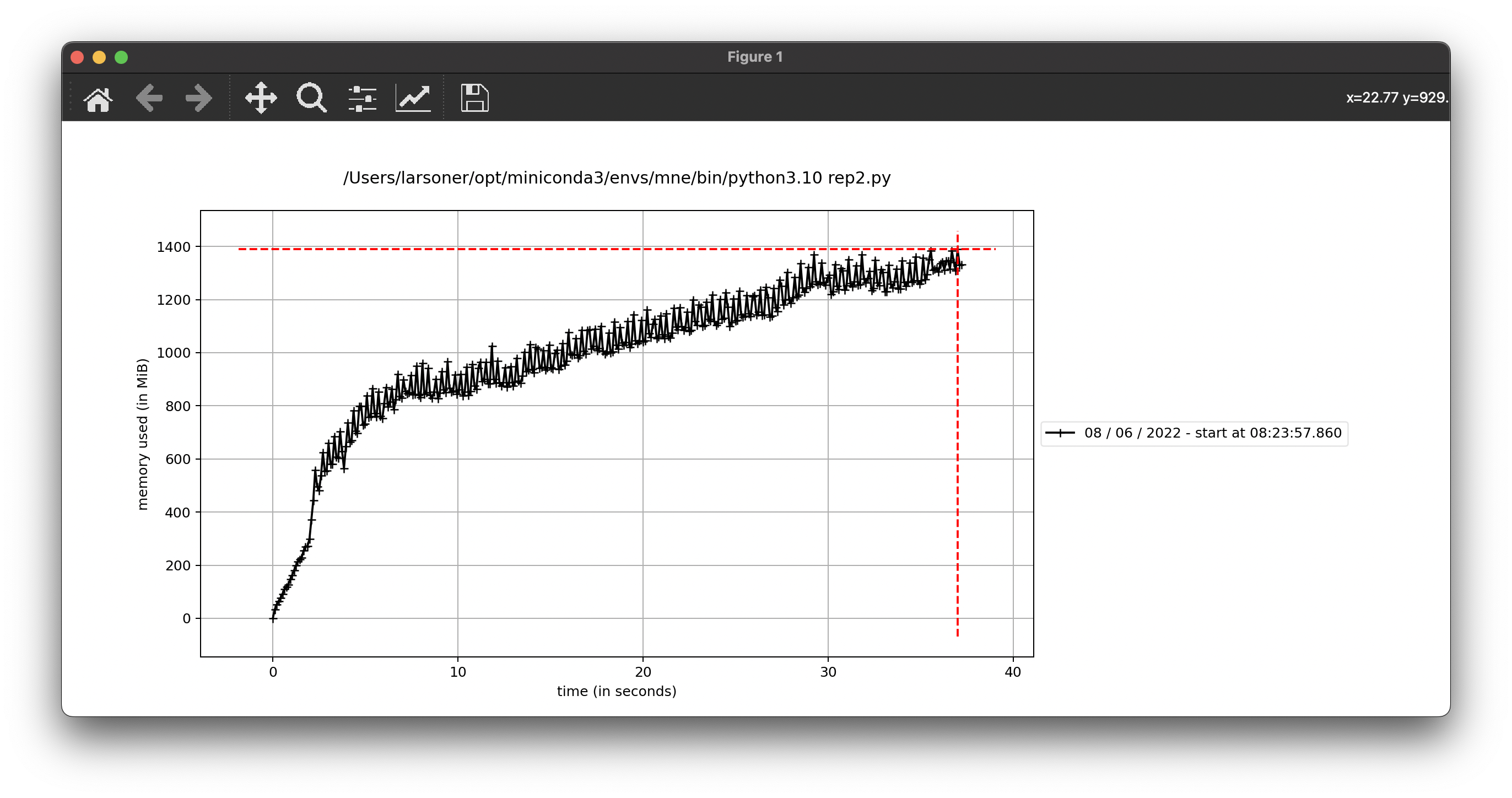
Notably in my command window I every 8th or 9th window I see:
Context leak detected, msgtracer returned -1
So this probably means it's a Qt or VTK issue. :(
I see, thanks for checking. Is there a bug we could file with Qt or VTK? Sorry, I'm not very familiar with this.
Yes eventually I will make one in https://gitlab.kitware.com/vtk/vtk/-/issues/?sort=created_date&state=opened&author_username=larsoner but I need to remove the pyvistaqt dependency to get it to pure VTK + Qt, as they usually ask for this (see e.g. https://gitlab.kitware.com/vtk/vtk/-/issues/18559#note_1192379 )
And possibly relatedly, even on Linux there is a problem if you open more than one window at once
https://gitlab.kitware.com/vtk/vtk/-/issues/18588
Closing this at our end since I think it's really an upstream problem. Feel free to follow the issues linked above plus https://gitlab.kitware.com/vtk/vtk/-/merge_requests/9443 and https://github.com/pyvista/pyvista/issues/2944 for updates
Although this has never fixed on the VTK side, I wanted to share a workaround in case people stumble upon this here. The workaround is discussed here: https://github.com/pyvista/pyvista/issues/2252
The idea is to reuse the same renderer for all plots and call:
renderer.plotter.clear_actors()
renderer is the object returned by
mne.viz.create_3d_figure(scene=False)
Might be useful to potentially have some mne wrapper for this.