mmozeiko
can't browse HDD disk drives in local-mounted tabs windows
Using rclone v1.37, rclonebrowser v1.2, qt v5.8.0 in windows 10 x64 system. Can list, mount, copy, sync files with my current config, also my local mount works fine. But I notice that that only C: drive is browseable, can't open other HDD drives. my config:
[GD-Crypt]
type = crypt
remote = Gdrive:crypted
filename_encryption = off
password = mypass1
password2 = mypass2

[Gdrive]
type = drive
client_id = myID.apps.googleusercontent.com
client_secret = myclient
token = {"access_token":"MyToken","token_type":"Bearer","refresh_token":"REFRESHTOKEN","expiry":"2017-08-29T17:23:48.0815636-04:00"}

[local-Drives]
type = local
nounc = true

[localUncrypt]
type = crypt
remote = local-Drives:c:\unCrypt\
filename_encryption = off
password = MYPASS1
password2 = MYPASS2
For example, using "local-Drives" remote, tab shows all disk drives, can browse C:\ , but when I try to browse E:\ disk drive rcloneBrowser shows me a empty tree. Also notice that is possible to create NEW FOLDER in this or others disks drives (in fact is created in windows file system), but is the only folder visible under local-mounted tabs and other folders is not showing.
Also check with rclone comand line and can ls all files and directories using my remote "local-Drives" in c:\ and other disk (like e:\ for example)
maybe realted with issue #50 .

A similar problem was brought to my attention by a user where one of two external drives (F & G) would display the tree. The "F" drive would not. This is on a WIndows 7 64bit system with 16GB ram.

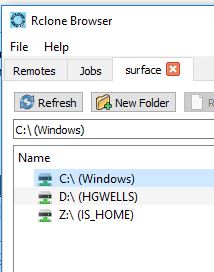
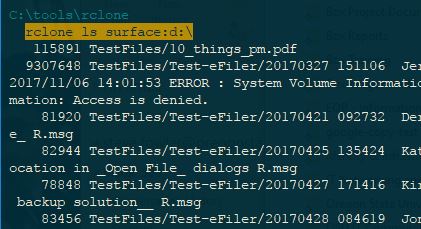
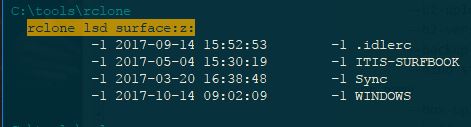
I created a remote for my local system and none of the drives (C, D, & Z) would display the tree. If I open a command line the folder tree is returned on all three. This is a Windows 10 64bit system.