
kicad_mmccoo
 kicad_mmccoo copied to clipboard
 mmccoo
Segmentation Fault
I freshly installed KiCad 5.0 and this plugin on a Mint Linux virtualbox. KiCad exits abruptly with a segmentation fault on launch of pcbnew. Any idea how to figure out why? All dependencies can be imported from python2.7. Pcbnew launches no problem if I rename ~/.kicad_plugins to ~/.kicad_plugins_backup (but of the scripts are then invisible to kicad). As soon as I rename it back to what it should be the segmentation faults come back. These are the only scripts installed. Terminal output:
# amoose136@Spectrologix-mint: ~
ζ kicad
initializing mmccoo_kicad
adding genborderplugin
done adding genborderplugin
done adding toggle
adding ratnest plugin
done adding ratnest
done adding mmccoo_kicad
[1]    10669 segmentation fault (core dumped)  kicad

I suggest running pcbnew from gdb.
probably something like this:
sudo apt install gdb
which gdb -> this will give you the path to pcbnew
gdb
wait for it to seg fault which should give you a prompt in gdb run the command 'backtrace'
which should tell you where in the code it was when it died.
If you do get a trace, please let me know what it says.
A zillion things could have happened.

I'm also having this or related issues. I tried running a few different versions from the @aimylios/kicad-nightly and @kicad/kicad copr repositories in Fedora 28 and could only get a couple of the scripts to work properly.
I'll give it a try with gdb and see what I can find out later as well.

What I got was:
# amoose136@Spectrologix-mint: /usr/bin                                  (13:51:48)
ζ gdb pcbnew
GNU gdb (Ubuntu 8.1-0ubuntu3) 8.1.0.20180409-git
Copyright (C) 2018 Free Software Foundation, Inc.
License GPLv3+: GNU GPL version 3 or later <http://gnu.org/licenses/gpl.html>
This is free software: you are free to change and redistribute it.
There is NO WARRANTY, to the extent permitted by law.  Type "show copying"
and "show warranty" for details.
This GDB was configured as "x86_64-linux-gnu".
Type "show configuration" for configuration details.
For bug reporting instructions, please see:
<http://www.gnu.org/software/gdb/bugs/>.
Find the GDB manual and other documentation resources online at:
<http://www.gnu.org/software/gdb/documentation/>.
For help, type "help".
Type "apropos word" to search for commands related to "word"...
Reading symbols from pcbnew...(no debugging symbols found)...done.
(gdb) run
Starting program: /usr/bin/pcbnew
[Thread debugging using libthread_db enabled]
Using host libthread_db library "/lib/x86_64-linux-gnu/libthread_db.so.1".
initializing mmccoo_kicad
adding genborderplugin
done adding genborderplugin
done adding toggle
adding ratnest plugin
done adding ratnest
done adding mmccoo_kicad

Program received signal SIGSEGV, Segmentation fault.
0x00007fffe016cbb7 in wxStatusBarBase::CalculateAbsWidths(int) const ()
   from /usr/lib/x86_64-linux-gnu/libwx_gtk3u_core-3.0.so.0
(gdb) backtrace
#0  0x00007fffe016cbb7 in wxStatusBarBase::CalculateAbsWidths(int) const ()
   from /usr/lib/x86_64-linux-gnu/libwx_gtk3u_core-3.0.so.0
#1  0x00007fffe000ca2e in wxStatusBar::DoUpdateFieldWidths() ()
   from /usr/lib/x86_64-linux-gnu/libwx_gtk3u_core-3.0.so.0
#2  0x00007fffe000cd09 in wxStatusBar::OnSize(wxSizeEvent&) ()
   from /usr/lib/x86_64-linux-gnu/libwx_gtk3u_core-3.0.so.0
#3  0x00007ffff6b4d4be in wxEvtHandler::ProcessEventIfMatchesId(wxEventTableEntryBase const&, wxEvtHandler*, wxEvent&) ()
   from /usr/lib/x86_64-linux-gnu/libwx_baseu-3.0.so.0
#4  0x00007ffff6b4d5c3 in wxEventHashTable::HandleEvent(wxEvent&, wxEvtHandler*) () from /usr/lib/x86_64-linux-gnu/libwx_baseu-3.0.so.0
#5  0x00007ffff6b4d98b in wxEvtHandler::TryHereOnly(wxEvent&) ()
   from /usr/lib/x86_64-linux-gnu/libwx_baseu-3.0.so.0
#6  0x00007ffff6b4da13 in wxEvtHandler::ProcessEventLocally(wxEvent&) ()
   from /usr/lib/x86_64-linux-gnu/libwx_baseu-3.0.so.0
#7  0x00007ffff6b4da75 in wxEvtHandler::ProcessEvent(wxEvent&) ()
   from /usr/lib/x86_64-linux-gnu/libwx_baseu-3.0.so.0
#8  0x00007ffff6b4d7d7 in wxEvtHandler::SafelyProcessEvent(wxEvent&) ()
   from /usr/lib/x86_64-linux-gnu/libwx_baseu-3.0.so.0
#9  0x00007ffff72b566e in wxWindow::DoSetSize(int, int, int, int, int) ()
   from /usr/lib/x86_64-linux-gnu/libwx_gtk2u_core-3.0.so.0
#10 0x00007ffff72f407d in wxStatusBar::Create(wxWindow*, int, long, wxString const&) () from /usr/lib/x86_64-linux-gnu/libwx_gtk2u_core-3.0.so.0
---Type <return> to continue, or q <return> to quit---
#11 0x00007ffff73c4096 in wxFrameBase::OnCreateStatusBar(int, long, int, wxString const&) () from /usr/lib/x86_64-linux-gnu/libwx_gtk2u_core-3.0.so.0
#12 0x00007ffff73c4273 in wxFrameBase::CreateStatusBar(int, long, int, wxString const&) () from /usr/lib/x86_64-linux-gnu/libwx_gtk2u_core-3.0.so.0
#13 0x00007fffea91c628 in ?? () from /usr/bin/_pcbnew.kiface
#14 0x00007fffea71e61e in ?? () from /usr/bin/_pcbnew.kiface
#15 0x00007fffea3a071d in ?? () from /usr/bin/_pcbnew.kiface
#16 0x00007fffea080503 in ?? () from /usr/bin/_pcbnew.kiface
#17 0x000055555559566b in ?? ()
#18 0x0000555555589561 in ?? ()
#19 0x000055555558c850 in ?? ()
#20 0x00007ffff6a5bb3a in wxEntry(int&, wchar_t**) () from /usr/lib/x86_64-linux-gnu/libwx_baseu-3.0.so.0
#21 0x0000555555586888 in ?? ()
#22 0x00007ffff5dd5b97 in __libc_start_main (main=0x555555586860, argc=1, argv=0x7fffffffdea8, init=<optimized out>, fini=<optimized out>,
    rtld_fini=<optimized out>, stack_end=0x7fffffffde98) at ../csu/libc-start.c:310
#23 0x0000555555588d6a in _start ()
(gdb)
Well that's not what I expected.
Kicad 5.0 downloaded from the kicad site (ie, you didn't compile it) running on a recent Linux Mint (19? I haven't used that distro but I understand it to be easy to install)
I'll give it shot. Thanks for taking the time.
Miles
On Fri, Aug 24, 2018, 7:57 PM Amos Manneschmidt [email protected] wrote:
What I got was:
amoose136@Spectrologix-mint: /usr/bin (13:51:48)
ζ gdb pcbnew GNU gdb (Ubuntu 8.1-0ubuntu3) 8.1.0.20180409-git Copyright (C) 2018 Free Software Foundation, Inc. License GPLv3+: GNU GPL version 3 or later http://gnu.org/licenses/gpl.html This is free software: you are free to change and redistribute it. There is NO WARRANTY, to the extent permitted by law. Type "show copying" and "show warranty" for details. This GDB was configured as "x86_64-linux-gnu". Type "show configuration" for configuration details. For bug reporting instructions, please see: http://www.gnu.org/software/gdb/bugs/. Find the GDB manual and other documentation resources online at: http://www.gnu.org/software/gdb/documentation/. For help, type "help". Type "apropos word" to search for commands related to "word"... Reading symbols from pcbnew...(no debugging symbols found)...done. (gdb) run Starting program: /usr/bin/pcbnew [Thread debugging using libthread_db enabled] Using host libthread_db library "/lib/x86_64-linux-gnu/libthread_db.so.1". initializing mmccoo_kicad adding genborderplugin done adding genborderplugin done adding toggle adding ratnest plugin done adding ratnest done adding mmccoo_kicad
Program received signal SIGSEGV, Segmentation fault. 0x00007fffe016cbb7 in wxStatusBarBase::CalculateAbsWidths(int) const () from /usr/lib/x86_64-linux-gnu/libwx_gtk3u_core-3.0.so.0 (gdb) backtrace #0 0x00007fffe016cbb7 in wxStatusBarBase::CalculateAbsWidths(int) const () from /usr/lib/x86_64-linux-gnu/libwx_gtk3u_core-3.0.so.0 #1 0x00007fffe000ca2e in wxStatusBar::DoUpdateFieldWidths() () from /usr/lib/x86_64-linux-gnu/libwx_gtk3u_core-3.0.so.0 #2 0x00007fffe000cd09 in wxStatusBar::OnSize(wxSizeEvent&) () from /usr/lib/x86_64-linux-gnu/libwx_gtk3u_core-3.0.so.0 #3 0x00007ffff6b4d4be in wxEvtHandler::ProcessEventIfMatchesId(wxEventTableEntryBase const&, wxEvtHandler*, wxEvent&) () from /usr/lib/x86_64-linux-gnu/libwx_baseu-3.0.so.0 #4 0x00007ffff6b4d5c3 in wxEventHashTable::HandleEvent(wxEvent&, wxEvtHandler*) () from /usr/lib/x86_64-linux-gnu/libwx_baseu-3.0.so.0 #5 0x00007ffff6b4d98b in wxEvtHandler::TryHereOnly(wxEvent&) () from /usr/lib/x86_64-linux-gnu/libwx_baseu-3.0.so.0 #6 0x00007ffff6b4da13 in wxEvtHandler::ProcessEventLocally(wxEvent&) () from /usr/lib/x86_64-linux-gnu/libwx_baseu-3.0.so.0 #7 0x00007ffff6b4da75 in wxEvtHandler::ProcessEvent(wxEvent&) () from /usr/lib/x86_64-linux-gnu/libwx_baseu-3.0.so.0 #8 0x00007ffff6b4d7d7 in wxEvtHandler::SafelyProcessEvent(wxEvent&) () from /usr/lib/x86_64-linux-gnu/libwx_baseu-3.0.so.0 #9 0x00007ffff72b566e in wxWindow::DoSetSize(int, int, int, int, int) () from /usr/lib/x86_64-linux-gnu/libwx_gtk2u_core-3.0.so.0 #10 0x00007ffff72f407d in wxStatusBar::Create(wxWindow*, int, long, wxString const&) () from /usr/lib/x86_64-linux-gnu/libwx_gtk2u_core-3.0.so.0 ---Type
to continue, or q to quit--- #11 0x00007ffff73c4096 in wxFrameBase::OnCreateStatusBar(int, long, int, wxString const&) () from /usr/lib/x86_64-linux-gnu/libwx_gtk2u_core-3.0.so.0 #12 0x00007ffff73c4273 in wxFrameBase::CreateStatusBar(int, long, int, wxString const&) () from /usr/lib/x86_64-linux-gnu/libwx_gtk2u_core-3.0.so.0 #13 0x00007fffea91c628 in ?? () from /usr/bin/_pcbnew.kiface #14 0x00007fffea71e61e in ?? () from /usr/bin/_pcbnew.kiface #15 0x00007fffea3a071d in ?? () from /usr/bin/_pcbnew.kiface #16 0x00007fffea080503 in ?? () from /usr/bin/_pcbnew.kiface #17 0x000055555559566b in ?? () #18 0x0000555555589561 in ?? () #19 0x000055555558c850 in ?? () #20 0x00007ffff6a5bb3a in wxEntry(int&, wchar_t**) () from /usr/lib/x86_64-linux-gnu/libwx_baseu-3.0.so.0 #21 0x0000555555586888 in ?? () #22 0x00007ffff5dd5b97 in __libc_start_main (main=0x555555586860, argc=1, argv=0x7fffffffdea8, init= , fini= , rtld_fini= , stack_end=0x7fffffffde98) at ../csu/libc-start.c:310 #23 0x0000555555588d6a in _start () (gdb) — You are receiving this because you commented. Reply to this email directly, view it on GitHub https://github.com/mmccoo/kicad_mmccoo/issues/7#issuecomment-415835202, or mute the thread https://github.com/notifications/unsubscribe-auth/ABBErGtAryd6Hhm3RBs_fpXP4BZK-ndzks5uUD53gaJpZM4VtMuT .
I installed Kicad 5.0 via the package manager following the instructions found at: http://kicad-pcb.org/download/linux-mint/ Mint is super simple to install. It's almost just Ubuntu but with a desktop layout that more closely resembles the way Ubuntu looked pre-Unity.
Edit: The virtual machine is running linux Mint 19 Cinnamon 64bit
I have reproduced the seg fault. The hunt begins.
Miles
On Fri, 24 Aug 2018 at 20:48, Amos Manneschmidt [email protected] wrote:
I installed Kicad 5.0 via the package manager following the instructions found at: http://kicad-pcb.org/download/linux-mint/ Mint is super simple to install. It's almost just Ubuntu but with a desktop layout that more closely resembles the way Ubuntu looked pre-Unity.
— You are receiving this because you commented. Reply to this email directly, view it on GitHub https://github.com/mmccoo/kicad_mmccoo/issues/7#issuecomment-415849014, or mute the thread https://github.com/notifications/unsubscribe-auth/ABBErFOoq3WH5WKN35sWNiu7OLBliOfiks5uUEpdgaJpZM4VtMuT .
so the problem is a simple matter of version mismatches.
You can find a little discussion about it here: https://forum.kicad.info/t/wxpython-3-1-error-building-kicad-from-source-ubuntu-18-04/11431/10
In linux, kicad sits on gtk2. gtk2 is old and most of the linux world is moving towards or is told to move toward gtk3
wxpython is used as a glue layer between gtk and python. The version of wxpython that is built against gtk2 is no longer built in the common distros. I wasn't able find an older build of it. (or I got errors about release files missing which I think happens when a release area is being phased out)
anyway, the latest wxpython4.0 does still support gtk2 builds, but kicad is not built on that yet.
I did some work on moving kicad there some time last year: https://lists.launchpad.net/kicad-developers/msg31889.html
but wxpython4.0 didn't seem ready at the time.
now that the world has evolved in a way that the python stuff just doesn't work, those not readinesses seem less critical.
Perhaps normal ubuntu could work but it seems unlikely. (I'm on arch).
Kind of a drag. Maybe there's older kicad nightlies somewhere.
On Sat, 25 Aug 2018 at 10:21, miles mccoo [email protected] wrote:
I have reproduced the seg fault. The hunt begins.
Miles
On Fri, 24 Aug 2018 at 20:48, Amos Manneschmidt [email protected] wrote:
I installed Kicad 5.0 via the package manager following the instructions found at: http://kicad-pcb.org/download/linux-mint/ Mint is super simple to install. It's almost just Ubuntu but with a desktop layout that more closely resembles the way Ubuntu looked pre-Unity.
— You are receiving this because you commented. Reply to this email directly, view it on GitHub https://github.com/mmccoo/kicad_mmccoo/issues/7#issuecomment-415849014, or mute the thread https://github.com/notifications/unsubscribe-auth/ABBErFOoq3WH5WKN35sWNiu7OLBliOfiks5uUEpdgaJpZM4VtMuT .
That sucks, the aimylios / kicad-nightly repository does bundle wx-python and wxPython-GTK2 but I guess that isn't enough, or I'll test it again to be sure I didn't miss installing something. https://copr-be.cloud.fedoraproject.org/results/aimylios/kicad-nightly/fedora-29-x86_64/00789449-wxPython-GTK2/
This Ubuntu PPA has kicad nightlies with wxpython3.0 and wxwidgets3.0 in it, not sure if that helps, haven't had a chance to try Ubuntu yet. https://launchpad.net/~js-reynaud/+archive/ubuntu/ppa-kicad
I'd be willing to give Arch a try if it works, is there a particular version you're running?
for running kicad with scripting enabled, I suggest ubuntu 16.04 (18 has the same issues as Mint, of course)
I don't know whether the nighly build would work. I suspect not; I believe some/much of the python stuff is disabled.
compiling youself is not hard and it sounds like you're motivated: https://kicad.mmccoo.com/2017/02/01/compiling-kicad-on-ubuntu/
Generally, I recommend against the kicad "releases" since they are few and far between. The Kicad folks do a great job of keeping the nighly stuff working and reliable.
also, note that for my plugin to work, you need additional python packages. They are listed in the readme, which I just updated.
On Mon, 27 Aug 2018 at 16:42, Michael Best [email protected] wrote:
That sucks, the aimylios / kicad-nightly repository does bundle wx-python and wxPython-GTK2 but I guess that isn't enough, or I'll test it again to be sure I didn't miss installing something.
https://copr-be.cloud.fedoraproject.org/results/aimylios/kicad-nightly/fedora-29-x86_64/00789449-wxPython-GTK2/
This Ubuntu PPA has kicad nightlies with wxpython3.0 and wxwidgets3.0 in it, not sure if that helps, haven't had a chance to try Ubuntu yet. https://launchpad.net/~js-reynaud/+archive/ubuntu/ppa-kicad https://launchpad.net/%7Ejs-reynaud/+archive/ubuntu/ppa-kicad
I'd be willing to give Arch a try if it works, is there a particular version you're running?
— You are receiving this because you commented. Reply to this email directly, view it on GitHub https://github.com/mmccoo/kicad_mmccoo/issues/7#issuecomment-416250133, or mute the thread https://github.com/notifications/unsubscribe-auth/ABBErHmtJloqma52JOEp9fPK3rhebLbyks5uVAVFgaJpZM4VtMuT .
Great, I will try when I get the chance.
On Thu, Aug 30, 2018, 4:19 AM Miles McCoo, [email protected] wrote:
for running kicad with scripting enabled, I suggest ubuntu 16.04 (18 has the same issues as Mint, of course)
I don't know whether the nighly build would work. I suspect not; I believe some/much of the python stuff is disabled.
compiling youself is not hard and it sounds like you're motivated: https://kicad.mmccoo.com/2017/02/01/compiling-kicad-on-ubuntu/
Generally, I recommend against the kicad "releases" since they are few and far between. The Kicad folks do a great job of keeping the nighly stuff working and reliable.
also, note that for my plugin to work, you need additional python packages. They are listed in the readme, which I just updated.
On Mon, 27 Aug 2018 at 16:42, Michael Best [email protected] wrote:
That sucks, the aimylios / kicad-nightly repository does bundle wx-python and wxPython-GTK2 but I guess that isn't enough, or I'll test it again to be sure I didn't miss installing something.
https://copr-be.cloud.fedoraproject.org/results/aimylios/kicad-nightly/fedora-29-x86_64/00789449-wxPython-GTK2/
This Ubuntu PPA has kicad nightlies with wxpython3.0 and wxwidgets3.0 in it, not sure if that helps, haven't had a chance to try Ubuntu yet. https://launchpad.net/~js-reynaud/+archive/ubuntu/ppa-kicad https://launchpad.net/%7Ejs-reynaud/+archive/ubuntu/ppa-kicad
I'd be willing to give Arch a try if it works, is there a particular version you're running?
— You are receiving this because you commented. Reply to this email directly, view it on GitHub <https://github.com/mmccoo/kicad_mmccoo/issues/7#issuecomment-416250133 , or mute the thread < https://github.com/notifications/unsubscribe-auth/ABBErHmtJloqma52JOEp9fPK3rhebLbyks5uVAVFgaJpZM4VtMuT
.
— You are receiving this because you commented. Reply to this email directly, view it on GitHub https://github.com/mmccoo/kicad_mmccoo/issues/7#issuecomment-417269079, or mute the thread https://github.com/notifications/unsubscribe-auth/AAF3LyYCDtCRaYT3aODu1z_1og0-Vufgks5uV7wfgaJpZM4VtMuT .
In the linked thread Rene_Poschl said that 5.1 will likely be fixed for newer versions of wxpython. In my case if this is true and 5.1 comes by next spring, that's good enough for me and I'll just wait. I already have things working on my (admittedly obsolete) Macbook Pro using a nightly from just prior to the 5.0 release so it should be good enough to just open things there for the initial layout step until 5.1 is released.
I installed Ubuntu 16.04 in a virtual machine.
Installed kicad from the instructions at http://kicad-pcb.org/download/ubuntu/
sudo add-apt-repository ppa:js-reynaud/kicad-5
sudo apt-get update
sudo apt install kicad
sudo apt install python-setuptools
sudo pip install autoenv
sudo easy_install pip
sudo pip install dxfgrabber numpy scipy shapely
I was able to have the following plugins show up in kicad:
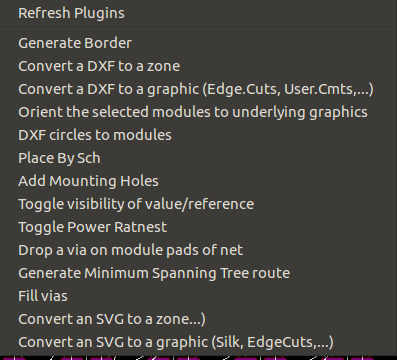
Although, I used a virtualenv to install the dxfgrabber numpy scipy shapely and ran kicad from the command line while the virtualenv was activated:
virtualenv --system-site-packages venv
source venv/bin/activate
pip install dxfgrabber numpy scipy shapely
kicad
This allows me to keep the required packages listed with my project in requirements.txt to more easily track the required libraries.
I believe that all the plugins are available, I count 14 of them using grep self.name */*.py and I have 14 menu items.
It loads everything now at least. I still think I'm having other issues though, not related to just outright crashing, but it's an improvement.