
pegasus-frontend
 pegasus-frontend copied to clipboard
 mmatyas
commandline problem
*i am using latest Windows stable version.
when i try to use GBLauncher to run GameBases from Pegasus, the quotes in the command-line get messed up when filename has spaces.
launch: C:\GameBase\GBLauncher.exe db=Atari-XL fn={file.name} emu=1 wait=1 file: .\xex\1 Million BC.xex
pegasus sends this on command-line (note position of quotes) [db=Atari-XL "fn=1 Million BC.xex" emu=1 wait=1]
this is the correct GBLauncher command. [db=Atari-XL fn="1 Million BC.xex" emu=1 wait=1]
When the filename does not contain spaces, it works. as no quotes are needed.
launch: C:\GameBase\GBLauncher.exe db=Atari-XL fn={file.name} emu=1 wait=1 file: .\xex\defender.xex
[db=Atari-XL fn=Defender.xex emu=1 wait=1]

Hi, you can also put quotes around the filename manually: fn="{file.name}".

Hi, when i add the quotes manually it also adds extra quotes and backslashes.
launch: C:\GameBase\GBLauncher.exe db=Atari-XL fn="{file.name}" emu=1 wait=1 [db=Atari-XL "fn="1 million BC.xex"" emu=1 wait=1]
only this command will work in the GBlauncher [db=Atari-XL fn="1 million BC.xex" emu=1 wait=1]
the backslash didn't show in the post above [db=Atari-XL "fn= \ "1 million BC.xex \ " " emu=1 wait=1]
Hm tried this out with some dummy data, but is seems to work fine for me.
The launch command launch: echo db=Atari-XL fn="{file.name}" emu=1 wait=1
with the file a file with spaces.txt
turns into
echodb=Atari-XLfn="a file with spaces.txt"emu=1,wait=1
as expected, ie. I see
[i] Executing command: [`echo`,`db=Atari-XL`,`fn="a file with spaces.txt"`,`emu=1`,`wait=1`]
in the log.
If this is not what you experience, please copy the [i] Executing command line from your log or attach the log file here.
yes i think the log looks correct, but the result is different when viewed in gblauncher log. something odd is happenening on the command line before or when it reaches gblauncher. attached both logs.
if you could add a new lookup metadata value. i could make gblauncher run with the number value (no spaces, filename or quotes needed)
launch: C:\GameBase\gblaucher.exe gb=atari-xl id={gb-id} gb-id=1234567 GBLauncher & pegasus.log
It seems as if GBLauncher is trying to do some post-processing on its ow too on the command line. Perhaps it expects to be launched only through the command prompt? Is this an open-source program? It might be fixable. Or maybe it expects a single long line of arguments?
There's nothing between Pegasus and the launched program, not even a command line. You can try running it through one like this: cmd /c C:\GameBase\gblaucher.exe .... Also you can use single-quotes ' in the metadata files, if that helps.
On Sat, 19 Mar 2022 07:26:59 -0700 Mátyás Mustoha @.***> wrote:
It seems as if GBLauncher is trying to do some post-processing on its ow too on the command line. Perhaps it expects to be launched only through the command prompt? Is this an open-source program? It might be fixable. Or maybe it expects a single long line of arguments?
There's nothing between Pegasus and the launched program, not even a command line. You can try running it through one like this:
cmd /c C:\GameBase\gblaucher.exe .... Also you can use single-quotes'in the metadata files, if that helps.
Hi Matyas,
I think GBlauncher does use only 1 line of arguments. It's the quotes and commas that are causing the problem. As it works perfectly when no quotes are needed from Pegasus.
i just don't understand where it is going wrong.
best solution is to have GBlauncher use the game ID rather than a filename in the metadata key. quotes and spaces can be avoided and it just works. filename is read from the GA_ID stored in the Access .MDB file.
this example is working for me. *but end user must have GameBase collection installed.
launch: C:\GameBase\GBLauncher.exe db=Atari-XL id={file.name} emu=1 wait=1 file: 1234
if pegasus had more customisable options like these... {extra1.name} {extra2.name} {extra3.name} {game.id)
it would make it even better. ;)
you have been very helpful.
thanks very much. Ste.
Thanks! There are a couple of interesting things here:
- It seems the program just treats the whole command line as a single long text
- It seems it is irrelevant whether you write
fn=somethingor"fn=something" - It seems both
fn=somethingandfn="something with spaces"is handled (whatever printed in the log is irrelevant), but quotes inside the filename are not - I haven't found code for replacing quotes inside the command line, if there's actually some quoting and not just a logging issue, it might be caused by something else, including the platform code this program builds on top of
- It seems the code wasn't updated since 2009
One idea: Try the launch command C:\GameBase\GBLauncher.exe 'db=Atari-XL fn="{file.name}" emu=1 wait=1'
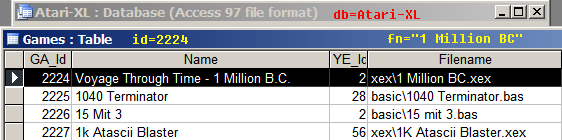
fn="something something" reads the Atari-XL.mdb for that exact filename. if found, it runs it. ID=2224 runs the filename stored at that entry in the mdb, so makes using fn=blah blah redundant now.
using your new launch example the quotes are now in the correct position (after fn=) so one step closer.
but gblauncher logs with 2 added backslashes. --> Command line: ["db=Atari-XL fn= \ "1 million bc \ " emu=1 wait=1"]
Could you post a GBLauncher log file for a successful launch of a file with spaces in its name?