
pegasus-frontend
 pegasus-frontend copied to clipboard
 mmatyas
Multiple errors trying to build with QT Creator
The issue
Hi, hope im not breaking any rule by posting this here.
The issue is that i´ve been trying to build Pegasus Frontend for Android, read the documentation and installed all the requirements, then cloned the source recursively, configured Android SDK, JAVA JDK, OpenSSL and finally load and click "RUN" the project with QT Creator, i've alredy tried QT 5.14, 5.9 and 5.15.2.
The result is always the next compiling error:
qmlimportscanner: No such file or directory: "home/nechrobyte/pegasus-frontend/src/app/qmake_qmake_qm_files_qrc" Invalid json output from qmlimportscanner The process "/home/nechrobyte/Qt/5.14.0/android/bin/androiddeployqt" exited with code 4. Error while building/deploying project pegasus (kit: Android Qt 5.14.0 Clang Multi-abi) When executing step "Build Android APK"
System info
Tried with two different Desktop Systems, Windows 10 64-bit and Linux Mint 64-bit

Hm could you take a look on the build settings (Projects -> [Your Android kit] -> Build)? It should look like this:
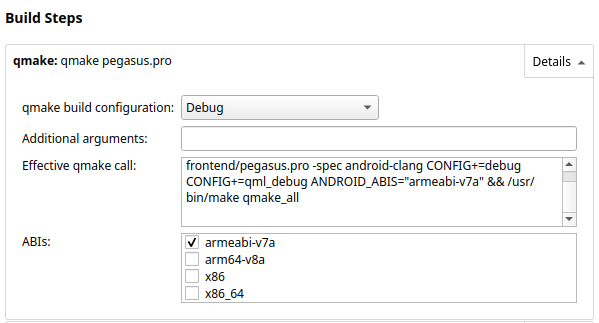
Also make sure Build .aab is turned off under Build Android APK too.

Thanks for replying :)
I'm checking it right now, build Android aab is unchecked but under "Efective qmake call i have a single difference, instead of "qmldebug" i have "qtquickcompiler"
Maybe it's something related to this, thanks again :)
Edit: I found a clue, the missing file is being created inside of a subfolder "build-pegasus-Android_Qt_5_14_0_Clang_Multi_Abi-Debug/src/app/armeabi-v7a" maybe the compiler is looking in the wrong place.
I cleaned all the files, cloned recursively direct from Qt Creator > New Project changed the build Settings to "qmldebug" and looks exactly like the image but i'm having the same result.
Another details, i forgot that i have "Shadow build" checked. I'm trying this fixes in my Linux Mint 64bit desktop, with QT 5.14.0. Every time i try to build after having error the console gives me "The API level set for APK is less than minimum required by kit. The minimum API level required by the kit is 21" i have to clean the directory each time i try to run the build again.
Maybe watching the Compile Output you could look if something else is wrong. CompileOut.txt