

 mmatl
mmatl
Transparency with back-culling disabled does not work as expected
I am trying to create an offscreen rendering scene, with back-face culling disabled and faces with 1>alpha>0. Here is my attempt:
import numpy as np
import trimesh
import pyrender
import pyrender.constants as pyrc
from scipy.spatial.transform import Rotation as R
import matplotlib.pyplot as plt

tms = trimesh.creation.box()
# Red material with 0.5 alpha
mat = pyrender.MetallicRoughnessMaterial(alphaMode="BLEND",
                                              baseColorFactor=(1.0,0.0,0.0,0.5),
                                              metallicFactor=0.0,
                                              doubleSided=True)
mesh = pyrender.Mesh.from_trimesh(tms,
                                  material=mat,
                                  smooth=False)

# Creating scene
scene = pyrender.Scene(ambient_light=True, bg_color=(0,0,1.,1.))
scene.add(mesh)
camera = pyrender.OrthographicCamera(1,1, zfar=100)
camera_pose= np.array([[1, 0, 0, 0],
                       [0, 1, 0, 0],
                       [0, 0, 1, 5],
                       [0, 0, 0, 1]])

# Rotated view
phi = np.pi/4
theta = np.pi/4

rot1 = R.from_rotvec(-phi*np.array([0,1,0]))
rot1 = rot1.as_matrix()
rot1 = np.append(rot1, np.array([[0],[0],[0]]), axis=1)
rot1 = np.append(rot1, np.array([[0, 0, 0, 1]]), axis=0)

rot2 = R.from_rotvec(-theta*np.array([0,0,1]))
rot2 = rot2.as_matrix()
rot2 = np.append(rot2, np.array([[0],[0],[0]]), axis=1)
rot2 = np.append(rot2, np.array([[0, 0, 0, 1]]), axis=0)

cpm = rot2 @ rot1 @ camera_pose

# Finishing up scene and rendering
scene.add(camera, pose=cpm)
r = pyrender.OffscreenRenderer(400, 400)
flags = pyrc.RenderFlags.OFFSCREEN | pyrc.RenderFlags.SKIP_CULL_FACES
color, depth = r.render(scene, flags=flags)
plt.figure()
plt.subplot(1,2,1)
plt.axis('off')
plt.imshow(color)
plt.subplot(1,2,2)
plt.axis('off')
plt.imshow(depth, cmap=plt.cm.gray_r)
plt.show()
Which gives the following result:

If I enable back-face culling and disable the double-sidedness of the material:
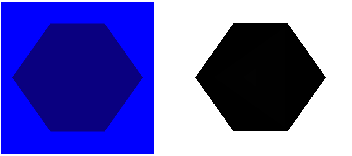
Which seems much more reasonable: as I see it, the result should be uniformly purple (red faces+blue background with transparency). It seems to me that in the first case, there are some back-faces that do participate in the transparent rendering twice, and some do not (there are two triangles in each face of the cube, of course: one of each pair seems to behave differently).
I need back-face culling disabled and a double-sided material for more complex geometries. How can I achieve a something similar to the second picture, with back-face culling disabled and a double-sided material?
