
torch
 torch copied to clipboard
 mlverse
different GPU memory use between torch in R and pytorch
I have some code here where I'm running the same models on the same random data to compare torch in R vs pytorch.
One thing that I'm noticing is that the memory consumption on the GPU seems quite different for torch in R and pytorch.
For example:
ResNet: peak GPU memory is around 3.2GiB . It's also still growing a bit even after it's been running for a few epochs. In contrast the same model in pytorch is 1077MiB and the memory use doesn't budge after the beginning.
For my Transformer model I get peak GPU memory of 3.2 GiB as well in R but in pytorch 839MiB
This is quite a lot of difference, 3-4x.
Any idea what could be the cause?

@egillax I'll take a look at the code more closely later but in general the reason for this is the difference between R garbage collector and python's.
The R garbage collector is very lazy, ie, it will only run when R needs more CPU memory from the OS. Since R doesn't know at all about GPU memory and GPU tensors uses very few CPU memory, it will in general allow more uncollected tensors in the session, which means higher peak memory usage.
That shouldn't be a problem though because in our implementation LibTorch will call R's gc if it's running out of GPU memory:
https://github.com/mlverse/torch/blob/76cebab8addff3169510649cf83d80e98807b2bd/lantern/src/AllocatorCuda.cpp#L13-L26
You should be able to have similar PyTorch peak usage by more aggressively calling gc() but that shouldn't be necessary at all.

That shouldn't be a problem though because in our implementation LibTorch will call R's gc if it's running out of GPU memory:
I've actually been sometimes running out of memory using R. I've a 4GiB gpu on my laptop and running this Transformer model sometimes will run out of memory while in pytorch it only uses 839MiB. I've also tried running gc() at various points but never seen it lower the GPU memory in use as reported by nvidia-smi.
I'll look more closely at the code now. nvidia-smi is not really reliable to tell how much memory it's actually using because LibTorch uses a Caching Allocator, so the memory is not necessarily returned to the OS, but reserved for later allocations.
Comparing both implementations based on cuda_memory_stats(), I see the following:
Peak memory usage with torch for R is larger but adding a gc(full = TRUE) right before batch <- self$batchToDevice(dataset[b]) was enough to achieve the same peak memory usage as PyTorch.
In theory, a larger peak memory usage shouldn't be a problem because we call GC when LibTorch requires more memory.
There's one case though that could be problematic:
We can only call R's gc when in the main thread but backward() might require more GPU memory and is run from different threads, thus, we wouldn't be able to call it and could fail with OOM error. Maybe we want to always call gc() whenever backward() is called, so any pending-to-freed memory is already given back to LibTorch. I will put this idea in a branch and ask you to try it out and see if it fixes the OOM you were getting.
Here's the data I got:
See memory allocation in PyTorch: (After 2 epochs) torch.cuda.memory_summary().
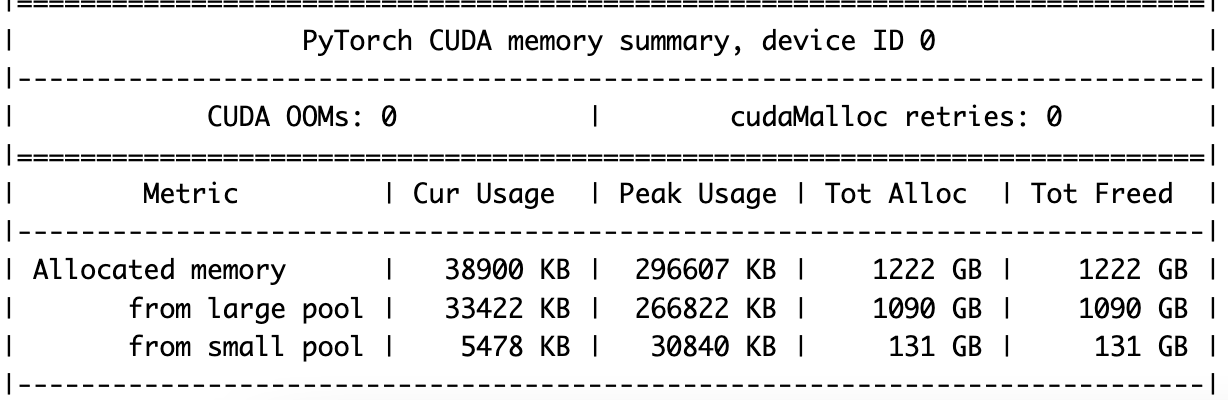
In R when forcing more GC:
> scales::number_bytes(torch::cuda_memory_stats()$allocated_bytes$all$current, units = "si")
[1] "40 MB"
> scales::number_bytes(torch::cuda_memory_stats()$allocated_bytes$all$peak, units = "si")
[1] "359 MB"
> scales::number_bytes(torch::cuda_memory_stats()$allocated_bytes$all$allocated, units = "si", symbol = "GB")
[1] "1 091 GB"
> scales::number_bytes(torch::cuda_memory_stats()$allocated_bytes$all$freed, units = "si", symbol = "GB")
[1] "1 090 GB"
And here's R without forcing GC:
> scales::number_bytes(torch::cuda_memory_stats()$allocated_bytes$all$current, units = "si")
[1] "40 MB"
> scales::number_bytes(torch::cuda_memory_stats()$allocated_bytes$all$peak, units = "si")
[1] "2 GB"
> scales::number_bytes(torch::cuda_memory_stats()$allocated_bytes$all$allocated, units = "si", symbol = "GB")
[1] "1 087 GB"
> scales::number_bytes(torch::cuda_memory_stats()$allocated_bytes$all$freed, units = "si", symbol = "GB")
[1] "1 087 GB"
Unfortunately the solution of adding gc(full = TRUE) to the training loop causes quite a slowdown, more than 2x. Using the full-gc branch (not sure it was ready for testing but tried it anyway) causes a slow down of about 30% but doesn't allow me to increase the batch size without an OOM error.
I did try to see how big of a batch I could train for my ResNet in pytorch, turns out I can fit a batch of 37k without an OOM error. For torch in R and adding the full gc to the training loop I got up to 13k. Using the full-gc branch did not allow me to increase it from the default 2k without OOM error. I would expect and hope to be able to fit a similarly sized batch with similar performance as in pytorch.
@egillax Still not ideal but I made a few changes to how we call the garbage collector from backward. That should make it better at handling those situations where un-collected tensors are still there during a backward call that will require more GPU memory.
It's definitely better in terms of memory, and the performance hit is not as severe, it's mostly now during the first epoch. The memory use is still higher than in pytorch though.
But there is another issue I was wondering in terms of memory. I'm doing a hyperparameter search and the gpu memory seems to grow with each iteration. Just a little bit but enough to cause OOM errors about halfway through. I've gone through the code line by line a few times to make sure I'm detaching tensors and moving to cpu if storing values like losses. And I've also tried calling gc(full=T) between iterations. I've also stopped after the first iteration, removed all variables with rm(list=ls()) and then called gc(full=T). But still the gpu memory doesn't budge, and when looking at torch::cuda_memory_stats it seems the memory still occupied is the reserved_bytes. So my question is, is the R gc() able to reach memory reserved by the cuda caching allocator when freeing? Should it? In python I've had this happen and then I've used torch.cuda.empty_cache() between iterations. Would it make sense to have that available from torch in R ?
Yes, the first epoch is slower because PyTorch will ask memory from the OS more often, and thus triggering a gc call.
Later, the memory should be already in 'reserved' state making it faster.
Sure, we can make torch.cuda.empty_cache() from R. The reserved bytes is memory that pytorch has allocated but didn't return to the OS. It might be that it's reserved in large/small segments in a way that it doesn't work for the next iteration of the hyperparameter optimization. Thus using empty_cache() could help.
The peak should still be higher for small models, but in my tests the largest model that fitted with R was the same that fitted with pytorch.
Regarding the leaked memory. It could be a bug in our c++ implementation if allocated memory is growing. Do you mean that the allocated_memory (as returned by the memory stats) increases between iterations or just what nvidia-smi shows? The gc won't free reserved memory, because that has already been released by R, but LibTorch will use it as needed to allocate tensors, without having to ask more memory from the OS.
Thanks for helping me understand all this. I was looking at nvidia-smi, which you already told me wasn´t the best but I guess it's an old habit. Would you suggest I track allocated_bytes.all current to look for memory leaks?
Sure, no worries @egillax ! It's really great that you are bringing those points.
Yes:
torch::cuda_memory_stats()$allocation$all$current
Should be the same as the value in a clean session when you rm all variables and gc(full=TRUE).
I think this memory management session in the pytorch docs is very useful: https://pytorch.org/docs/stable/notes/cuda.html#memory-management
Almost everything applies to torch for R.