

 mltframework
Switching external monitors results in wrong position, crash etc.
Shotcut 19.07.15 Windows 10 (broken on older versions too)
In a setup with multiple monitors, switching between external monitors doesn't work reliably. My display setup is: [2][3] [1] were display 3 uses a separate graphics card. Resolutions are 1920x1080 on the external displays and 2736x1824 on internal display.
When selecting an external monitor for the first time (or when restarting the application with an arbitrary external monitor set), the positioning "kind of" works as intended BUT
1.) screen nunbers are inconsistent between shotcut and windows: windows screen 1 -> shotcut screen 0 windows screen 2 -> shotcut screen 2 windows screen 3 -> shotcut screen 1
2.) switching from external monitor 1 to external monitor 2 will position video on screen 0 instead, trying to switch back to none in this state will KEEP a working full screen video display on screen 0
3.) switching from external monitor 1 to none will often result in monochrome video overlaying the whole shotcut window, rendering the UI useless (tool tips will still work)
4.) switching from external monitor 2 to external monitor 1 will always result in wrongly positioned video overlaying part of shotcut screen 0 (the x-coordinate seems right, but y-coordinate is at top of screen 0.
5.) switching back from external monitor 1 to external monitor 2 will result in wrongly positioned video INSIDE a black box overlaying the left side of screen 0 (right border of the black box seems right, but video size is wrong)
6.) switching back to external monitor 1 will SHRINK the video (no black box), top left corner of video overly is the same as in 4. x/y size of video is exactly 1/2 of desired display size (960x540)
7.) switching external monitor back and forth repeatedly while video is playing will always result in a crash (application closes)
8.) running shotcut on the display using the external graphics card and switching external monitors betwen displays of the internal graphics doesn't behave much better - I'll spare you the details...
9.) now for the good news: you don't need an external graphics card to reproduce a crash. Removing windows screen 3 (including the whole hardware) completely from my setup and positioning screens of the internal graphics card side-by-side will still crash shotcut when trying to switch from etxternal monitor 1 to none while playing video. If video is not playing, it will produce the same result as in 3.
I observed similar behaviour on three other systems with completely different hardware, including a configuration where the integrated graphics can handle three monitors simultaneously.

1.) screen nunbers are inconsistent between shotcut and windows:
The GUI library we use (Qt) does not support getting screen numbers from the OS. It has its own order. I would like to add a description and Qt v5.9 added a model(), but that is not working and returns only empty string. I can display resolution, and that may help. I am not particularly interested to add Windows-specific code but will consider a pull request from someone else.
2.) switching from external monitor 1 to external monitor 2
Not observed, but I have a different result with no video anywhere.
3.) switching from external monitor 1 to none
not reproduced here
4, 5, & 6 are variations on 2 with different results here
7.) switching external monitor back and forth repeatedly while video is playing will always result in a crash
not reproduced here with multiple tests while testing above scenarios
For now, sometimes you need to restart the app. And Shotcut does not yet respond to screen-added or screen-removed events.
I did all my testing with only external graphics card. I have another system where I can test 2 monitors on internal graphics only. I do not have anything where I can test internal and external.

I made a few changes to support this including fixing switching between external monitors that works for me plus one that might improve stability by stopping the engine sooner than later when a restart is issued - before apply changes.
I made a few changes to support this including fixing switching between external monitors that works for me plus one that might improve stability by stopping the engine sooner than later when a restart is issued - before apply changes.
Thanks for looking into this. If there is a way to access a shotcut build with your recent commits I could try this out on my setup(s).
You can get a nightly build here: http://build.mltframework.org/viewLog.html?buildId=63010&tab=artifacts&buildTypeId=bt43
It is an improvement, but there is still a problem. If I set an external montior and switch back to none, I get a strange kind of video overlay on part of the UI (which is actually moving if I play)
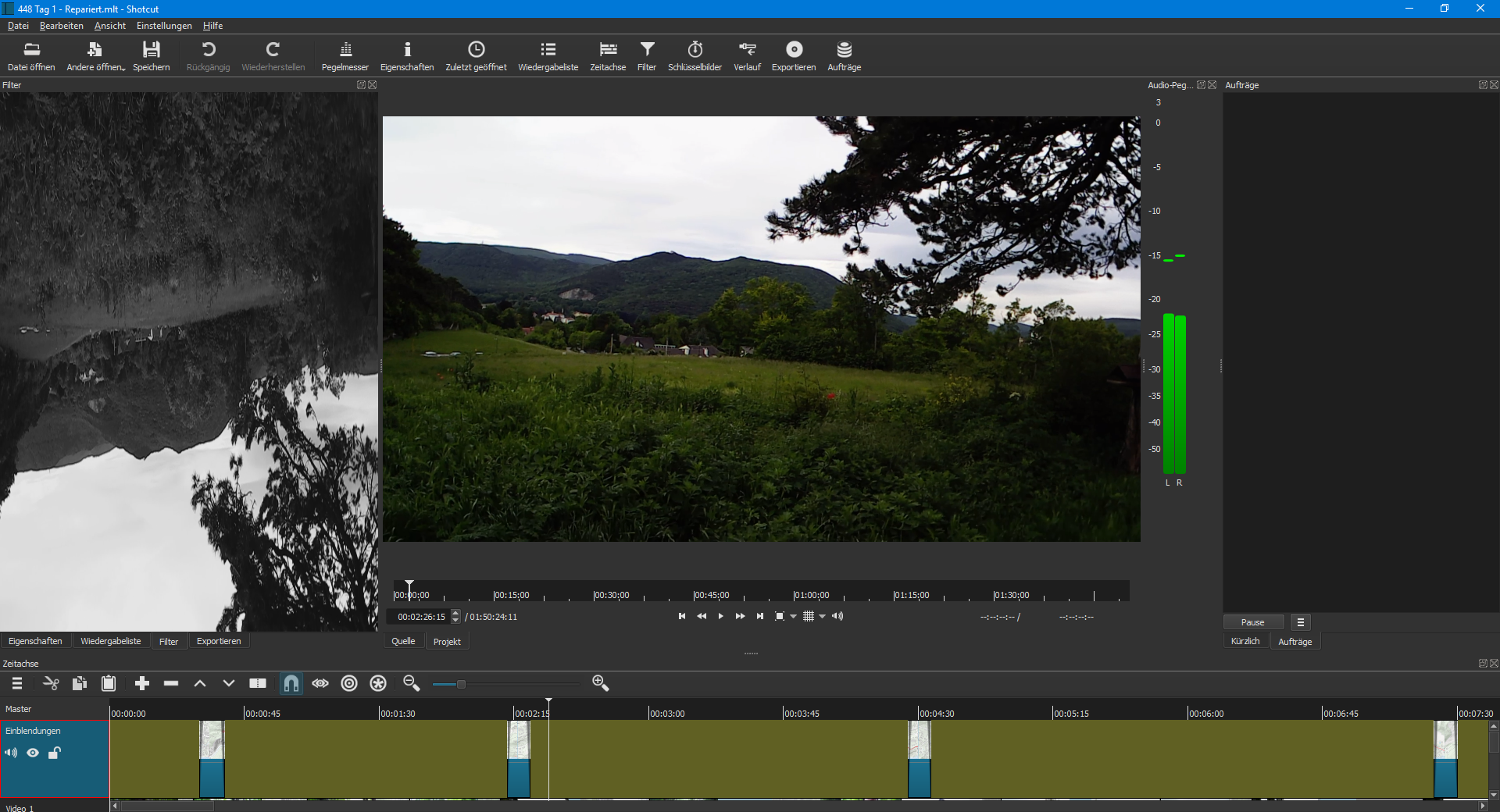
If (and only if) I set an external monitor again, I can partially restore the UI if I resize the filter pane (switching to properties and back to filter will not do the trick), however, some text elements are not displayed correctly at first. They get restored after I switch between clips.
Aside from that everything else seems to work fine i.e. switching back and forth between external monitors does exactly what it is supposed to do.
I have seen something like that before, and it is related to OpenGL and a race condition around texture IDs. For your technical curiosity, the player, Filters, Keyframes, and Timeline panels use technologies called Qt QML and Qt Quick. Quick draws and composes using OpenGL into a texture. The Shotcut player code also uses OpenGL using an under-painting API in Quick. Something is done in a non-thread-safe manner, and some drivers have better protection against the bad practice than others. I was not getting this problem on my main system, but I do get some temporary green glitches. I made a small change that improves things. Then, I found a system that has a similar problem (but it covers the entire window), and this small change did not fix it. I also found that I had Settings > Display Method = DirectX, and changing it to OpenGL makes it work. Going back to my main system, and I was using OpenGL. Changing it to DirectX did not make a difference (still works). Software mode works for me on either. You can try again after tonight's nightly build, but I do not yet have a foolproof fix for all systems.
OK, shotcut 20190727 really behaves better, although it is sitll not perfect.
Open GL: Switching external monitors seems to work in arbitrary configurations, the strange overlay is gone, the green glitch remains most of the time, but it goes away after a few seconds at most.
Switching external monitors during playback also usually works although it restarts the video instead of resuming play at the current location. Occasionally it will show the play state on the UI button but there is no playback - however, it didn't crash on me and the button still works i.e. i can resume play by klicking it twice.
DirectX: Switching external monitors works as long as you don't switch back to none. Switching in DirectX appears to be faster than OpenGL.
With DirectX I get a monochrome video overlay on the whole shotcut window if I try to switch back to none. The video is actually functional i.e. playback works with some flickering. I can restore the UI if I manage to find the menu and switch to an external monitor again, then resize the shotcut window and the UI is there.
Switching external monitors during playback works like for OpenGL.
Now the bad news:
Trying to set Mesa as display method with 20190727 gets me this (at least on my main system):
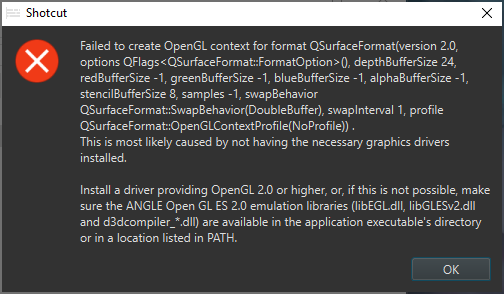 I had to reset the opengl property in regedit to get shotcut working again.
Just an inconsistency: Moving the shotcut window above the external monitor display will display the selected external monitor setting as "none", but the external monitor display is still there. Although the menu item is already selected, I can still use it to get the UI in a consistent state. I'd expect the menu to display the actual state (if it says "none" then where is my video in the shotcut window?) even if I move the window and update the availability of external monitors once I switch external monitors manually.
Shotcut also hangs (not responding) when I hibernate the machine with external monitor set to none and then try to switch to an external monitor immediately after wakeup. This seems to be reproduceable (tried it a few times), it doesn't make a difference whether or not the correspoding screens are rendered on the same graphics adapter or not..