

 mkleehammer
pyodbc, macOS, and iODBC
Environment
- Python: any
- pyodbc: any
- OS: macOS / OS X / Mac OS X
- DB: any ODBC- or JDBC-accessible DB
- driver: any iODBC-compatible driver
Issue
pyodbc on macOS doesn't work with ODBC drivers that work with iODBC and with their other macOS apps (Microsoft Excel, Tableau, Stata, etc.).
pyodbc documentation all pushes unixODBC, which requires extra installation on macOS. UnixODBC does not make use of the default macOS ODBC configuration file and driver locations (/Library/ODBC/ and ~/Library/ODBC/), among other departures from conventional Mac operation. UnixODBC has no macOS-native implementation (Frameworks, admin apps, etc.), while iODBC has always provided fully-native implementation (Frameworks, dylibs, admin apps, sample apps, etc.).
Apple has shipped iODBC libraries (in dylib form) in macOS (a/k/a OS X, a/k/a Mac OS X) since 10.3.x, and continues to do so in 10.13.x.
iODBC has been built and updated for compatibility with all versions of Mac OS X since 10.0, provided as both dylibs and Frameworks.
We (OpenLink Software -- maintainers of iODBC since the 1990s, vendor of ODBC drivers and various other products, and my employer) would like to help you get pyodbc built and working properly with the macOS-native iODBC (whether you link to the dylibs or the Frameworks; we do recommend the latter, as chosen by most macOS GUI developers, including Microsoft). (Of course, you can continue providing the UnixODBC-linked version, but this should be a user-chosen-option, not a forced break from everything else macOS.)
We do not expect you'll have much if any difficulty, but if you do, please use open a Case in our Support System.

iODBC used to be the default DM for macOS builds, but I thought Apple stopped shipping it quite a while back. They also added deprecation warnings to the header files.
I would be happy to support both on macOS, but will need to figure out how to support both cleanly. Simply using the first one found leads to tons of questions since it might not be the one the user actually wants.
I'm very hesitant to make iODBC the default, particularly with pip provided binaries. I like to get paid for my work too, but a lot of the drivers use the open source unixODBC. Users of pip may not be familiar with things as simple as setup.cfg files, etc. If there was an easy way to add flags to pip requirement files it would be easier. Perhaps on macOS I provide two different packages, specific to the driver manager?
Maybe there is some way to build 2 different dynamically loadable backends, and require some initial configuration when connecting? pyodbc.iodbc.connect vs pyodbc.unixodbc.connect?
Any suggestions on how to support both?

iODBC remains the default in macOS, as of 10.13.3.
Apple did stop shipping their home-grown ODBC Administrator.app some while ago, and told us (i.e., OpenLink) that they would encourage users to shift to the iODBC Administrator.app (and iODBC Administrator64.app) which we had provided from day one.
Apple never did ship the Frameworks build of iODBC, for reasons we were never told, which remains surprising and frustrating, as many significant apps (not least being Microsoft Office) build against and require the Frameworks; they cannot operate with just the dylibs -- which also means they cannot run with just unixODBC, in its standard build.
Your comment about "the open source unixODBC" suggests that you may not realize that iODBC is also open source and is also here on github.
iODBC and unixODBC are generally API-equivalent from the application and driver perspective. iODBC has full macOS-native UI implementation (and has since roughly Mac OS 9.0), which differs from unixODBC. Homebrew and MacPorts projects do tend to have different variants for linking to iODBC vs unixODBC, because these are built on each user's machine, and the user might prefer to link to Frameworks vs dylibs, or to dylibs in /usr/lib vs /lib. Once built, the binaries don't usually care, as long as the library names and locations are consistent, as they are in a default environment.
You building against iODBC, whether Frameworks or dylibs, does not limit user choice of drivers in any way. FOSS and commercial drivers alike build and work fine, with no cost for use of the iODBC SDK.
I am unsure if this issue is related in any way to the ones opened by me (pip and pip3 failing on MacOS 10.12). But would it be possible to fall back to the preinstalled iODBC, if no unixODBC can be found in the usual places?
Looking at "setup.py" (starting around line 162) there would be three places to look in?
We have been using PyODBC for years very succesfully to automatically store data into FileMaker DB on MacOS.
Many thanks.

Any workaround?? That would be helpful. Strangely enough, I don't understand why MSQL-Tools works while Python doesn't.
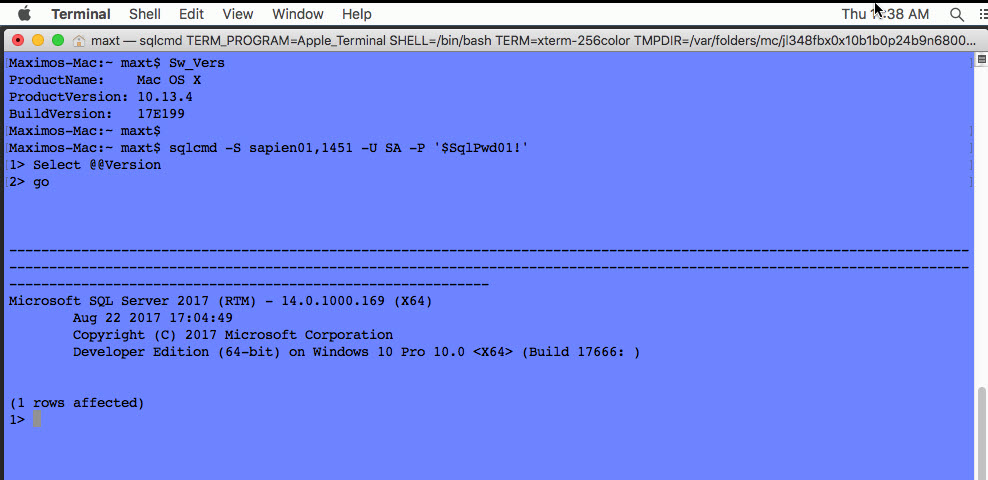
Ok! I'm a newbie with MacOS cmdline which I'm trying to get used to. I got must of what I want to use set on my test MacOS.
Any help would be great! :)
Maximos-Mac:~ maxt$ Sw_Vers
ProductName:	Mac OS X
ProductVersion:	10.13.4
BuildVersion:	17E199

I don't understand why MSQL-Tools works while Python doesn't.
That uses the Microsoft ODBC Driver for SQL Server ("msodbcsql"), which depends on and thus installs unixODBC. Note that msodbcsql cannot be used with iODBC since it is currently a UTF-16 driver only, whereas iODBC is UTF-32.

I've been using Ubuntu and CentOS with Anaconda 3.6 Python (SQLServer installed). Then, I got msodbcsql17 installed with no issues.

Then, on MacOS, I install both the msodbcsql17 with mssql-tools-Tools and is working. (https://docs.microsoft.com/en-us/sql/connect/odbc/linux-mac/installing-the-microsoft-odbc-driver-for-sql-server?view=sql-server-2017#os-x-1011-el-capitan-macos-1012-sierra-and-macos-1013-high-sierra)
There's a blog post that saying the ini file is missing from a user folder. But using Finder seems restricting getting to those folder (contrary to using Nautilus in Linux).
Then again, I'm new to Mac!
So, I'm thinking, if this is working for MS SqlCmd then it should have work for Python.
:)
Maximos-Mac:~ maxt$ python --version
Python 3.6.4 :: Anaconda, Inc.
@TallTed I'm still not clear on the state of ODBC on the Mac and I need to spend some time looking at the Frameworks vs dylibs. However, I don't think that would really provide a way forward. My problem right now is a lot of people don't want to build from source on macOS and expect pyodbc wheels to work out of the box. IIRC, the two projects have different Unicode character implementation sizes (not sure what term to use here ;) which is compile-time info, not to mention the linking the to the libraries.
If half of the users use unixODBC (via brew, usually) and half want iODBC, making either the default is not going to work well. The only way I can see this working is to make pyodbc-unixodbc and pyodbc-iodbc for macOS, which I'm not fond of. Am I missing anything?
Probably the first step is to make compiling with iODBC an option via the setup.cfg file and a command-line option just to get it back to a testable state. Does that sound right to you?

Probably the first step is to make compiling with iODBC an option via the setup.cfg file and a command-line option just to get it back to a testable state. Does that sound right to you?
I suppose this would be what I was asking about in #385 ?