

 mkaring
Referencing a System.Action event in another DLL causes error
I get an error when running Confuser EX if I try to add a delegate to an event defined in UnityEditor.dll (from Unity 2019.4) where the delegate type is System.Action.
- ConfuserEx Version: Confuser.Core 1.5.0+b5197549e4
- Target Framework: v4.7.1
- Operating System: Windows 10
My Code:
public class Test
{
    public Test()
    {
        // System.Action (not event) no problem.
        UnityEditor.Selection.selectionChanged += Method;

        // System.Action event causes problem.
        UnityEditor.EditorApplication.hierarchyChanged += Method;
    }

    public void Method() { }
}
Here's the compiled DLL: Animancer.Lite.zip
Error:
  [DEBUG] Executing 'Encoding reference proxies' phase...
  [ERROR] Failed to resolve a member, check if all dependencies are present in the correct version.
  Exception: dnlib.DotNet.MemberRefResolveException: Could not resolve method: System.Void UnityEditor.EditorApplication::add_hierarchyChanged(System.Action) (UnityEditor, Version=0.0.0.0, Culture=neutral, PublicKeyToken=null)
     at dnlib.DotNet.MemberRef.ResolveMethodThrow()
     at Confuser.Protections.ReferenceProxy.MildMode.ProcessCall(RPContext ctx, Int32 instrIndex)
     at Confuser.Protections.ReferenceProxy.ReferenceProxyPhase.ProcessMethod(RPContext ctx)
     at Confuser.Protections.ReferenceProxy.ReferenceProxyPhase.Execute(ConfuserContext context, ProtectionParameters parameters)
     at Confuser.Core.ProtectionPipeline.ExecuteStage(PipelineStage stage, Action`1 func, Func`1 targets, ConfuserContext context)
     at Confuser.Core.ConfuserEngine.RunPipeline(ProtectionPipeline pipeline, ConfuserContext context)
     at Confuser.Core.ConfuserEngine.RunInternal(ConfuserParameters parameters, CancellationToken token)
It also gives a list of Installed Framework Versions which I can post if necessary (it's quite long).
Crproj file:
<?xml version="1.0" encoding="utf-8"?>
<project baseDir="bin\2019.4.Editor" outputDir="..\..\Confused\2019.4\Internal\Core" seed="666" xmlns="http://confuser.codeplex.com">
    <rule preset="none" pattern="true">
        <protection id="anti ildasm" />
        <protection id="ctrl flow" />
	<protection id="ref proxy" />
        <protection id="rename" />
    </rule>
    <module path="Animancer.Lite.dll" />
</project>

This issue and #369 are closely related and can likely be fixed the same way.
What your Confuser project file is missing is the probe path to your unit installation. I only got a relatively old version of Unity on my system. All the assemblies are located at C:\Program Files\Unity\Editor\Data\Managed for me. So in that case adding the following line to the project does the trick:
<probePath>C:\Program Files\Unity\Editor\Data\Managed</probePath>
You can also set that path using the user interface:
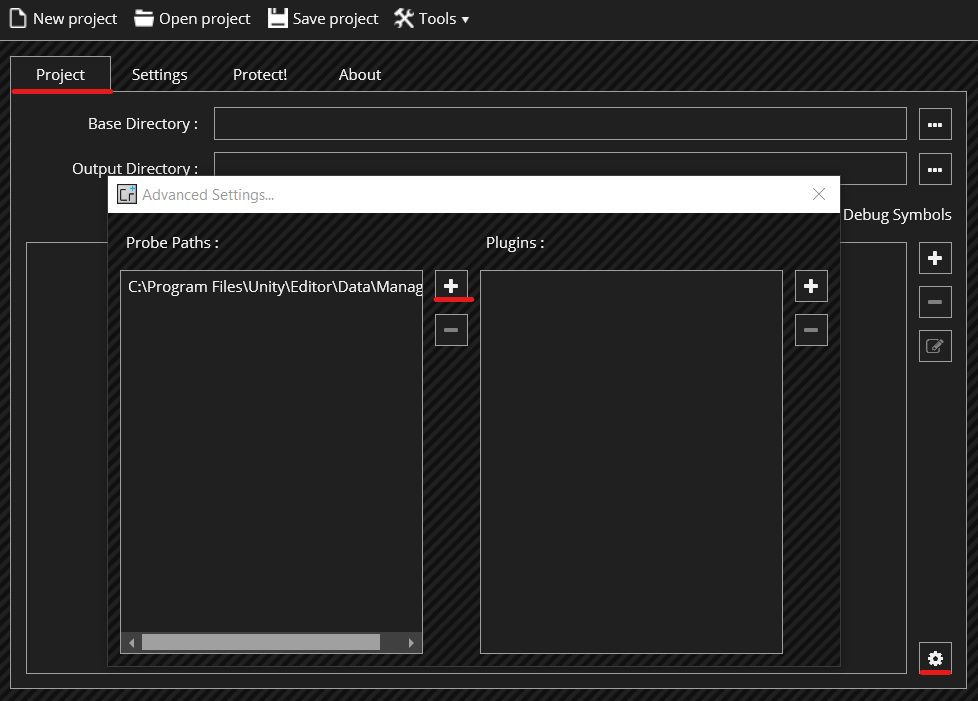
This should also fix #369

I'm using the CLI (from a post-build event in Visual Studio), but I can't figure out where to put that probe path.
...
    <module path="Animancer.Lite.dll" />
    <probePath>C:\Program Files\Unity\Hub\Editor\2019.4.0f1\Editor\Data\Managed</probePath>
</project>
That still gives the same error as before, but putting it before the module or rule gives a different error:
Confuser.Core.Project.ProjectValidationException: The element 'project' in namespace 'http://confuser.codeplex.com' has invalid child element 'rule' in namespace 'http://confuser.codeplex.com'. List of possible elements expected: 'probePath, plugin' in namespace 'http://confuser.codeplex.com'.
Also, the links in that error are dead.
Also, I would have assumed that it would look in the same directory as the target assembly which for me is the bin folder where Visual Studio already copies all the other referenced assemblies.
It checks the baseDir for the referenced assemblies. So it needs the referenced assemblies either in the directory referenced in baseDir or in the probe paths.
Your project file including the probe path should look like this:
<?xml version="1.0" encoding="utf-8"?>
<project baseDir="bin\2019.4.Editor" outputDir="..\..\Confused\2019.4\Internal\Core" seed="666" xmlns="http://confuser.codeplex.com">
    <rule preset="none" pattern="true">
        <protection id="anti ildasm" />
        <protection id="ctrl flow" />
	<protection id="ref proxy" />
        <protection id="rename" />
    </rule>
    <module path="Animancer.Lite.dll" />
    <probePath>C:\Program Files\Unity\Hub\Editor\2019.4.0f1\Editor\Data\Managed</probePath>
</project>
Yeah, that's exactly what I tried and the referenced assemblies have always been in the base dir since Visual Studio copies them there as part of a build.
Here are the Referenced Assemblies.zip in case that can help you identify the problem.
Is there anything else I should try?
Okay, one thing of note is that the version information doesn't line up with the assembly for some reason.
You can add the following line to your project to force ConfuserEx to use a specific assembly:
<module path="UnityEditor.dll" external="true" />
That doesn't seem to change which error I get.
Here's a Visual Studio 2019 project to replicate the issue. Just open the sln and build it in debug mode which runs Confuser as a post-build command. The zip includes the Unity DLLs and they get copied into the bin directory so there shouldn't be any room for version mismatches.
For some reason it's not giving the error for the EditorApplication.hierarchyChanged property in that project, but it's still giving the error for having a finalizer in a class that inherits from one of Unity's classes (as per https://github.com/mkaring/ConfuserEx/issues/369).
I grabbed the Confuser source code and managed to get it working with a couple of modifications wherever I got exceptions.
- In
VTable.ConstructVTableI can see a https://github.com/mkaring/ConfuserEx/commit/4ee7f749ab1aeb781b2d1cb93730fbc08f9d7e6d changed it fromSingletoSingleOrDefaultbut then it goes and throws an exception if it's null anyway which seems to defeat the point. So I just changed it toif (targetSlot != null)then do the rest of that block.
//if (targetSlot == null) {
//	throw new Exception($"method [{method}] not found.");
//}
if (targetSlot != null) {
	CheckKeyExist(storage, vTbl.SlotsMap, targetSlot.Signature, "MethodImpl Normal Sig");
	targetSlot = vTbl.SlotsMap[targetSlot.Signature]; // Use the most derived slot
													  // Maybe implemented by above processes --- this process should take priority
	while (targetSlot.MethodDef.DeclaringType == typeDef)
		targetSlot = targetSlot.Overrides;
	vTbl.SlotsMap[targetSlot.Signature] = targetSlot.OverridedBy(method.Value);
}
- In
MildMode.ProcessCallit's callingDnlibUtils.ResolveThrow. For some reason if I compileConfuser.Core.DLLit fails to run when I try to use it so I can't modifyResolveThrowdirectly. Instead, I just made a copy of it inMildModewhich callsResolveMethodinstead ofResolveMethodThrowand call that to return safely instead of throwing.
public static MethodDef Resolve(IMethod method) {
	var def = method as MethodDef;
	if (def != null)
		return def;

	var spec = method as MethodSpec;
	if (spec != null)
		return spec.Method.ResolveThrow();

	//return ((MemberRef)method).ResolveMethodThrow();
	return ((MemberRef)method).ResolveMethod();
}

public override void ProcessCall(...
	...
	if (Resolve(target) == null)
		return;
	if (!target.ResolveThrow().IsPublic...
- In
VTableAnalyzer.PostRenamethe call toUtils.RemoveWherewas causing...MissingMethodException: Method not found: 'Void Confuser.Core.Utils.RemoveWhere...which I think was just because I can't use a newly compiledConfuser.Core.dll. I'm not sure what the actual problem is because opening the dll in ILSpy shows that it does in fact have that method with the same signature, but anyway I was able to resolve that by copyingRemoveWhereintoVTableAnalyzerand having it use that one instead.
With those changes made, I recompiled Confuser.Renamer.dll and Confuser.Protections.dll, put them into the downloaded v1.5.0 release, and everything seems to be working. I can Confuse my DLL, it looks nice and obfuscated in ILSpy, and it works properly in Unity. But I can't be sure if those changes are actually a good idea since I don't know anything about the actual purpose of those methods. I get the feeling I'm just treating the symptoms rather than fixing the actual problem (some sort of versioning issue based on your suggestions, though I don't really understand it).
I also ran into another bit of odd behaviour too. If I build my DLL for Target Framework v4.6.1 and bring it into Unity everything works fine. But if I Confuse it and bring it into Unity anywhere my other scripts try to access a ref readonly property in the confused DLL gives error CS0570: 'Class.Property' is not supported by the language. Changing the Target Framework to v4.7.2 and Confusing it fixes the problem. But according to this page ref readonly returns were only added in C# 7.2 and according to this table C# 7.2 corresponds to framework v4.7.1 so I don't understand how my DLL could compile and work when I had it set to v4.6.1.
It checks the
baseDirfor the referenced assemblies. So it needs the referenced assemblies either in the directory referenced inbaseDiror in the probe paths.Your project file including the probe path should look like this:
<?xml version="1.0" encoding="utf-8"?>
<project baseDir="bin\2019.4.Editor" outputDir="..\..\Confused\2019.4\Internal\Core" seed="666" xmlns="http://confuser.codeplex.com">
    <rule preset="none" pattern="true">
        <protection id="anti ildasm" />
        <protection id="ctrl flow" />
	<protection id="ref proxy" />
        <protection id="rename" />
    </rule>
    <module path="Animancer.Lite.dll" />
    <probePath>C:\Program Files\Unity\Hub\Editor\2019.4.0f1\Editor\Data\Managed</probePath>
</project>
Hi @mkaring, for the "probePah" attribute, can I use a relative path?

@mkaring
- Can we insert that path automatically upon Unity detection ?
- Is there hints inside the Assembly itself that would allow us to know when to use and not to use the probePath in the crproj ?
- Would you accept PR ?

@XenocodeRCE:
- This will not be as easy as it sounds, because at the point when the detection of Unity can take place, the list of paths for the probing is already fixed.
- The reference to the Unity assemblies is likely a good indicator :wink: Those assemblies should have fixed names.
- Yes ❤️