

 mjmlio
Social elements not rendered horizontally on Outlook mobile web client
Describe the bug
The mobile web version of the Outlook client does not seem to respect the mode="horizontal" attribute on the mj-social element. It stacks the elements vertically instead of displaying them in one row.
To Reproduce Steps to reproduce the behavior:
- Open the MJML application
- Paste the following snippet:
<mjml>
  <mj-body>
    <mj-wrapper full-width="full-width">
      <mj-section padding-bottom="0">
        <mj-column padding="0">
          <mj-social font-size="15px" icon-size="30px" mode="horizontal" padding="0" align="center">
            <mj-social-element name="instagram-noshare" href="https://mjml.io/" href="https://mjml.io/">
            </mj-social-element>
            <mj-social-element name="facebook-noshare" href="https://mjml.io/">
            </mj-social-element>
            <mj-social-element name="youtube-noshare" href="https://mjml.io/">
            </mj-social-element>
            <mj-social-element name="twitter-noshare" href="https://mjml.io/">
            </mj-social-element>
          </mj-social>
        </mj-column>
      </mj-section>
    </mj-wrapper>
  </mj-body>
</mjml>
- Send the HTML to an outlook address.
- Open Chrome and use the developer toolbar to switch to the "mobile device mode"
- Login to your Outlook account, open the email and notice that the icons are stacked vertically instead of horizontally
Expected behavior The social icons are supposed to be rendered horizontally in one single row on both desktop and mobile views.
MJML environment (please complete the following information):
- OS: MacOS 10.14.6
- MJML Version: v^4.6.2
- MJML tool used: MJML App v3.0.2
Email sending environment(for rendering issues):
- Platform used to send the email: Mailjet
Affected email clients (for rendering issues):
- Email Client: Outlook Mobile on the Web
- OS: MacOS
- Browser: Chrome in mobile device mode (using dev tools)
Screenshots


I'm not sure which version of outlook you're using, i've just tried it on my account and it renders fine ?


Just use a mobile device or Chrome with mobile device mode enabled and open the email at https://outlook.live.com.
Ok, I can reproduce on iOS Safari. I don't know yet if we'll be able to fix it soon (or find a fix) as mobile Outlook.com isn't really a popular client, people tend to use the App instead of the website.
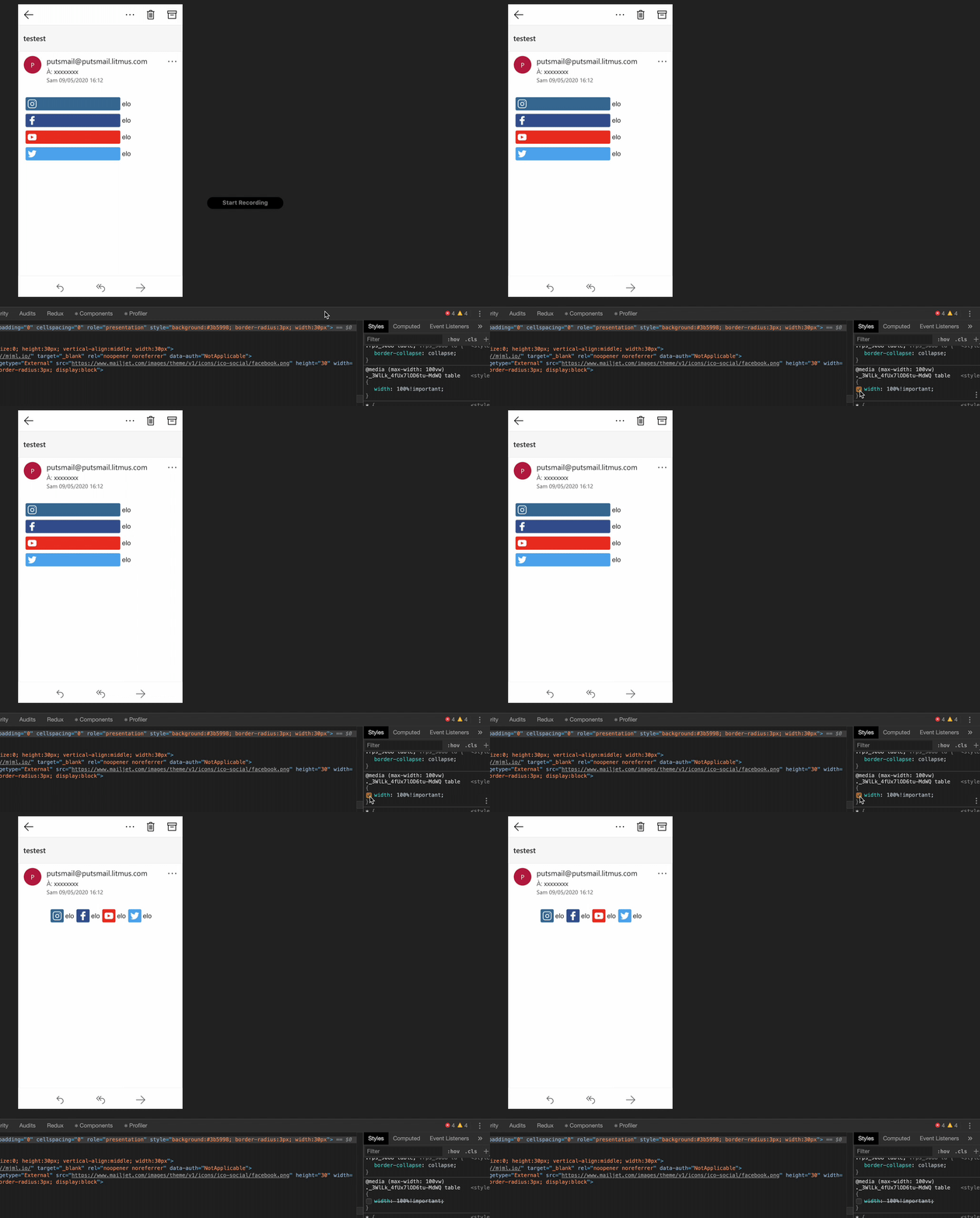
Well I don't know why this version of outlook have a special media query that force every table to a 100% !important.
Still not sure that we can really override this behavior from outlook, I don't know know if litmus partnership with Microsoft is still a thing https://litmus.com/microsoft-partnership but maybe we can forward this issue to them.
I'll try to get another shot at this maybe with a special media query that force this table to be inherit instead of 100% with https://howtotarget.email/#2019-10-15-outlook-dark-mode
