

 mjcrouch
p4 move on move/rename
Is your feature request related to a problem? Please describe. If i forget to manually p4 move/rename and instead just F2 in vscode it can lead to pain later on when trying to reconcile offline work.
Describe the solution you'd like
It would be good to have similar funcitonality to perforce.deleteOnFileDelete or perforce.addOnFileCreate for renaming/moving that happens automatically when a rename/move occurs.
Describe alternatives you've considered I'm aware there's an option to rename/move via the plug-in. Perhaps (if it's not already the case) it would be good to be able to set a shortcut for that.

I checked and there is a keybind for perforce move / rename but it doesn't seem to be working for me getting the following error when trying to move / rename via shortcut:
Cannot read properties of undefined (reading 'length')
Hi, thanks for raising
It would be good to have similar funcitonality to perforce.deleteOnFileDelete or perforce.addOnFileCreate for renaming/moving that happens automatically when a rename/move occurs.
I think I did look at adding this some time ago but found it challenging with a bunch of edge cases to consider. Having said that I think it might be fairly straightforward to: whenever there is a rename, run a p4 reconcile with the old name and the new name as inputs - this seems to work for me to open the files for move/delete and move/add - so maybe this is a good way to do it.
I checked and there is a keybind for perforce move / rename but it doesn't seem to be working for me getting the following error when trying to move / rename via shortcut:
There are two different move / rename commands:

- perforce.move - this allows you to move the file you currently have open in the editor, and already has a default shortcut
- perforce.explorer.move - this is used internally by the extension to provide the context menu command to move a file when you right click on it in the explorer (screenshot below), and won't work as a shortcut since it doesn't have any file for context
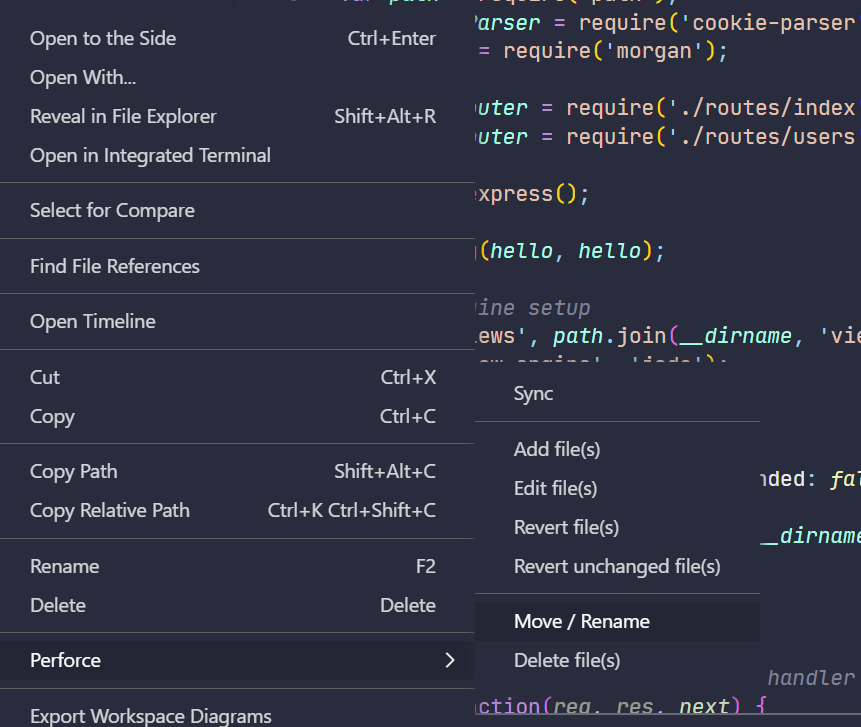
I'm assuming you've added a keybinding to the latter command and expected it to behave like the former, but let me know if that's not what happened or you think there's a better behaviour for a keybinding :)

@mjcrouch
I'm assuming you've added a keybinding to the latter command and expected it to behave like the former, but let me know if that's not what happened or you think there's a better behaviour for a keybinding :)
Yes that's exactly what I've done, thanks! :)
I was trying to use the other keybind by clicking the file in the explorer and then using the keybind which is when it was failing. In that case would it be possible to remove that option from the keybinds if it doesn't do anything?
In that case would it be possible to remove that option from the keybinds if it doesn't do anything?
Unfortunately no, we have to define the command to make it usable & have a description in the context menu, and all defined commands show up in the keybindings. If anything, I should probably just handle the error better (i.e. check that the command is being used in the right context and show a more sensible error message)