

 mjcrouch
Where is the Perforce context-menu?
Describe the bug: There doesn't seem to be a Perforce context menu anymore. Was it removed? Is there a config that turns the context menu off and on? Maybe I accidentally hit a checkbox in some setting somewhere? I used to be able to right-click on a file in the explorer view, and see a Perforce sub-menu containing relevant commands (edit, revert, etc.). Now that sub menu is no longer there.
BTW, I am using the latest VS Code (1.69.2) and extension (4.15.2) versions, respectively, with project files residing in various directories of a WSL-2 rh6 distribution, under Windows 10.
Expected behavior: To see a "Perforce" context menu submenu when right-clicking on a Perforce -managed file in the Explorer View
To Reproduce: Right-click a perforce managed file in the Explorer View
Versions & Details:
- Perforce extension: 4.15.2
- VSCode version: 1.69.2
- Operating System: Windows 10 / WSL-2 mounted rh6 distribution
- Perforce server details (if known):
- Are you using a multi-root workspace?: No
Additional context
Not a bug, just a question
Please open view -> Output, select "Perforce Log" from the dropdown and paste it here, if possible / relevant

Hi - assuming that all the other behaviours are working fine for this workspace and the specific files you are selecting?
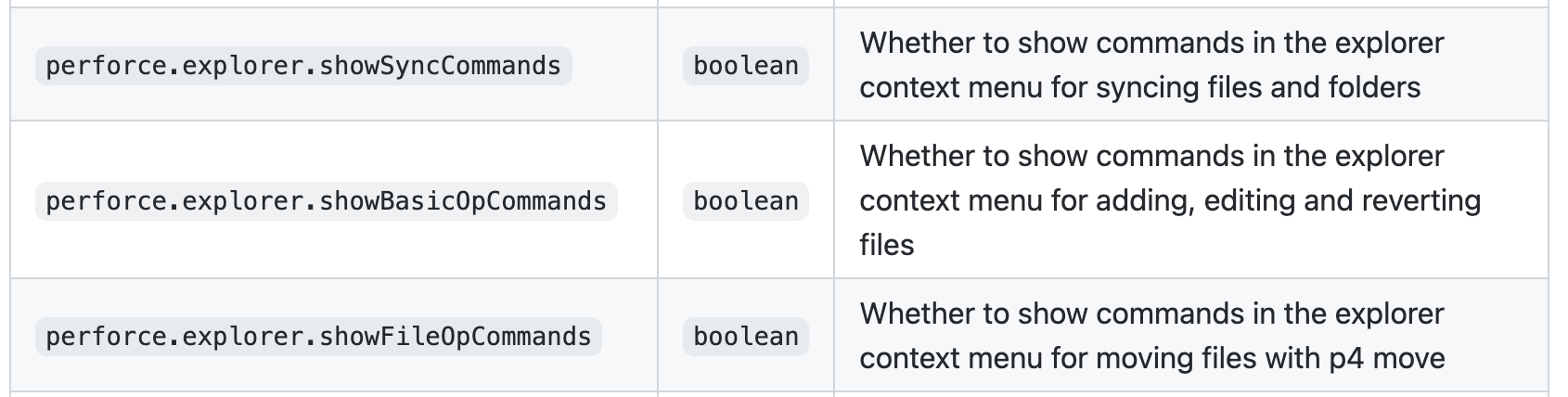
There are some settings for it (see screenshot from readme) though I would be surprised if you accidentally turned all 3 off!
If the rest of the features are working, but the context menus are still not working after checking the settings, it might be worth checking the console in the developer tools (Developer: Toggle Developer Tools) and see if there are any errors in the javascript log when you right click the file

I have set all three of those settings explicitly (true) in my user settings. Everything else seems to work (i.e., from the p4 button on the status bar).
Also, while I have your attention, the Changelist Search does not appear in the Source Control panel, either.
Note that the Perforce for VSCode (2020 fork) extension is installed both locally and in my WSL distro, but it is only enabled in the latter, not locally. My projects are all on linux (in WSL), but I am running VSCode on the Windows host.
Could that have something to do with either of those problems?
Thanks for responding!
From: Matt Crouch @.> Sent: Wednesday, July 20, 2022 3:26 PM To: mjcrouch/vscode-perforce @.> Cc: Miller, David @.>; Author @.> Subject: Re: [mjcrouch/vscode-perforce] Where is the Perforce context-menu? (Issue #232)
You don't often get email from @.@.>. Learn why this is importanthttps://aka.ms/LearnAboutSenderIdentification
[External Email: Use Caution when clicking on links and attachments]
Hi - assuming that all the other behaviours are working fine for this workspace and the specific files you are selecting?
There are some settings for it (see screenshot from readme) though I would be surprised if you accidentally turned all 3 off!
If the rest of the features are working, but the context menus are still not working after checking the settings, it might be worth checking the console in the developer tools (Developer: Toggle Developer Tools) and see if there are any errors in the javascript log when you right click the file
Reply to this email directly, view it on GitHubhttps://nam11.safelinks.protection.outlook.com/?url=https%3A%2F%2Fgithub.com%2Fmjcrouch%2Fvscode-perforce%2Fissues%2F232%23issuecomment-1190667028&data=05%7C01%7Cdavid.miller%40bgcpartners.com%7C3b7b921fbab541e8575308da6a859f0d%7Ccfeb5f5e839a44b8ab4647157d8f1241%7C0%7C0%7C637939419378762940%7CUnknown%7CTWFpbGZsb3d8eyJWIjoiMC4wLjAwMDAiLCJQIjoiV2luMzIiLCJBTiI6Ik1haWwiLCJXVCI6Mn0%3D%7C3000%7C%7C%7C&sdata=H7X45OCQB%2FU1UuGmgnv8avLGqEtWUOEVOT2rebJ3G20%3D&reserved=0, or unsubscribehttps://nam11.safelinks.protection.outlook.com/?url=https%3A%2F%2Fgithub.com%2Fnotifications%2Funsubscribe-auth%2FA2CM2DX342BNHZB42U2AGDTVVBHC7ANCNFSM535Y5IJA&data=05%7C01%7Cdavid.miller%40bgcpartners.com%7C3b7b921fbab541e8575308da6a859f0d%7Ccfeb5f5e839a44b8ab4647157d8f1241%7C0%7C0%7C637939419378762940%7CUnknown%7CTWFpbGZsb3d8eyJWIjoiMC4wLjAwMDAiLCJQIjoiV2luMzIiLCJBTiI6Ik1haWwiLCJXVCI6Mn0%3D%7C3000%7C%7C%7C&sdata=7mKzc%2FZDeD0F9Ojv5NNN%2Fmqvn6ySuUNQKKk7uVuHQzA%3D&reserved=0. You are receiving this because you authored the thread.Message ID: @.@.>>
DISCLAIMER
This communication may include confidential and privileged information, is for information purposes only, is not a recommendation or a trade confirmation, is not an offer to sell, or a solicitation of an offer to buy. If you are not the intended recipient, please advise the sender immediately and delete or destroy this communication and any copies. Use by other than intended recipients is prohibited. For additional disclosures, including disclosures relevant to your region, please see https://www.bgcpartners.com/disclaimers/electronic-communications-disclaimers-disclosures/
For disclosures related to how your personal data is processed in certain please see https://www.bgcpartners.com/privacy/
the Changelist Search does not appear in the Source Control panel, either.
the logic for whether or not to show this is simply whether there is a perforce client in your workspace / folder - i.e. if you can see the list of changelists / open files in the SCM view, then the changelist search should be available somewhere -
It is however possible to drag and drop views and move them in to random places or hide them inadvertantly. If it's lost, there should be a command in the command palettte "focus on search changelists view" which would locate it and open it. (Or in the extreme case 'reset view locations' which removes any custom locations and puts everything back.) If it still doesn't show up then something's wrong
Note that the Perforce for VSCode (2020 fork) extension is installed both locally and in my WSL distro, but it is only enabled in the latter, not locally. My projects are all on linux (in WSL), but I am running VSCode on the Windows host.
Could that have something to do with either of those problems?
In general, it's expected to work when disabled locally and enabled on the remote server (edit: my experience is with remote ssh but I think it's similar underlying technology) - the local extension instance is totally unrelated to the remote one. Unfortunately I'm not in a position to test the remote setup atm - I know it used to work as I used to use it daily via remote-SSH but I don't have that setup anymore. There have previously been minor bugs with remote setups so I wouldn't rule out being a change in vs code remoting breaking things, but we would hopefully see more reports if that's the case.
Thanks for responding.
As you can see when I start to enter "Focus on S", there is no "Perforce: Focus on Search Changelists View":
@.***
but only the two views that I actually do see, Source Control View and Source Control Repositories View:
@.***
Also, "Reset View Locations" didn't change anything for me.
Also, I am not using Remote-SSH, but Remote-WSL with one each of WSL-2 based RH6 and RH8 distributions on my local PC, if that matters (which I presume it doesn't).
Is it possible I somehow have the old slevesque.perforce extension somewhere in my installation, but hidden? Where should I look for it to remove it?
Thanks, David
From: Matt Crouch @.> Sent: Wednesday, July 20, 2022 5:58 PM To: mjcrouch/vscode-perforce @.> Cc: Miller, David @.>; Author @.> Subject: Re: [mjcrouch/vscode-perforce] Where is the Perforce context-menu? (Issue #232)
You don't often get email from @.@.>. Learn why this is importanthttps://aka.ms/LearnAboutSenderIdentification
[External Email: Use Caution when clicking on links and attachments]
the Changelist Search does not appear in the Source Control panel, either.
the logic for whether or not to show this is simply whether there is a perforce client in your workspace / folder - i.e. if you can see the list of changelists in the SCM view, then the changelist search should be available somewhere -
It is however possible to drag and drop views and move them in to random places or hide them inadvertantly. If it's lost, there should be a command in the command palettte "focus on search changelists view" which would locate it and open it. (Or in the extreme case 'reset view locations' which removes any custom locations and puts everything back.) If it still doesn't show up then something's wrong
Note that the Perforce for VSCode (2020 fork) extension is installed both locally and in my WSL distro, but it is only enabled in the latter, not locally. My projects are all on linux (in WSL), but I am running VSCode on the Windows host.
Could that have something to do with either of those problems?
In general, it's expected to work when disabled locally and enabled on the remote server (assuming you're using Remote-SSH?) - the local extension instance is totally unrelated to the remote one. Unfortunately I'm not in a position to test the remote setup atm - I know it used to work as I used to use it daily via remote-SSH but I don't have that setup anymore. There have previously been minor bugs with remote setups so I wouldn't rule out being a change in vs code remoting breaking things, but we would hopefully see more reports if that's the case.
Reply to this email directly, view it on GitHubhttps://nam11.safelinks.protection.outlook.com/?url=https%3A%2F%2Fgithub.com%2Fmjcrouch%2Fvscode-perforce%2Fissues%2F232%23issuecomment-1190802857&data=05%7C01%7Cdavid.miller%40bgcpartners.com%7Cd47e8a2510ab4fa1f34b08da6a9ae690%7Ccfeb5f5e839a44b8ab4647157d8f1241%7C0%7C0%7C637939510799464702%7CUnknown%7CTWFpbGZsb3d8eyJWIjoiMC4wLjAwMDAiLCJQIjoiV2luMzIiLCJBTiI6Ik1haWwiLCJXVCI6Mn0%3D%7C3000%7C%7C%7C&sdata=brAaTcYJ1dZEFiubMKFhHyTWdawb1Wbrxq1bDWJsQGQ%3D&reserved=0, or unsubscribehttps://nam11.safelinks.protection.outlook.com/?url=https%3A%2F%2Fgithub.com%2Fnotifications%2Funsubscribe-auth%2FA2CM2DRNQLWQ5PLVUML3N4DVVBY6FANCNFSM535Y5IJA&data=05%7C01%7Cdavid.miller%40bgcpartners.com%7Cd47e8a2510ab4fa1f34b08da6a9ae690%7Ccfeb5f5e839a44b8ab4647157d8f1241%7C0%7C0%7C637939510799464702%7CUnknown%7CTWFpbGZsb3d8eyJWIjoiMC4wLjAwMDAiLCJQIjoiV2luMzIiLCJBTiI6Ik1haWwiLCJXVCI6Mn0%3D%7C3000%7C%7C%7C&sdata=YKxSeuvRPbi8f4OjQ%2B6Bz5nC%2BdXIfuVDjdSsGa3gOvQ%3D&reserved=0. You are receiving this because you authored the thread.Message ID: @.@.>>
DISCLAIMER
This communication may include confidential and privileged information, is for information purposes only, is not a recommendation or a trade confirmation, is not an offer to sell, or a solicitation of an offer to buy. If you are not the intended recipient, please advise the sender immediately and delete or destroy this communication and any copies. Use by other than intended recipients is prohibited. For additional disclosures, including disclosures relevant to your region, please see https://www.bgcpartners.com/disclaimers/electronic-communications-disclaimers-disclosures/
For disclosures related to how your personal data is processed in certain please see https://www.bgcpartners.com/privacy/
Is it possible I somehow have the old slevesque.perforce extension somewhere in my installation, but hidden? Where should I look for it to remove it?
If that's the case it should show up in the extensions view on your remote installation, I think if there were something having an impact it would be visible separately there (with the slevesque package name)
Both the context menu and the changelist search are mainly dependent on the perforce.activation.hasScmProvider context var, and this is set when we find a perforce client inside your workspace / folder. You mentioned that the perforce commands were working ok, but do you see the actual normal scm view correctly (the one like this?)

Otherwise, do you see any errors about activation in the perforce output log when you start up? (view -> output, then select 'perforce')?
I think I figured out the changelist search issue.
When I use VS Code to open the local perforce client folder under Windows, I see the changelist search. However, when I open the Linux folder from VS Code via the WSL-Remote extension (which runs your perforce extension on the Linux side), I don't see it.
In neither case do I see the context menus, however, so I don't know what is happening there.
I did, however, find remnants of the levesque-perforce extension in my Windows Appdata directory, after temporarily uninstalling the mjcrouch-perforce version first, so I must have installed the older one by mistake at one time or another and subsequently installed yours over it. I deleted the directory containing those files before I reinstalled yours; maybe that helped. Darned if I can tell.
In any event, I am able to use the p4 button on the status bar to access the newer (your) version of the perforce extension. This will have to be good enough for now.
Thanks for trying to help.
Thanks, David
From: Matt Crouch @.> Sent: Saturday, July 23, 2022 6:39 PM To: mjcrouch/vscode-perforce @.> Cc: Miller, David @.>; Author @.> Subject: Re: [mjcrouch/vscode-perforce] Where is the Perforce context-menu? (Issue #232)
You don't often get email from @.@.>. Learn why this is importanthttps://aka.ms/LearnAboutSenderIdentification
[External Email: Use Caution when clicking on links and attachments]
Is it possible I somehow have the old slevesque.perforce extension somewhere in my installation, but hidden? Where should I look for it to remove it?
If that's the case it should show up in the extensions view on your remote installation, I think if there were something having an impact it would be visible separately there (with the slevesque package name)
Both the context menu and the changelist search are mainly dependent on the perforce.activation.hasScmProvider context var, and this is set when we find a perforce client inside your workspace / folder. You mentioned that the perforce commands were working ok, but do you see the actual normal scm view correctly (the one like this?)
Otherwise, do you see any errors about activation in the perforce output log when you start up? (view -> output, then select 'perforce')?
Reply to this email directly, view it on GitHubhttps://nam11.safelinks.protection.outlook.com/?url=https%3A%2F%2Fgithub.com%2Fmjcrouch%2Fvscode-perforce%2Fissues%2F232%23issuecomment-1193198343&data=05%7C01%7Cdavid.miller%40bgcpartners.com%7C8962ea5460684f316a7b08da6cfc142c%7Ccfeb5f5e839a44b8ab4647157d8f1241%7C0%7C0%7C637942127178494740%7CUnknown%7CTWFpbGZsb3d8eyJWIjoiMC4wLjAwMDAiLCJQIjoiV2luMzIiLCJBTiI6Ik1haWwiLCJXVCI6Mn0%3D%7C3000%7C%7C%7C&sdata=5urTfsX%2BFyecbr%2ByDHsie8fMJjA3X%2B6vCKlgdy1MW%2Bk%3D&reserved=0, or unsubscribehttps://nam11.safelinks.protection.outlook.com/?url=https%3A%2F%2Fgithub.com%2Fnotifications%2Funsubscribe-auth%2FA2CM2DW65STEE74YXKBB3HTVVRX6VANCNFSM535Y5IJA&data=05%7C01%7Cdavid.miller%40bgcpartners.com%7C8962ea5460684f316a7b08da6cfc142c%7Ccfeb5f5e839a44b8ab4647157d8f1241%7C0%7C0%7C637942127178494740%7CUnknown%7CTWFpbGZsb3d8eyJWIjoiMC4wLjAwMDAiLCJQIjoiV2luMzIiLCJBTiI6Ik1haWwiLCJXVCI6Mn0%3D%7C3000%7C%7C%7C&sdata=q%2FDOsOpRVIxm0nZcJ8xBhrOj87ihX1UaRJSsggQvRRc%3D&reserved=0. You are receiving this because you authored the thread.Message ID: @.@.>>
DISCLAIMER
This communication may include confidential and privileged information, is for information purposes only, is not a recommendation or a trade confirmation, is not an offer to sell, or a solicitation of an offer to buy. If you are not the intended recipient, please advise the sender immediately and delete or destroy this communication and any copies. Use by other than intended recipients is prohibited. For additional disclosures, including disclosures relevant to your region, please see https://www.bgcpartners.com/disclaimers/electronic-communications-disclaimers-disclosures/
For disclosures related to how your personal data is processed in certain please see https://www.bgcpartners.com/privacy/