

 mistio
shell and log monitoring not working
hi Team,
I just spun up standalone mistio in a azure VM and i have also attached a KVM-VM as a cloud and im trying to get into the shell but unable to do that, the key was successfully taken while adding the KVM cloud.can you pls help

Hi @Bsivamani,
The key you uploaded is used for the KVM host and not its VMs.
To get this to work, first make sure that the key exists in the VMs and that they are reachable over the network from Mist's VM.
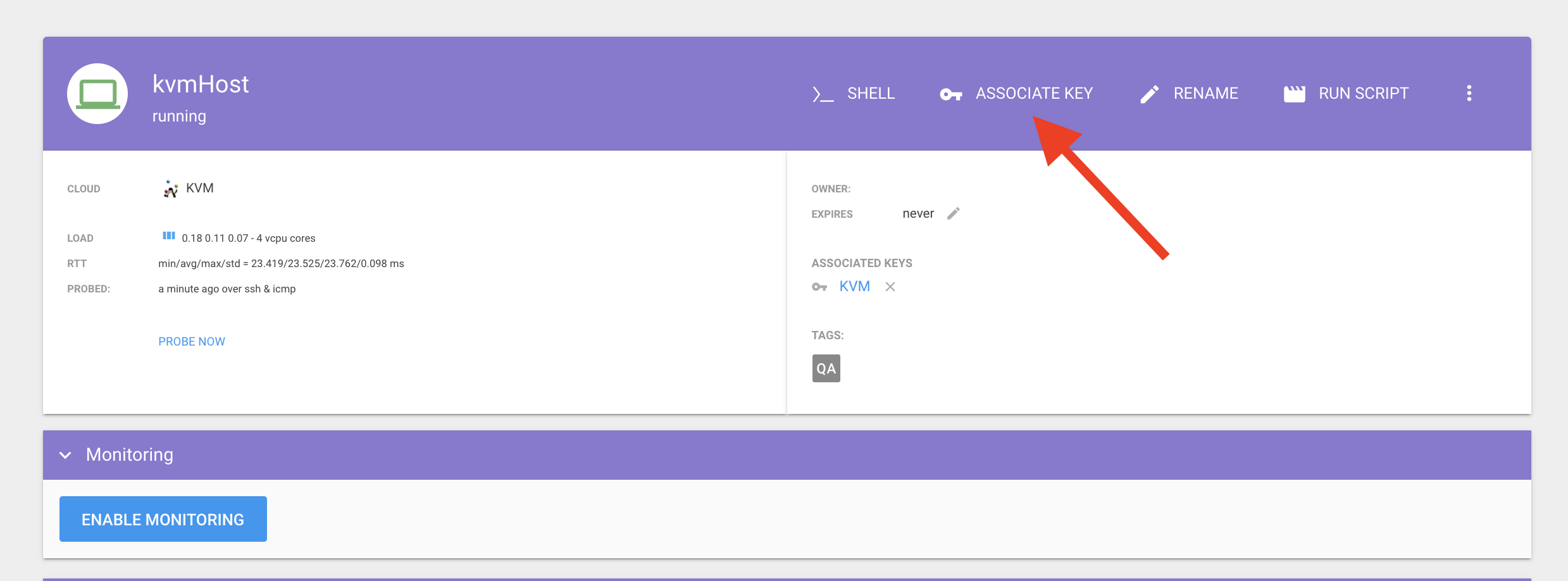
Then go to each VM in Mist and associate your key:

Ok sure let me try that and update you thanks On Thu, 27 May 2021 at 7:34 PM, Chris Psaltis @.***> wrote:
Hi @Bsivamani https://github.com/Bsivamani,
The key you uploaded is used for the KVM host and not its VMs.
To get this to work, first make sure that the key exists in the VMs and that they are reachable over the network from Mist's VM.
Then go to each VM in Mist and associate your key:
[image: key-associate] https://user-images.githubusercontent.com/646919/119840300-8ca47400-bf0d-11eb-82fd-1d8cf61c70e5.png
— You are receiving this because you were mentioned. Reply to this email directly, view it on GitHub https://github.com/mistio/mist-ce/issues/1008#issuecomment-849662969, or unsubscribe https://github.com/notifications/unsubscribe-auth/AKFU4BQJKNFJKKB4C3WATODTPZGQPANCNFSM45TZ76RQ .