

 misskey-dev
fix: proper expire remote user drivefile over limits at adding time
What
Keep delete drive file until under limit.
Why
Current it only delete one oldest file when adding file, leads that i set limit to 24m but end up with few GB isLink=false file for some remote user
Additional info (optional)
#9425 tested on my v12, should not have much change in v13

Codecov Report
Merging #9426 (28a6484) into develop (b7b8fd4) will increase coverage by
0.00%. The diff coverage is7.69%.
@@           Coverage Diff            @@
##           develop    #9426   +/-   ##
========================================
  Coverage    22.89%   22.89%
========================================
  Files          729      729
  Lines        68005    68007    +2
  Branches      2069     2069
========================================
+ Hits         15568    15569    +1
- Misses       52437    52438    +1
| Impacted Files | Coverage Δ | |
|---|---|---|
| packages/backend/src/core/DriveService.ts | 20.85% <7.69%> (+0.07%) |
:arrow_up: |
Help us with your feedback. Take ten seconds to tell us how you rate us. Have a feature suggestion? Share it here.
![codecov[bot] avatar](https://avatars.githubusercontent.com/in/254?v=4 "Published by a pub.dev verified publisher")

この(一つずつ非並列で消していく)実装だと恣意的な投稿や管理者の設定変更如何では一度にたくさんのファイルが対象になって DoS になったりしないかな(気にしすぎてるだけかも)

Misskeyの中ではそこまで重たい処理ではないし、MisskeyにおいてDoSっぽい処理はいくらでもあるかも
(usersRepository.fineOneを不必要(?)に呼びまくっているのは気になってはいるけど
I test with some high file usage account (about 16GB data per remote account), didn't see any dos or performance impact to the instance it self, guess because all using async calls. However, the process time is long, about 5min/GB drive data on deletion on S3 setup. This is one time thing after this code change, or owner reduce the limit. One possible solution is using "OVER" clause in the query in expireOldFile function to calculate cumulative usage and do batch delete for all over the limit, but I didn't find how to do it with typeORM. Example as:
SELECT
SUM("file"."size") OVER (ORDER BY "file"."id" DESC ROWS BETWEEN UNBOUNDED PRECEDING AND CURRENT ROW) AS cum_usage,
"file"."id" AS "file_id", "file"."createdAt" AS "file_createdAt", "file"."userId" AS "file_userId", "file"."userHost" AS "file_userHost", "file"."md5" AS "file_md5", "file"."name" AS "file_name", "file"."type" AS "file_type", "file"."size" AS "file_size", "file"."comment" AS "file_comment", "file"."blurhash" AS "file_blurhash", "file"."properties" AS "file_properties", "file"."storedInternal" AS "file_storedInternal", "file"."url" AS "file_url", "file"."thumbnailUrl" AS "file_thumbnailUrl", "file"."webpublicUrl" AS "file_webpublicUrl", "file"."webpublicType" AS "file_webpublicType", "file"."accessKey" AS "file_accessKey", "file"."thumbnailAccessKey" AS "file_thumbnailAccessKey", "file"."webpublicAccessKey" AS "file_webpublicAccessKey", "file"."uri" AS "file_uri", "file"."src" AS "file_src", "file"."folderId" AS "file_folderId", "file"."isSensitive" AS "file_isSensitive", "file"."maybeSensitive" AS "file_maybeSensitive", "file"."maybePorn" AS "file_maybePorn", "file"."isLink" AS "file_isLink", "file"."requestHeaders" AS "file_requestHeaders", "file"."requestIp" AS "file_requestIp"
FROM "drive_file" "file"
WHERE "file"."userId" = 'xxxxxxxxx' AND "file"."isLink" = FALSE AND "file"."id" != 'xxxxxxxxx' AND "file"."id" != 'xxxxxxxxx'
ORDER BY "file"."id" ASC
SUM("file"."size") OVER (ORDER BY "file"."id" DESC ROWS BETWEEN UNBOUNDED PRECEDING AND CURRENT ROW) AS cum_usage
add the second line to the query will get all cumulative sum at once, then can use delete all file with cum_usage greater than limit. Can do this with sub query but time complexity would be O(n^2) could exceed query time for large amount of files.
Use addSelect and getRawMany to use the over clause, expire 8gb data only take few seconds, however the over clause is hard coded and bypass typeorm, be aware if db schema change. free free to revert the commit if it sounds bad.
could remove the await in line 491, since the expiring part is independent to the rest add file part
It would be a bit hard to create testing scenarios, I tested it in my production instance. テストシナリオを作るのはちょっと難しいので、本番インスタンスでテストしてみました。
SELECT
"file"."id" AS "file_id", "file"."createdAt" AS "file_createdAt", "file"."userId" AS "file_userId", "file"."userHost" AS "file_userHost", "file"."md5" AS "file_md5", "file"."name" AS "file_name", "file"."type" AS "file_type", "file"."size" AS "file_size", "file"."comment" AS "file_comment", "file"."blurhash" AS "file_blurhash", "file"."properties" AS "file_properties", "file"."storedInternal" AS "file_storedInternal", "file"."url" AS "file_url", "file"."thumbnailUrl" AS "file_thumbnailUrl", "file"."webpublicUrl" AS "file_webpublicUrl", "file"."webpublicType" AS "file_webpublicType", "file"."accessKey" AS "file_accessKey", "file"."thumbnailAccessKey" AS "file_thumbnailAccessKey", "file"."webpublicAccessKey" AS "file_webpublicAccessKey", "file"."uri" AS "file_uri", "file"."src" AS "file_src", "file"."folderId" AS "file_folderId", "file"."isSensitive" AS "file_isSensitive", "file"."maybeSensitive" AS "file_maybeSensitive", "file"."maybePorn" AS "file_maybePorn", "file"."isLink" AS "file_isLink", "file"."requestHeaders" AS "file_requestHeaders", "file"."requestIp" AS "file_requestIp"
FROM "drive_file" "file"
WHERE "file"."userId" = 'xxxxxxxxx' AND "file"."isLink" = FALSE AND "file"."id" != 'xxxxxxxxx' AND "file"."id" != 'xxxxxxxxx'
ORDER BY "file"."id" ASC
This is the original query generated by the query in "expireOldFile", which will pick the oldest file and remove it. Excludes avatar and banner. これは、expireOldFileのクエリで生成されたオリジナルのクエリで、最も古いファイルを選んで削除するものです。アバター、バナーを除く。
SUM("file"."size") OVER (ORDER BY "file"."id" DESC ROWS BETWEEN UNBOUNDED PRECEDING AND CURRENT ROW) AS cum_usage
This line would add additional select that not in the object definition, so I use "getRawMany" to get the raw result from query instead a "DriveFile" object. この行は、オブジェクトの定義にないSelectを追加してしまうので、DriveFileオブジェクトの代わりにgetRawManyを使ってクエリから生の結果を取得しています。
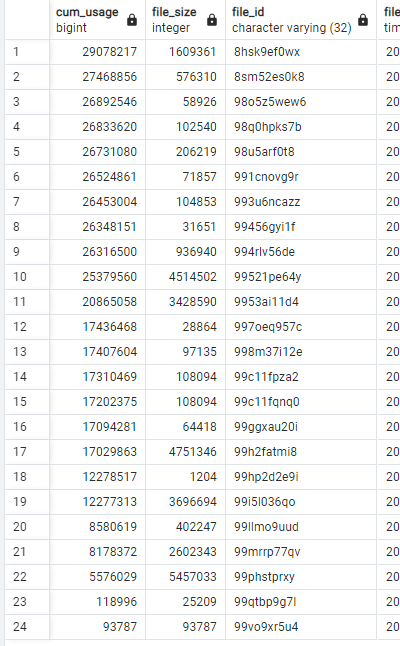 This is how the new command result looks like, I pick one of my remote account as example. I move the size column to the front, notice that cum_usage just a sum from the line to all the line below it.
これは、新しいコマンドの結果がどのように見えるかを示しています。サイズカラムを前面に移動させると、cum_usageはその行からその下の行までの合計であることに気づく。
This is how the new command result looks like, I pick one of my remote account as example. I move the size column to the front, notice that cum_usage just a sum from the line to all the line below it.
これは、新しいコマンドの結果がどのように見えるかを示しています。サイズカラムを前面に移動させると、cum_usageはその行からその下の行までの合計であることに気づく。
SELECT b.username, b.host, a.sum/1024/1024 as size_in_mb
FROM (
	SELECT "userId" as uid, SUM("size")
	FROM public.drive_file
	WHERE "isLink" = FALSE
	GROUP BY "userId"
) AS a JOIN public.user AS b
ON a.uid = b.id
WHERE b.host IS NOT null
ORDER BY sum DESC
This sql command will show the actual drive space usage for remote users. このSQLコマンドは、リモートユーザーの実際のドライブスペースの使用量を表示します。
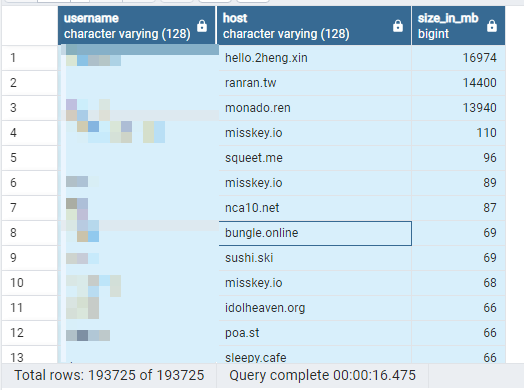 I created a endpoint to do "expireOldFile" manually for remote user, it tooks about half hours for all users. The top 3 users I didnt run, so i have 3 chances to debug if anything goes wrong. On my server the remote users has 64MB storage. They were all use 10GB or more for the top 100 users.
エンドポイントを作成して、リモートユーザーに対して手動で "expireOldFile" を実行したところ、すべてのユーザーで約30分かかりました。上位3ユーザは実行しなかったので、何か問題があればデバッグするチャンスが3回あります。私のサーバーでは、リモート・ユーザーは64MBのストレージを持っています。いずれも上位100名のユーザーが10GB以上使用しているとのことでした。
I created a endpoint to do "expireOldFile" manually for remote user, it tooks about half hours for all users. The top 3 users I didnt run, so i have 3 chances to debug if anything goes wrong. On my server the remote users has 64MB storage. They were all use 10GB or more for the top 100 users.
エンドポイントを作成して、リモートユーザーに対して手動で "expireOldFile" を実行したところ、すべてのユーザーで約30分かかりました。上位3ユーザは実行しなかったので、何か問題があればデバッグするチャンスが3回あります。私のサーバーでは、リモート・ユーザーは64MBのストレージを持っています。いずれも上位100名のユーザーが10GB以上使用しているとのことでした。