

 mintty
TODO: Remove Launcher and execute mintty directly in Appx package
Here are my thoughts:
- Get execution path with
GetModuleFileName()which has only read permission. - Get
Local\AppData\Package\mintty.wsltty-xxx\LocalCachefolder (UWP environment specific) withSHGetKnownFolderPath()which has read/write/execute permission. - Copy wslbridge.exe, wslbridge-backend and cygwin1.dll from execution path to LocalCache folder.
- Execute mintty.exe with parameters having wslbridge.exe in LocalCache folder (like in the C# project).
All functions/variable should be with UNICODE/wide character.

I'm not sure what to do with this:
- What's the benefit of using C instead of C++? (Not that I would mined, but the existing launcher works, so why spend effort?)
- I've never understood why this copying is needed.
- If the behaviour of the Windows API functions used is obscure, I'm not more familiar with them than you.
- About your enquiry to port this to cygwin (received per email, comments seems deleted): if this worked, I would see no reason anymore to use a launcher at all, mintty (maybe in a special compiled brand) could be invoked directly.

Previously, you said to make the launcher in C/C++. So I do some search to make a C project. This is not so important. Just making it so that user can also get alternative to make that launcher with cygwin or mingw.
OK, so the current launcher is C#, right? Actually, I rather said two things:
- build the launcher without the VS IDE (which works now)
- check whether we can do without the launcher at all (which is still unclear)
In cygwin, your code compiles (but does not link) with the following additions:
#include <wchar.h>
#include <w32api/windows.h>
#include <w32api/pathcch.h>
#undef NTDDI_VERSION
#define NTDDI_VERSION 0x06000000  // needed to test compilation on Windows 7
#include <w32api/shlobj.h>
#define KF_FLAG_FORCE_APP_DATA_REDIRECTION 0x00080000
...
                SHGetKnownFolderPath(&FOLDERID_LocalAppData, ...  // add & here
This is not complete. I just provide an outline. I've not fully tested it. And there are some mistakes. If I complete that I shall let you know. BTW, this code need Pathcch.lib and Shlwapi.lib.
If this can be done without launcher, then you may have to add the code in mintty, which I think is not a great idea. Because mintty project is most important and it is shared in many project e.g. git, cygwin, comemu etc.
It's not a problem to add code to mintty that gets compiled in conditionally, e.g. only when building for wsltty.appx. If that saves us the launcher, I'll gladly do it.
Actually the current repository version supports that already, you just need to rename mintty.exe to wsltty.exe. If you don't want to install a cygwin environment, I can provide a binary.
I've never understood why this copying is needed.
- When you install AppX package the files installed in
ProgramFiles\WindowsApps. We know thatProgramFilesfolder has not any normal user permission (i.e. you can't add/edit files). With UWP environment that acts like a container. So you can't write or execute other files from that folder. Here is what happen if you executewslbridgefrom WindowsApps folder:
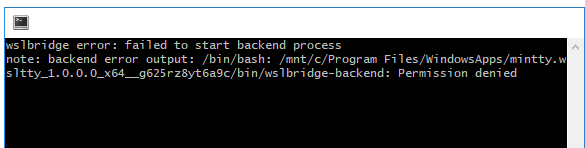
- Hence by copying
wslbridgein Local\Packages folder you get write and execute permission. So that mintty can easily execute wslbridge from that folder (with --exec option).
- But with normal unpacked installation with command
Add-AppxPackage -Path <Path_To_AppxManifest.xml> -Register, user can install it anywhere. So mintty has full control in that folder and copying not required. Hence I announce that Launcher is no longer required with unpacked files.
Great to see this progress. Actually, testing the execute permissions, if I copy e.g. /bin/ls (from WSL) into the app /bin directory, I can run it from WSL.
Just a note: it's not necessary to pull in C++ just for this function (but maybe there will be other APIs to use): https://msdn.microsoft.com/en-us/library/windows/desktop/bb762188%28v=vs.85%29.aspx
How about using a function like this in a separate DLL? Also include the icon extracting function from so-called Appx-wraper-exe file.
void getAppdata(PWSTR backend, PWSTR config, PWSTR icon) {
    PWSTR appData = NULL;
    HMODULE dll = LoadLibraryExW(L"shell32.dll", NULL, LOAD_LIBRARY_SEARCH_SYSTEM32);
    pSHGetKnownFolderPath SHGetKnownFolderPath = (pSHGetKnownFolderPath)GetProcAddress(dll, "SHGetKnownFolderPath");
    HRESULT hres = SHGetKnownFolderPath(FOLDERID_LocalAppData, KF_FLAG_FORCE_APP_DATA_REDIRECTION, 0, &appData);

    swprintf(backend, MAX_PATH, L"%ls\\%ls", appData, L"wslbridge-backend");
    swprintf(config, MAX_PATH, L"%ls\\%ls", appData, L".minttyrc");
    swprintf(icon, MAX_PATH, L"%ls\\%ls", appData, L"wsl.ico");
}
Sorry I hadn't responded to this yet. For all three we have other solutions already, or meanwhile (for the backend), also the .minttyrc is not the preferred one, which should be in $APPDATA, for which the standard mintty solution will find it.
Released 1.9.0. It is now possible to run a stand-alone wsltty.exe (or mintty.exe if compiled with -DWSLTTY_APPX) which handles the wslbridge backend copying. I'll appreciate a contribution to generate a modified appx package. (Or I may check whether I can generate an updated appx package, following the old scheme.)
Latest mintty commit doesn't work. It shows "wslbridge: unknown option --backend". May be there is some problem with the command line string.
I somehow lost the update to use the latest wslbridge commit. (Would be easier if that were a release eventually...) Add this before makefile section "# default target":
# after 0.2.4, with --backend option:
wslbridge-commit=47b41bec6c32da58ab01de9345087b1a4fd836e3
How can I add the wsltty_appx option in mintty makefile?
(comment deleted?) Easiest would be to rename mintty.exe to wsltty.exe, so the static option WSLTTY_APPX is not needed. Otherwise I'll have to fiddle it into the makefile when I find the time.
I've compiled the mintty with make CCOPT=-DWSLTTY_APPX command. Also compiled wslbridge from it's repository manually. wsltty.exe may not take the wsl.ico from /usr/share/mintty/icon/wsl.ico path. Any solution?
If mintty does not find a distro-specific icon, it would look for one in the APPDATA places, not in the config directories (like /usr/share...). (The latter, which you may have seen in the code, is a specific configurable fallback for the mintty session launcher and does not apply to the icon of the current mintty session.)
I made a fixed wsltty release and also updated the makefile for wsltty.appx, which now defines WSLTTY_APPX for the backend copying. I'd appreciate your contribution of further updated files (manifest probably, and the appx package of course) as I won't find the time to try it myself soon.
- Things that works:
wslbridge-backendcopies correctly..minttyrccreated correctly.
- Things that doesn't work well:
- mintty desn't find
wsl.ico. Where to place? - mintty opens in System32 folder at first run (as expected), should be configured to set default path.
See my forked repo. I've change the building procedure with batch file and will change if necessary.