
console
 console copied to clipboard
 minio
minio
Policy permission reflection on Web Console UI
NOTE
Permissions granted to a user via policies do not wholly reflect in MinIO Console Web UI.
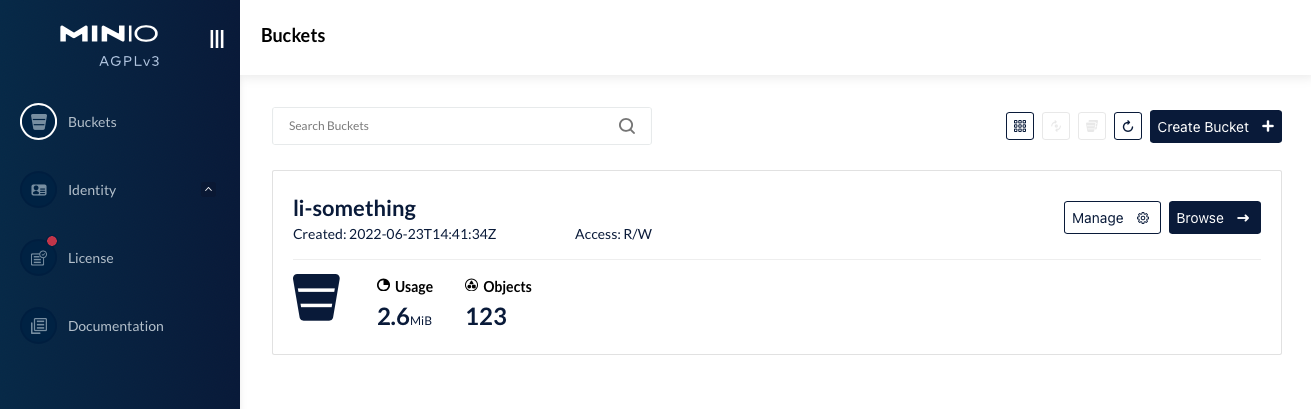
I created a Policy with Actions - "s3:CreateBucket", "s3:Get*", "s3:List*", "s3:Put*"; but the user with the policy attached is unable to view objects in the bucket via minIO Web UI. on the contrary, mc commands work greatly.
Expected Behavior
It is expected that the web UI also observes permissions granted to a user via the attached policy(ies).
Current Behavior
Buckets page shows usage statistics that the bucket has objects, but the "browse" page says the bucket is empty. Also, the "rewind", "refresh" and "upload" buttons are unavailable, thus, user cannot upload objects or write into the bucket.

Possible Solution
Steps to Reproduce (for bugs)
Terminal 1:
1. docker run -it --rm -v $PWD/data:/data -p 9000:9000 -p 9010:9010 quay.io/minio/minio:RELEASE.2022-06-20T23-13-45Z server --console-address :9010 /data
Policy / PolicyFile - $PWD/dotmc/policy.json
policy:
    {
        "Version": "2012-10-17",
        "Statement": [
            {
                "Effect": "Allow",
                "Action": [
                    "s3:CreateBucket",
                    "s3:Get*",
                    "s3:List*",
                    "s3:Put*"
                ],
                "Resource": [
                    "arn:aws:s3:::li-*/*"
                ]
            }
        ]
    }
Terminal 2:
1. alias mc='docker run -it --rm -v $PWD/dotmc:/root/.mc minio/mc:RELEASE.2022-06-17T02-52-50Z'
2. mc alias set admin http://host.docker.internal:9000 minioadmin minioadmin
3. mc admin user add admin test minioadmin
4. mc admin policy add admin li-readwrite /root/.mc/policy.json
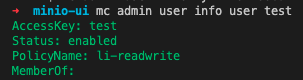
5. mc admin policy set admin li-readwrite user=test
6. mc alias set user http://host.docker.internal:9000 test  minioadmin
7. mc mb user/li-something                # verify CreateBucket permission
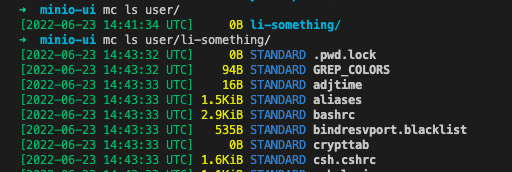
8. mc cp -r /etc/ user/li-something/   # verify Put* Permission
9. mc ls user/li-something/                 # verify Get* and List* Permission
navigate to minio console on web browser with user credentials "test:minioadmin" and browse 'li-something' bucket
http://localhost:9010/buckets
Debugging
1. mc admin trace admin
2022-06-24T07:07:56.604 [200 OK] s3.GetBucketLocation 172.17.0.3:9000/li-something/?location=  172.17.0.3        4.447ms      ↑ 98 B ↓ 444 B
2022-06-24T07:07:56.610 [200 OK] s3.GetBucketVersioning 172.17.0.3:9000/li-something/?versioning=  172.17.0.3        1.118ms      ↑ 98 B ↓ 414 B
2022-06-24T07:11:24.675 [200 OK] s3.GetBucketLocation 172.17.0.3:9000/li-something/?location=  172.17.0.3        322µs       ↑ 98 B ↓ 444 B
2022-06-24T07:11:24.677 [404 Not Found] s3.GetBucketPolicy 172.17.0.3:9000/li-something/?policy=  172.17.0.3        349µs       ↑ 98 B ↓ 623 B
2022-06-24T07:11:24.678 [404 Not Found] s3.GetBucketTagging 172.17.0.3:9000/li-something/?tagging=  172.17.0.3        494µs       ↑ 98 B ↓ 610 B
Context
Regression
Your Environment
minio --version
minio version RELEASE.2022-06-20T23-13-45Z (commit-id=b3ebc69034bff982ca2c1a6ca43afd20838e99d5)
Runtime: go1.18.3 linux/amd64
Copyright (c) 2015-2022 MinIO, Inc.
Licence AGPLv3 <https://www.gnu.org/licenses/agpl-3.0.html>
mc --version
mc version RELEASE.2022-06-17T02-52-50Z (commit-id=0e44ad30db7ee58386117f9bed143418c79d2980)
Runtime: go1.18.3 linux/amd64
Copyright (c) 2015-2022 MinIO, Inc.
Licence AGPLv3 <https://www.gnu.org/licenses/agpl-3.0.html>
uname -a
Darwin my-MacBook-Pro.local 21.5.0 Darwin Kernel Version 21.5.0: Tue Apr 26 21:08:22 PDT 2022; root:xnu-8020.121.3~4/RELEASE_X86_64 x86_64

@souljaboy935 first of all your resource string can be simplified you do not need
li-*/*
Since it's wildcard and flat key match you only need
li-*

@souljaboy935 first of all your resource string can be simplified you do not need
li-*/*Since it's wildcard and flat key match you only need
li-*
Thank you for the input @harshavardhana The policy has been revised as advised, but the issue still persists.
could you render any further assistance, please?
@souljaboy935 first of all your resource string can be simplified you do not need
li-*/*Since it's wildcard and flat key match you only need
li-*
@harshavardhana !PING!
You are probably missing some permissions the console needs, e.g.
         {"action": "s3:GetBucketObjectLockConfiguration"},
           {"action": "s3:GetBucketPolicyStatus"},
To find out which, enable tracing in the console to see what gets requested.

You are probably missing some permissions the console needs, e.g.
         {"action": "s3:GetBucketObjectLockConfiguration"},
           {"action": "s3:GetBucketPolicyStatus"},
To find out which, enable tracing in the console to see what gets requested.
@harshavardhana Great input @bpedersen2,
However, I had earlier enabled tracing. reference post above
1. mc admin trace admin

2022-06-24T07:07:56.604 [200 OK] s3.GetBucketLocation 172.17.0.3:9000/li-something/?location=  172.17.0.3        4.447ms      ↑ 98 B ↓ 444 B
2022-06-24T07:07:56.610 [200 OK] s3.GetBucketVersioning 172.17.0.3:9000/li-something/?versioning=  172.17.0.3        1.118ms      ↑ 98 B ↓ 414 B
2022-06-24T07:11:24.675 [200 OK] s3.GetBucketLocation 172.17.0.3:9000/li-something/?location=  172.17.0.3        322µs       ↑ 98 B ↓ 444 B
2022-06-24T07:11:24.677 [404 Not Found] s3.GetBucketPolicy 172.17.0.3:9000/li-something/?policy=  172.17.0.3        349µs       ↑ 98 B ↓ 623 B
2022-06-24T07:11:24.678 [404 Not Found] s3.GetBucketTagging 172.17.0.3:9000/li-something/?tagging=  172.17.0.3
I experienced the same issues after explicitly including GetBucketPolicy and GetBucketTagging actions in the policy.
Moreover, Get* wildcard is specified in the policy. I believe the ^Get actions should be included.
Thank you again, I'm on standby for possible solutions.
You probably need to grant these rights on the bucket (not restricted to the prefix)
@Alevsk is this related to the wildcards in the actions?
I was thinking that this might be a wildcard support issue for Console, as @souljaboy935 can create the bucket, but can't upload or list objects in it
