
MiniExcel
 MiniExcel copied to clipboard
 mini-software
Fast, Low-Memory, Easy Excel .NET helper to import/export/template spreadsheet (support Linux, Mac)


使用的excel模版 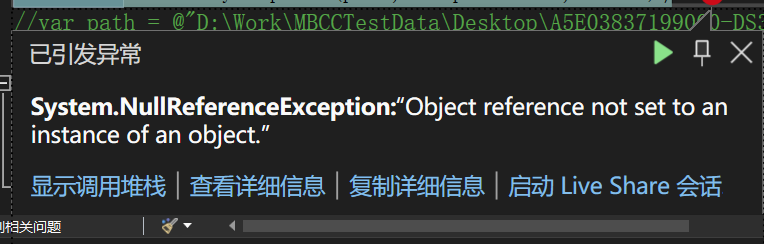 出现NullReferenceException 的异常  查看源码发现异常原因如下  从代码层面看如果进入此步骤必然会出现NullReferenceException

scenario: ``` var dataTable = AdoNet.ExecuteDataTable("SELECT * FROM Table"); MiniExcel.SaveAsByTemplate(resultFilePath, templateFilePath, dataTable); ``` I knew wrapping it to an object would solve the problem, but wouldn't that be easier to...

Add listener mode or Func to handle/edit Query IEnumerable objects, avoiding having to toList first


### Excel Type XLSX ### Upload Excel File [template.xlsx](https://github.com/user-attachments/files/19046463/template.xlsx) ### MiniExcel Version 1.37.0 ### Description 目前利用 SaveAs 產生的文件中若附帶圖片會呈現如附件的情形,不論原圖片的大小或比例如何,都會被濃縮成小小的,並且圖片後面會附帶文字「@@@fileid@@@,xl/media/R6d0b07435b4142189ba95469385a1a66.jpg」,使用者需要自行把圖片拉開,由於使用者對文書軟體操作的理解程度參差不齊,部分會將此情況理解成Bug,是否可以增加功能讓匯出時可以指定圖片長寬,並且可以選擇隱藏圖片後面的附帶文字? 謝謝! ※ 我有嘗試把OpenXmlConfiguration.EnableConvertByteArray=false,雖然圖片後面的附帶文字會不見,可是圖片也不會顯示了... At present, files generated using SaveAs will appear as...

Hi, is there a way to pupulate tags with data that are inside Headers/Footers?  The method SaveAsByTemplate() works fine only with tags that are located in cells.

var value = new { employee = new[] { new {name="Jack", departs= "HR"}, new {name="Jack", departs= "IT"}, new {name="Rose", departs= "HR2"}, new {name="Rose", departs= "IT2"} }, mergecells = new[] {...

### Excel Type - [x] XLSX - [ ] XLSM - [ ] CSV - [ ] OTHER ### MiniExcel Version 1.28.1 ### Description Allow to customize styles, passing a...

Highest Point Memory is key value, I'm trying to search resolution not manual action.
### Excel Type - [x] XLSX - [ ] XLSM - [ ] CSV - [ ] OTHER ### Upload Excel File [meTemplate.xlsx](https://github.com/user-attachments/files/21899299/meTemplate.xlsx) ### MiniExcel Version 1.41.3 ### Description I...

Metadata
Owner
Metadata
Fast, Low-Memory, Easy Excel .NET helper to import/export/template spreadsheet (support Linux, Mac)