
MiniExcel
 MiniExcel copied to clipboard
 mini-software
Fast, Low-Memory, Easy Excel .NET helper to import/export/template spreadsheet (support Linux, Mac)
### Excel Type - [ ] XLSX - [ ] XLSM - [ ] CSV - [ ] OTHER ### Upload Excel File Please attach your issue file by dragging...

匯出格式詢問

你好,想請問一下,匯出excel在資料編排上,是否能變成下圖的樣子 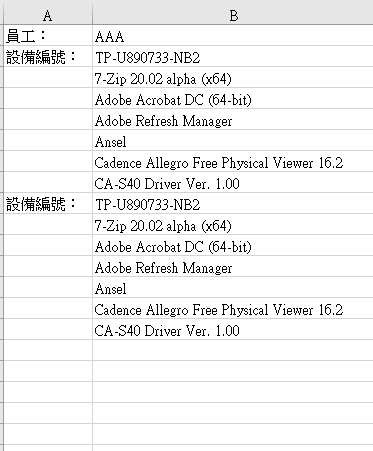 資料格式格式說明如下 一個員工,會有多個設備資料,每個設備資料底下會有多個軟體清單

System.Memory 包关联的文件太多,导致在net framework 生成出来的文件过多,不太优美/mini(There are too many files associated with the System.Memory package. As a result, too many files are generated in the NET Framework ) 


> 引用程序集“MiniExcel, Version=1.28.0.0, Culture=neutral, PublicKeyToken=null”没有强名称。 希望增加对 Strong name 的支持。

### Description Currently we can parse Enum from number but can't write back as number. One possible way is define a new model class and make it as a middleware....

MiniExcel.SaveAsByTemplate() 希望可以支持工作薄参数,如下: `MiniExcel.SaveAsByTemplate(sheetName : "Sheet1") ` 
如图:  模板文件: [导出模板.xlsx](https://github.com/mini-software/MiniExcel/files/9573717/default.xlsx) 注:模板文件由WPS创建和预览 代码片段: ``` ExcelModel excelModel = new ExcelModel() { NoTelVal0 = 0.12, NoTelVal1 = 1.12, TelVal0 = 2.12, TelVal1 = 3.12, NoTelIsOk = 1, TelIsOk =...

MiniExcel.SaveAs(path, excelModel, overwriteFile: true); 可以覆盖文件 但是 MiniExcel.SaveAsByTemplate(path, DataFile.ExcelTemplatePath, excelModel); 不能覆盖文件 希望 SaveAsByTemplate 可提供 overwriteFile 参数
Metadata
Owner
Metadata
Fast, Low-Memory, Easy Excel .NET helper to import/export/template spreadsheet (support Linux, Mac)