
MiniExcel

MiniExcel copied to clipboard
 mini-software
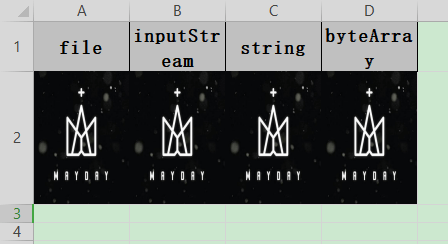
SaveAs Support Image height/width attribute
like easyexcel
@Data
@ContentRowHeight(100)
@ColumnWidth(100 / 8)
public class ImageData {
    private File file;
    private InputStream inputStream;
    /**
     * 如果string类型 必须指定转换器,string默认转换成string
     */
    @ExcelProperty(converter = StringImageConverter.class)
    private String string;
    private byte[] byteArray;
    /**
     * 根据url导出
     *
     * @since 2.1.1
     */
    private URL url;
}
/**
 * 样式的数据类
 *
 * @author Jiaju Zhuang
 **/
@Data
// 头背景设置成红色 IndexedColors.RED.getIndex()
@HeadStyle(fillPatternType = FillPatternType.SOLID_FOREGROUND, fillForegroundColor = 10)
// 头字体设置成20
@HeadFontStyle(fontHeightInPoints = 20)
// 内容的背景设置成绿色 IndexedColors.GREEN.getIndex()
@ContentStyle(fillPatternType = FillPatternType.SOLID_FOREGROUND, fillForegroundColor = 17)
// 内容字体设置成20
@ContentFontStyle(fontHeightInPoints = 20)
public class DemoStyleData {
    // 字符串的头背景设置成粉红 IndexedColors.PINK.getIndex()
    @HeadStyle(fillPatternType = FillPatternType.SOLID_FOREGROUND, fillForegroundColor = 14)
    // 字符串的头字体设置成20
    @HeadFontStyle(fontHeightInPoints = 30)
    // 字符串的内容的背景设置成天蓝 IndexedColors.SKY_BLUE.getIndex()
    @ContentStyle(fillPatternType = FillPatternType.SOLID_FOREGROUND, fillForegroundColor = 40)
    // 字符串的内容字体设置成20
    @ContentFontStyle(fontHeightInPoints = 30)
    @ExcelProperty("字符串标题")
    private String string;
    @ExcelProperty("日期标题")
    private Date date;
    @ExcelProperty("数字标题")
    private Double doubleData;
}

