
SwiftPamphletApp

SwiftPamphletApp copied to clipboard
Published
8 months ago
•
 ming1016
ming1016
Text
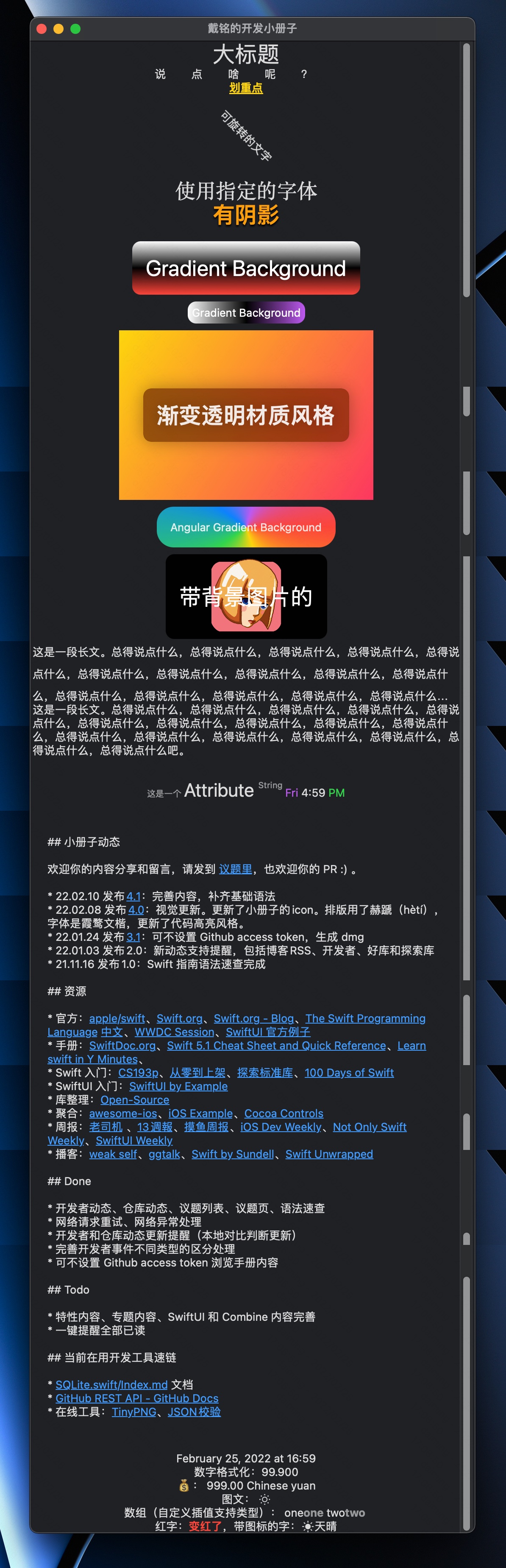
基本用法
// MARK: - Text
struct PlayTextView: View {
    let manyString = "这是一段长文。总得说点什么,总得说点什么,总得说点什么,总得说点什么,总得说点什么,总得说点什么,总得说点什么,总得说点什么,总得说点什么,总得说点什么,总得说点什么,总得说点什么,总得说点什么,总得说点什么,总得说点什么,总得说点什么,总得说点什么吧。"
    var body: some View {
        ScrollView {
            Group {
                Text("大标题").font(.largeTitle)
                Text("说点啥呢?")
                    .tracking(30) // 字间距
                    .kerning(30) // 尾部留白
                Text("划重点")
                    .underline()
                    .foregroundColor(.yellow)
                    .fontWeight(.heavy)
                Text("可旋转的文字")
                    .rotationEffect(.degrees(45))
                    .fixedSize()
                    .frame(width: 20, height: 80)
                Text("使用指定的字体")
                    .font(.custom("Georgia", size: 24))
            }
            Group {
                Text("有阴影")
                    .font(.largeTitle)
                    .foregroundColor(.orange)
                    .bold()
                    .italic()
                    .shadow(color: .black, radius: 1, x: 0, y: 2)
                Text("Gradient Background")
                    .font(.largeTitle)
                    .padding()
                    .foregroundColor(.white)
                    .background(LinearGradient(gradient: Gradient(colors: [.white, .black, .red]), startPoint: .top, endPoint: .bottom))
                    .cornerRadius(10)
                Text("Gradient Background")
                    .padding(5)
                    .foregroundColor(.white)
                    .background(LinearGradient(gradient: Gradient(colors: [.white, .black, .purple]), startPoint: .leading, endPoint: .trailing))
                    .cornerRadius(10)
                ZStack {
                    Text("渐变透明材质风格")
                        .padding()
                        .background(
                            .regularMaterial,
                            in: RoundedRectangle(cornerRadius: 10, style: .continuous)
                        )
                        .shadow(radius: 10)
                        .padding()
                        .font(.largeTitle.weight(.black))
                }
                .frame(width: 300, height: 200)
                .background(
                    LinearGradient(colors: [.yellow, .pink], startPoint: .topLeading, endPoint: .bottomTrailing)
                )
                Text("Angular Gradient Background")
                    .padding()
                    .background(AngularGradient(colors: [.red, .yellow, .green, .blue, .purple, .red], center: .center))
                    .cornerRadius(20)
                Text("带背景图片的")
                    .padding()
                    .font(.largeTitle)
                    .foregroundColor(.white)
                    .background {
                        Rectangle()
                            .fill(Color(.black))
                            .cornerRadius(10)
                        Image("logo")
                            .resizable()
                            .frame(width: 100, height: 100)
                    }
                    .frame(width: 200, height: 100)
            }

            Group {
                // 设置 lineLimit 表示最多支持行数,依据情况依然有会被减少显示行数
                Text(manyString)
                    .lineLimit(3) // 对行的限制,如果多余设定行数,尾部会显示...
                    .lineSpacing(10) // 行间距
                    .multilineTextAlignment(.leading) // 对齐

                // 使用 fixedSize 就可以在任何时候完整显示
                Text(manyString)
                    .fixedSize(horizontal: false, vertical: true)

            }

            // 使用 AttributeString
            PTextViewAttribute()
                .padding()

            // 使用 Markdown
            PTextViewMarkdown()
                .padding()

            // 时间
            PTextViewDate()

            // 插值
            PTextViewInterpolation()
        }

    }
}
font 字体设置的样式对应 weight 和 size 可以在官方交互文档中查看 Typography
markdown 使用
// MARK: - Markdown
struct PTextViewMarkdown: View {
    let mdaStr: AttributedString = {

        var mda = AttributedString(localized: "这是一个 **Attribute** ~string~")

        /// 自定义的属性语法是^[string](key:value)
        mda = AttributedString(localized: "^[这是](p2:'one')^[一](p3:{k1:1,k2:2})个 **Attribute** ~string~", including: \.newScope)
        print(mda)
        /// 这是 {
        ///     NSLanguage = en
        ///     p2 = one
        /// }
        /// 一 {
        ///     NSLanguage = en
        ///     p3 = P3(k1: 1, k2: 2)
        /// }
        /// 个  {
        ///     NSLanguage = en
        /// }
        /// Attribute {
        ///     NSLanguage = en
        ///     NSInlinePresentationIntent = NSInlinePresentationIntent(rawValue: 2)
        /// }
        ///   {
        ///     NSLanguage = en
        /// }
        /// string {
        ///     NSInlinePresentationIntent = NSInlinePresentationIntent(rawValue: 32)
        ///     NSLanguage = en
        /// }

        // 从文件中读取 Markdown 内容
        let mdUrl = Bundle.main.url(forResource: "1", withExtension: "md")!
        mda = try! AttributedString(contentsOf: mdUrl,options: AttributedString.MarkdownParsingOptions(interpretedSyntax: .inlineOnlyPreservingWhitespace), baseURL: nil) // .inlineOnlyPreservingWhitespace 支持 markdown 文件的换行

        // Markdown 已转换成 AtrributedString 结构。
        for r in mda.runs {
            if let ipi = r.inlinePresentationIntent {
                switch ipi {
                case .lineBreak:
                    print("paragrahp")
                case .code:
                    print("this is code")
                default:
                    break
                }
            }
            if let pi = r.presentationIntent {
                for c in pi.components {
                    switch c.kind {
                    case .paragraph:
                        print("this is paragraph")
                    case .codeBlock(let lang):
                        print("this is \(lang ?? "") code")
                    case .header(let level):
                        print("this is \(level) level")
                    default:
                        break
                    }
                }
            }
        }

        return mda
    }()
    var body: some View {
        Text(mdaStr)
    }
}
AttributedString 的使用
// MARK: - AttributedString
struct PTextViewAttribute: View {
    let aStr: AttributedString = {
        var a1 = AttributedString("这是一个 ")
        var c1 = AttributeContainer()
        c1.font = .footnote
        c1.foregroundColor = .secondary
        a1.setAttributes(c1)

        var a2 = AttributedString("Attribute ")
        var c2 = AttributeContainer()
        c2.font = .title
        a2.setAttributes(c2)

        var a3 = AttributedString("String ")
        var c3 = AttributeContainer()
        c3.baselineOffset = 10
        c3.appKit.foregroundColor = .yellow // 仅在 macOS 里显示的颜色
        c3.swiftUI.foregroundColor = .secondary
        c3.font = .footnote
        a3.setAttributes(c3)
        // a3 使用自定义属性
        a3.p1 = "This is a custom property."

        // formatter 的支持
        var a4 = Date.now.formatted(.dateTime
                                        .hour()
                                        .minute()
                                        .weekday()
                                        .attributed
        )

        let c4AMPM = AttributeContainer().dateField(.amPM)
        let c4AMPMColor = AttributeContainer().foregroundColor(.green)

        a4.replaceAttributes(c4AMPM, with: c4AMPMColor)
        let c4Week = AttributeContainer().dateField(.weekday)
        let c4WeekColor = AttributeContainer().foregroundColor(.purple)
        a4.replaceAttributes(c4Week, with: c4WeekColor)

        a1.append(a2)
        a1.append(a3)
        a1.append(a4)


        // Runs 视图
        for r in a1.runs {
            print(r)
        }
        /// 这是一个  {
        ///     SwiftUI.Font = Font(provider: SwiftUI.(unknown context at $7ff91d4a5e90).FontBox<SwiftUI.Font.(unknown context at $7ff91d4ad5d8).TextStyleProvider>)
        ///     SwiftUI.ForegroundColor = secondary
        /// }
        /// Attribute  {
        ///     SwiftUI.Font = Font(provider: SwiftUI.(unknown context at $7ff91d4a5e90).FontBox<SwiftUI.Font.(unknown context at $7ff91d4ad5d8).TextStyleProvider>)
        /// }
        /// String  {
        ///     SwiftUI.ForegroundColor = secondary
        ///     SwiftUI.BaselineOffset = 10.0
        ///     NSColor = sRGB IEC61966-2.1 colorspace 1 1 0 1
        ///     SwiftUI.Font = Font(provider: SwiftUI.(unknown context at $7ff91d4a5e90).FontBox<SwiftUI.Font.(unknown context at $7ff91d4ad5d8).TextStyleProvider>)
        ///     p1 = This is a custom property.
        /// }
        /// Tue {
        ///     SwiftUI.ForegroundColor = purple
        /// }
        ///   {
        /// }
        /// 5 {
        ///     Foundation.DateFormatField = hour
        /// }
        /// : {
        /// }
        /// 16 {
        ///     Foundation.DateFormatField = minute
        /// }
        ///   {
        /// }
        /// PM {
        ///     SwiftUI.ForegroundColor = green
        /// }

        return a1
    }()
    var body: some View {
        Text(aStr)
    }
}

// MARK: - 自定 AttributedString 属性
struct PAKP1: AttributedStringKey {
    typealias Value = String
    static var name: String = "p1"


}
struct PAKP2: CodableAttributedStringKey, MarkdownDecodableAttributedStringKey {
    public enum P2: String, Codable {
        case one, two, three
    }

    static var name: String = "p2"
    typealias Value = P2
}
struct PAKP3: CodableAttributedStringKey, MarkdownDecodableAttributedStringKey {
    public struct P3: Codable, Hashable {
        let k1: Int
        let k2: Int
    }
    typealias Value = P3
    static var name: String = "p3"
}
extension AttributeScopes {
    public struct NewScope: AttributeScope {
        let p1: PAKP1
        let p2: PAKP2
        let p3: PAKP3
    }
    var newScope: NewScope.Type {
        NewScope.self
    }
}

extension AttributeDynamicLookup{
    subscript<T>(dynamicMember keyPath:KeyPath<AttributeScopes.NewScope,T>) -> T where T:AttributedStringKey {
        self[T.self]
    }
}
时间的显示
// MARK: - 时间
struct PDateTextView: View {
    let date: Date = Date()
    let df: DateFormatter = {
        let df = DateFormatter()
        df.dateStyle = .long
        df.timeStyle = .short
        return df
    }()
    var dv: String {
        return df.string(from: date)
    }
    var body: some View {
        HStack {
            Text(dv)
        }
        .environment(\.locale, Locale(identifier: "zh_cn"))
    }
}
插值使用
// MARK: - 插值
struct PTextViewInterpolation: View {
    let nf: NumberFormatter = {
        let f = NumberFormatter()
        f.numberStyle = .currencyPlural
        return f
    }()
    var body: some View {
        VStack {
            Text("图文 \(Image(systemName: "sun.min"))")
            Text("💰 \(999 as NSNumber, formatter: nf)")
                .environment(\.locale, Locale(identifier: "zh_cn"))
            Text("数组: \(["one", "two"])")
            Text("红字:\(red: "变红了"),带图标的字:\(sun: "天晴")")
        }
    }
}

// 扩展 LocalizedStringKey.StringInterpolation 自定义插值
extension LocalizedStringKey.StringInterpolation {
    // 特定类型处理
    mutating func appendInterpolation(_ value: [String]) {
        for s in value {
            appendLiteral(s + "")
            appendInterpolation(Text(s + " ").bold().foregroundColor(.secondary))
        }
    }

    // 实现不同情况处理,可以简化设置修改器设置
    mutating func appendInterpolation(red value: LocalizedStringKey) {
        appendInterpolation(Text(value).bold().foregroundColor(.red))
    }
    mutating func appendInterpolation(sun value: String) {
        appendInterpolation(Image(systemName: "sun.max.fill"))
        appendLiteral(value)
    }
}
